Typo is a sample mangler you play through a grid of tiles. It cuts your samples into slices, draws each slice as a tile, and lets readers walk the grid and play it while you scatter, turn and wear the tiles down.
Start here
Five steps from opening Typo to playing your own sound. It runs in Chrome, Edge and Safari, on a computer or an iPad, and comes with two samples of its own: a beat and some keys.
Open Typo and tap begin. The first time, a short intro shows you around over the grid; you can skip it. Leaving it starts the sound, and the readers start walking the tiles as it does. (Browsers only allow sound after a tap or a key press.) The first time, the drawer is shut so the grid is all you see: tap a tab on the left to open it.
Listen to the grid. Each tile flashes as a reader plays it. The top half of the grid is the beat, the bottom half the keys. stop under the grid (or space) stops the readers and play starts them again.
Press scatter (or s). Every slice moves to a new place, so the same readers play a new pattern. Press it again for another, or undo to go back.
Tap some tiles. With the play tool on (the lit one after tap; it is to start with), a tap plays a tile, holding it stutters and dragging scrubs across the grid. Try turn next: each tap turns a tile a quarter, which changes how it plays.
Load your own sound. Tap load… in the header, or drop up to four audio files on the grid. Then step through the presets with ‹› at the top: each one is a different way to play the same samples.
TipEvery tile is a slice of sound you can see. Big, solid tiles are the loud slices; tiny dots are the quiet ones. Reading a tile takes a minute and makes everything else easier.
The screen
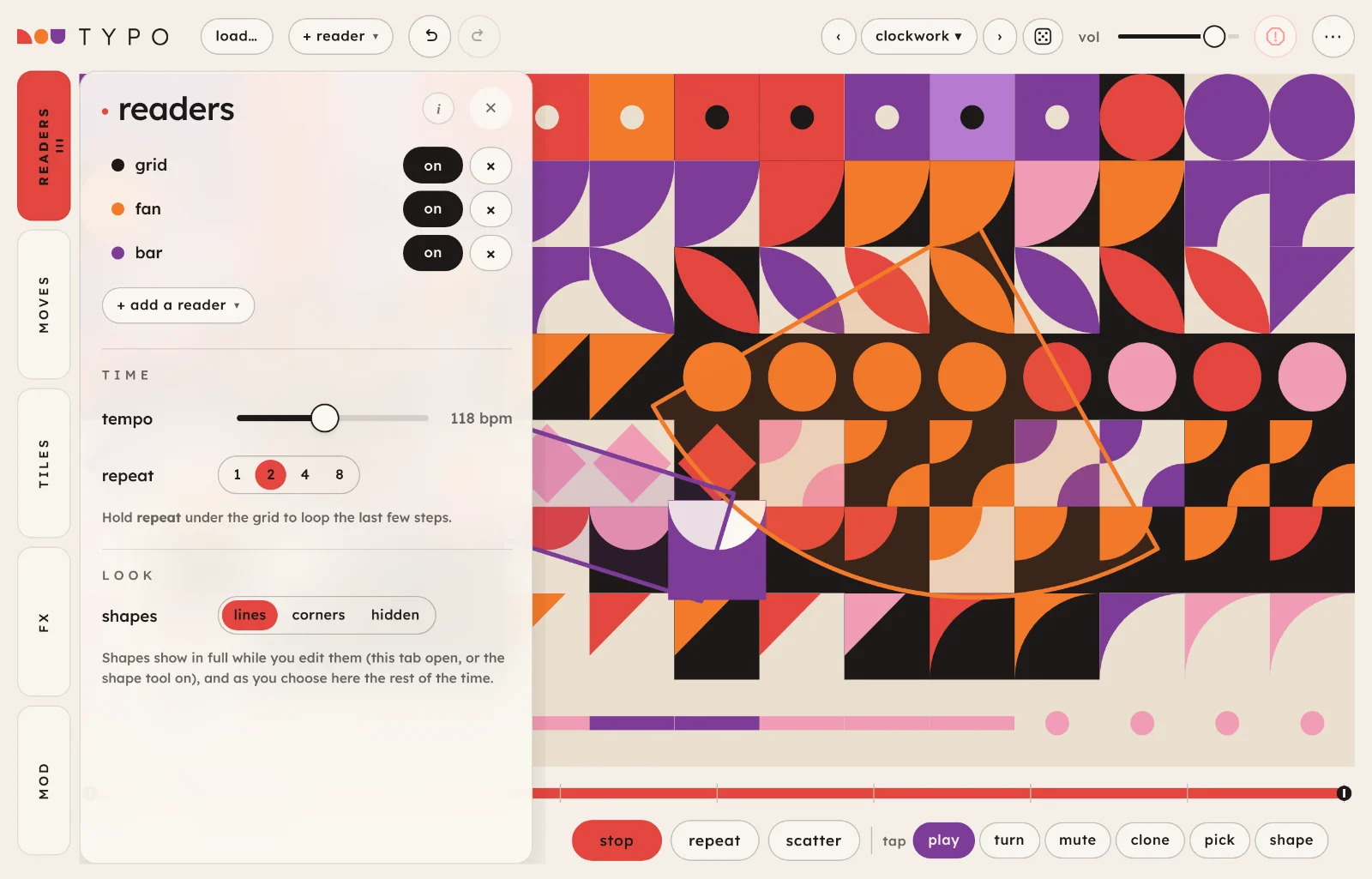
The tabs on the left, the grid filling the rest, the controls you play with under it. Everything on screen, numbered:
Tabs. Five tabs, each in its own colour: readers, moves, tiles, fx and mod. Tap one to open its drawer; tap it again to close it. Dots on readers count the readers that are on, on moves the running moves, and on mod the mods that are moving something.
The drawer holds the open tab's controls. In landscape it slides over the grid, so opening a tab never changes the grid. Its i shows a few short lines about the tab; ✕ closes it.
Undo and redo (the two arrows), for most changes you make by hand: the grid, the readers and the settings. What they cover.
Presets.‹› step through them, the name opens the list, the die rolls a random one. More.
vol, the volume. It isn't saved in presets.
Panic stops the readers and silences everything at once, echoes and reverb tails included. So does esc, once there is nothing for it to close first: a menu, hide ui, a tap tool other than play, then an open tab.
⋯ has reset the grid, tempo, tile size, tile set and colours, hide ui, how to play, this guide, the intro and what's new. More.
The grid. Every tile is one slice of a sample. How to read it.
A shape reader, outlined over the tiles it plays. More.
The strip shows where a grid reader walks, and lets you change it. More.
The tools, after a small tap label, decide what a tap on the grid does: play, turn, mute, clone, pick and shape. More.
On a phone or a tall window
The grid turns so its long side runs down the screen, the tabs move to the bottom, and the drawer slides up from there. Some header buttons (load, + reader, undo, redo and the die) move into ⋯ to make room. While a tab is open the grid keeps its shape and gets smaller.
On a phone.
How Typo works
A sample becomes a grid. Typo cuts each sample into equal slices and lays them out in reading order, left to right and top to bottom, one slice per tile. With two samples, the first fills the top half of the grid and the second the bottom half; with four, a quarter each. The grid fills the screen, so how many tiles there are, and how short each slice is, depends on tile size and the shape of your screen when you choose it.
You can see each slice. A tile's shape shows how loud its slice is, its colour how bright it sounds, its background which sample it came from, and the way it faces how it plays. Reading a tile has the whole legend.
Readers play the grid. Nothing sounds until a reader lands on a tile. A grid reader walks a stretch of the grid in a path, a pick reader walks tiles picked from anywhere, and a shape reader (triangle, circle, bar or fan) is laid over the grid and plays the tiles inside it. You can have up to eight, each at its own speed, so their loops drift in and out of line with each other. Tiles no reader can reach shrink a little, so you can see what's in play.
Moving a slice changes the music. The readers keep their paths; what changes is which slice sits where. Moves rearrange the whole grid at once (scatter, sort, gravity, mirror), the tools under the grid change one tile at a time, and the running moves keep changing it while it plays: tiles swap places, copy themselves into their neighbours or slowly rot.
Then the fx. Everything the readers play goes through one chain of effects: crush, a filter, an echo in time with the readers, a tuned resonator, a reverb and tape. Mods (three to start, up to six) can move the effects and the readers for you.
Reading a tile
Every tile says four things about its slice. The same legend is in the app, in ⋯ › how to play, always drawn in the original tile set.
⋯ › how to play.
shape16 steps, quiet to loud
How loud the slice is. The shapes go from a small dot for the quietest slices, through bars, quarter circles, triangles and diamonds, to a full square for the loudest, roughly in order of how much of the tile they fill. Loudness is ranked across the grid, so whatever samples you load, the grid always has the whole range of shapes.
colourfour, dull to bright
How bright the slice sounds: the dullest, roundest slices take the first colour and the noisiest the last. In the bauhaus colours that's purple, red, orange, then pink. Also ranked across the grid.
groundone per sample
The tile's background shows which sample its slice came from. In the bauhaus colours the first sample is on cream, the second on black, the third on peach and the fourth on lilac. A slice keeps its ground wherever it moves, so after a scatter you can still see whose slice is whose.
facingfour ways
How the slice plays:
upright: forward, as it is;
a quarter turn (clockwise): an octave up, twice as fast;
A tile with only a short line across its middle is muted: readers pass over it in silence. The mute tool switches it.
faded and shakingrotting
A rotting tile fades towards its ground, shrinks and shivers. Its slice gets quieter and crunchier and sometimes drops out. See rot.
A tile flashes when it plays, often in the colour of the reader that played it.
Tile sets and colours
The tiles can be drawn in other ways, all reading the same: original (the Bauhaus shapes in this guide), pixel, type, halftone, rings and moon. Each still fills more of the tile as the slice gets louder, and each is lopsided so you can see which way it faces. Choose one in ⋯ › tile set, or press t to step through them. The choice is remembered on this device, not in presets.
⋯ › colours has four palettes: bauhaus, primary, riso and mid-century. They change the tiles and the whole app, and they don't change the sound.
Still changingThe tile sets and palettes are being tried out side by side, so some of them may go.
Playing it
Typo plays its own samples, or yours. The controls under the grid start and stop it, and the tools decide what your taps on the grid do.
Samples
load…up to 4 files
Opens audio files: wav, aiff, caf, mp3, m4a, flac, ogg or opus. Typo reads wav, aiff and caf itself, at any bit depth, so they work in every browser. Choose up to four at once, or drop them on the grid. A sample can be up to 20 seconds long: if a file is longer, the chooser opens so you can pick the part of each file to use. Typo mixes each sample to mono and sets a steady level, then cuts them into tiles: the grid is shared out between the samples by rows, top to bottom.
Long files are fine. Typo reads only what it needs of a wav, aiff or caf, so you can choose a part from anywhere in an hour-long recording. An mp3, flac, ogg or opus has to be decoded from its start, so Typo decodes the first 3 minutes and you choose from those; save a longer one as wav to choose from all of it. An m4a has to be read whole, so it can be up to 20 MB. A sample has to be at least 0.1 seconds long. Typo skips any file it can't use, and says why. It loads one batch at a time, so a second drop while it is loading, or while the chooser is open, is ignored with a message.
Loading replaces all the samples at once, and every tile goes back to its home slice. Undo takes a load back (more). On a narrow screen the button moves into ⋯ as load samples.
Short, busy samples (a drum loop, a spoken phrase) give the most varied tiles; a long, even pad gives a grid of near-identical ones.
the chooserfiles over 20 s
One row for each file in the load. The strip on top is the whole file, with the part marked on it: drag along it to move the part. Below it, the close-up shows the part on its sample's ground colour, cut into the tiles it will make, every other tile a shade darker. Drag either edge to make the part shorter or longer (0.1 to 20 seconds), drag the part to move it, or tap outside it to move it there. When you let go, the close-up centres on the part again; for a file under about 25 seconds it shows all of it.
Tap a tile to hear its slice, cut as the grid will cut it. play plays the whole part, and space plays the part of the row you touched last. Under each row are where the part starts and ends, its length, and how many tiles it makes and how long each one is. How many depends on the tile size and on how many files you load.
× on a row (with a mouse, it shows when you point at the row) leaves that file out, and so does delete with its strip or close-up selected; the files left share the grid out again. Leaving out the last one is the same as cancel. load (enter) cuts the parts into tiles; cancel (esc) keeps the samples you had. A file of 20 seconds or less in the same load starts as all of itself, and you can trim it too. With the strip or the close-up selected, the arrow keys move the part (on the close-up, by one tile), and shift with an arrow on the close-up makes it a tile longer or shorter. To choose again after loading, use ⋯ › choose parts…
A shorter part makes shorter tiles. One bar of a drum loop over the whole grid gives every tile a hit or less; twenty seconds of a song gives each tile a moment of it.
the built-in samples
A four-bar beat and four bars of keys, made inside Typo so they work offline. They're there when you open Typo. Samples you load aren't kept across a reload, so the built-in ones come back (more).
The chooser.
play, repeat and scatter
playspace
Starts the readers, each from the beginning of its path. Tapping begin in the intro starts them for you the first time. While they play the button reads stop. The running moves only run while it plays. It is not the play tool, which plays the tile you tap.
repeathold
While you hold it, the readers pause and the last few steps they played loop round in sixteenths. Let go and they carry on. How many steps it loops is repeat in the readers tab: 1, 2, 4 or 8.
scatters
Sends every slice to a new place on the grid. The readers keep walking the same paths, so you hear a new pattern from the same sounds. It's in the moves tab too, and undo brings the last layout back.
The tools
The row of tools on the right under the grid, after a small tap label, decides what touching the grid does. The one that's lit is on; any but play shows × beside its name, and tapping it again (or esc) goes back to play. Keys 1 to 6 choose them in order, and each tool's tooltip shows its key. A tool is not the same as the play button: that starts the readers, and the play tool plays the tile you tap. The grid follows one finger at a time: while one is down, a second is ignored.
play1
Tap a tile to play it. Hold it to stutter: it repeats every thirty-second note until you let go. Drag across the grid to scrub, playing each tile you cross.
turn2
Tap or drag to turn tiles a quarter clockwise, which changes how they play (see facing). Each turned tile plays as it turns.
mute3
Tap or drag to silence tiles, and again to bring them back. The first tile you touch decides which: start on a muted tile and the drag unmutes.
clone4
Tap a tile to pick up its slice (a dashed outline marks it), then tap or drag over other tiles to paint that slice onto them, facing and all. Painted tiles are unmuted. Tap the first tile again to put it down.
Paint one loud hit along a row a grid reader walks for an instant drum pattern.
pick5
Tap tiles in or out of a pick reader: the chosen one, or else the first pick reader. With no pick reader, it asks first: add a pick reader makes an empty one for you to fill and turns the tool on; not now leaves things as they were. While the readers tab is open, the picked tiles are ringed in the reader's colour.
shape6
Drag on an empty part of the grid to draw a shape reader: from where you start (a triangle's point, a bar's end, a circle's centre, a fan's corner) to where you let go. It draws the same kind as the shape reader you last chose or drew, a triangle to begin with (the message that shows when you choose the tool names it); change its kind afterwards in the readers tab. A drag shorter than a tile draws nothing, so a near miss doesn't leave a shape behind.
Drag a shape to move it; a touch just off its edge still takes it. The chosen shape has a handle, a ringed dot at its far end (a triangle's base, a bar's end, a fan's middle edge, a circle's rim) on a dotted line from its anchor: drag it and the shape reaches to your finger, so its size and its angle follow in one movement. Tap an empty part of the grid to choose none. While the tool is on, the shapes show in full and the grid sits behind glass, washed out and paler, so the shapes stand out; it keeps playing as usual.
A new shape reader, from + reader ▾ or drawn, comes with this tool on, so you can place and size it straight away.
The strip
The bar under the grid is a grid reader's path, laid out in a line: the chosen grid reader, or the first one. The coloured part is the stretch it walks, the ticks mark each row's worth of steps, and while it plays a dark mark shows where it is. Drag either end to set where it starts and stops, or slide the middle to move the whole stretch. Double-click it for the whole grid again.
With a pick reader chosen, the strip shows its picked tiles along its path instead, and can't be dragged. With no grid or pick reader, it's hidden.
What undo covers
Undo and redo (⌘z and ⇧⌘z) take back most of what you change by hand, in one list of up to 60 steps:
the grid: every move, the turn, mute, clone and pick tools, and loading samples (or choosing their parts again);
the readers: added, deleted, drawn or moved, a change of kind, every reader setting, and the strip;
the settings: the fx, the tempo, the look, the palette, the running moves and the mods;
loading a preset, which is one step however much it changes.
A drag, or a run of arrow keys, on one setting is one step. vol and tile size aren't part of undo. Changing the tile size, or loading a preset that brings a grid with other columns and rows, clears it. Undo takes back the latest sample load but not the one before it, because each set of samples is kept in memory; a reload starts with an empty list.
Typo has no MIDI or sync with other apps yet; the browser's limits are under Tips and limits.
readers tab 1
Everything that plays. The tab is a list of your readers and the settings they share; tap a reader to open its own settings, and tap the underlined readers heading to come back to the list.
the list
a reader's rowon · off · ×
Each reader has a row: its colour and its kind, an on / off switch and ×, which deletes it (undo brings it back). An off reader keeps its settings and stays silent. Tap the name to open its settings.
+ add a reader ▾up to 8
Adds a reader of the kind you choose: grid, pick, triangle, circle, bar or fan. A new shape lands somewhere on the grid at random, with the shape tool on so you can move and size it; a new pick reader comes with the pick tool on. + reader ▾ in the header does the same from anywhere. Eight is the most.
time
tempo50 to 200 bpm
Beats per minute. Every reader's rate, the echo and the running moves follow it.
repeat1 · 2 · 4 · 8
How many of the last steps the repeat button loops while you hold it. 1 is a machine-gun stutter on one tile; 8 loops a short phrase.
look
shapeslines · corners · hidden
How shape readers look while you aren't editing them. lines: a thin outline. corners: a small notch in a corner of each tile a shape holds, a different corner for each reader. hidden: nothing. While this tab is open, or the shape tool is on, shapes always show in full. Not saved in presets.
One reader
A reader's settings, from the top. Some only appear for some kinds; the shots below show a grid, a pick and a shape reader.
‹ grid ›1 of 3 readers
Steps through your readers without going back to the list.
kindgrid · pick · triangle · circle · bar · fan
Turns the reader into another kind and keeps its other settings. A reader turned into a shape appears where its shape was last, or where it was made.
onon · off
Switches the reader on or off, as in the list.
play
rate1/32 to 2 bars
How often the reader takes a step: 1/32, 1/16, 3/32, 1/8, 5/32, 3/16, 1/4, 3/8, 1/2, 3/4, 1 bar or 2 bars. Readers at different rates on paths of different lengths line up only now and then, which is where most of Typo's patterns come from. The slow rates are for ambient playing: length counts in the reader's own steps, so at 1 bar a length of 2 is a note two bars long, and with fade up the notes swell in and out.
level0 to 100
How loud the reader plays its tiles.
steps1 to 32
How long the reader's rhythm is, in its own steps. At a rate of 1/16, 16 steps is one bar; 8 is half a bar. Odd numbers, such as 7 or 5, drift against the bar and line up only now and then.
hits1 to steps, all
How many of those steps play, spread as evenly as they'll go: 4 of 16 is a kick on every beat, 3 of 8 the tresillo, 5 of 8 the cinquillo. With hits at steps it reads all and every step plays. The slider reaches as far as steps does.
shift0 to steps − 1
Starts the rhythm later, by this many steps. 2 of 16 plays on 1 and 3; shift it by 4 and it plays on 2 and 4, a snare's backbeat. 4 of 16 shifted by 2 is offbeat hats. A mod can move it (see mods), so a rhythm slides against the others.
chance0 to 100%
The chance each step that isn't a rest plays. Below 100% the reader thins out at random.
walk only on hitson · off
Off, the reader walks on every step and plays only on its hits, so the rhythm and the path cycle separately and the tiles you hear keep changing. On, it holds its place on a rest and moves on only when it plays. A pick reader of four tiles then plays them in turn, one per hit, like a programmed drum line. Rests left by chance hold it too.
pathrows · snake · columns · spiral · drunk
The order a grid or pick reader walks its tiles. rows reads like a page; snake goes along one row and back along the next; columns goes down each column in turn; spiral goes round the edge and in towards the middle; drunk wanders to a neighbouring tile (diagonals too) at random each step, staying inside its stretch or pick.
Shape readers don't have a path: a triangle reads from its point to its base, a bar from end to end, a circle from the centre out, and a fan across its arc.
directionforward · back · ping-pong · random
Which way along its path or shape it goes: forward, back, there and back again, or a random tile of its own each step. A drunk path ignores it.
only inside shapesgrid and pick
A grid or pick reader plays only the tiles that are inside a shape reader that's on. As the shapes move, it plays more or fewer.
One grid reader inside a slowly breathing circle gives a pattern that opens and closes on its own.
sound
length0.25 to 4.0
How long each note lasts, in the reader's own steps: 1 lasts until its next step. Below 1 notes are clipped short. Above 1 a note plays on past its own slice into the sample beyond it (or before it, for a tile that plays backwards), so notes overlap and ring.
vary0 to 100%
Gives each note a length of its own, picked at random around length. At 0 every note is the same; at 50% each is anywhere from half to twice as long; at 100%, from a quarter to four times, kept between 0.25 and 4. Fade follows each note's own length.
fade0 to 100%
How gently each note starts and ends. At 0 the notes are sharp and clicky; at 100% each fades in over half its length and out over the other half, so long overlapping notes crossfade into a wash.
where: a grid reader
whole grid
The reader walks the whole grid along its path.
one row
Shortens its stretch to one row's worth of steps, from where it starts now.
16 steps
Shortens it to 16 steps, from where it is now (or from its start, if it's stopped): a one-bar loop at 1/16.
How many tiles it walks. Raising it adds tiles from anywhere at random; lowering it drops some at random.
wander0 to 100
The chance, once a bar, that one of its tiles swaps for another from anywhere on the grid. The new tile pops in so you can see it. At 0 the pick stays put.
pick tool
Turns on the pick tool for this reader, so taps on the grid put tiles in or take them out.
pick again
A new random set of the same number of tiles.
To choose the tiles yourself, use the pick tool. A pick reader is how to play tiles from all over the grid in one loop: a scattered pattern that a grid reader, which only walks neighbours along its path, can't make.
where: a shape reader
movesstill · drift · spin · bounce · breathe
How the shape moves by itself, which changes the tiles it holds as it goes.
still: stays where you put it.
drift: wanders gently around where you put it.
spin: turns slowly round its middle.
bounce: travels across the grid and bounces off the edges.
breathe: grows and shrinks.
With reduced motion switched on in your device's settings, tiles jump to their places instead of gliding. The shapes keep moving, since where they are decides what plays.
move and size on the grid
Turns on the shape tool with this reader chosen, so you can drag it and its handle.
size0.8 to 20 tiles
How long the shape is, in tiles: a triangle or bar's length, a circle's radius, a fan's reach.
delete reader
Removes the reader (any kind) and goes back to the list. Undo brings it back.
To move, size or turn a shape by hand, or draw a new one, use the shape tool.
moves tab 2
One-tap changes to the whole grid, and changes that keep running while it plays. Each move is one step of undo, and a short message says what it did.
moves
scatter
Every slice to a new place, at random. The same as scatter under the grid.
sort: loudloud → bright → home
Sorts the grid, and each press moves on to the next sort: sort: loud puts the loudest slices first (top left) and the quietest last, sort: bright does the same by brightness, and sort: home puts every slice back in its original place. The button names the sort it will do next.
gravity
In each column, the loud tiles sink to the bottom and the quiet ones rise. A reader on the bottom row then plays mostly hits.
mirror
The right half of the grid becomes the left half reflected, each tile turned upside down, so the right half plays the left half backwards. With an odd number of columns the middle column stays as it is.
turn all
Turns every tile a quarter clockwise, in a ripple across the grid. Four presses bring them all back.
chop
Every tile takes a random slice from its own sample, half, the same or twice its usual length. The shapes and colours change to match.
reset
Every tile back to its original slice, place and facing, unmuted and with no rot. Also in ⋯ as reset the grid.
running
teleporton · off
Every two beats, two tiles swap places.
roton · off
Every three sixteenths, a tile somewhere rots a little more. A rotting tile fades and shivers, and its slice gets quieter, crunches (fewer bits, a lower sample rate) and drops out more and more often. Reset or undo cleans it.
spreadon · off
Every eighth note, a tile copies itself into a neighbour, so patches of one slice grow across the grid. It works against rot, or with it.
Rot and spread together: the grid slowly fills with a few worn slices.
taps
turn neighbourson · off
With the play tool, a tap also turns the four tiles around it a quarter, with a ring spreading out from it. So playing the grid changes it. Not saved in presets.
The running moves only run while Typo plays, and they're saved in presets.
tiles tab 3
The size of the grid and how the tiles look. The tile sets and colours are in ⋯ (see Tile sets and colours).
tile sizehuge · large · medium · small · tiny
How many rows of tiles fit across the grid's short side: 4, 6, 8, 12 or 16. The columns follow the shape of your screen when you choose it, so the grid fills it. Smaller tiles mean more of them and shorter slices.
Changing it cuts the samples again: shape readers keep their place and size on the new grid, grid readers go back to the whole grid, picks are chosen again, and undo is cleared. Choosing the size you already have fits a new grid to the screen as it is now. The size and the grid's columns and rows are shown in ⋯ as tile size.
detail16 · 8 · 4 · 2
How many shapes the tiles may use, quiet to loud. At 4 and 2 they use fewer colours too, so the grid gets blockier and easier to read at a glance. The row of shapes below it shows which are in use. It changes only the look, not the sound.
gap0 to 100%
Space between the tiles: at 0 they touch, edge to edge.
rests0 to 50%
Under random: how many tiles random mutes, as rests. At 0 it mutes none.
lift quietoff to 100%
Under random: random swaps tiles quieter than this for louder ones, so fewer patches are mostly rests. Off keeps every tile.
Turning the iPad or reshaping the window (Split View, Stage Manager) never changes the grid: the same tiles, in the same places, resize to fill the space, and the grid turns so its long side follows the screen's. A tile stretches until it is about 1.4 times as wide as it is tall, or as tall as it is wide; past that the grid stays that shape in the middle of the screen, with space around it. To fit a new grid to the screen, choose the tile size again.
fx tab 4
Effects on everything the readers play, in the order they're listed: crush, filter, echo, resonator, space and tape. Drag a slider; double-tap it to put it back.
crush
bits1 to 16 (clean)
How many bits the sound keeps. At the top it reads clean; lower is grittier, and the bottom few are barely recognisable.
sample rate400 Hz to clean
Lowers the sample rate. Lower is grittier and full of aliasing; at the top it reads clean.
filter
cutoff60 Hz to 18 kHz
A low-pass filter: lower takes the top off.
reso0 to 100
The filter's resonance: a peak at the cutoff that gets sharper and whistlier as it rises.
echo
time1/32 to 1/2
The echo's time, in step with the tempo: 1/32, 1/16, 3/32, 1/8, 5/32, 3/16, 1/4, 3/8 or 1/2. Change it while it plays and the echo swoops to the new time instead of clicking.
feedback0 to 90%
How much of the echo comes back, so how many repeats you hear.
echo0 to 100
How loud the echo is. It bounces between left and right. At 0 it's off.
resonator
resonator0 to 100
How loud the resonator is. It rings at a note, with a fifth, an octave and a twelfth above it, so clicks and noisy slices turn into pitched tones. At 0 it's off.
keyC to B
The key the pitch snaps to. It does nothing until you pick a scale.
Snaps the pitch, and a mod on it, to notes in the key. Off or chromatic leaves the pitch free.
pitchC1 to C6
The note it rings at. With a scale on, it lands on the nearest note in the key.
tone0 to 100
Darker to brighter.
ring0 to 100
How long it rings after each note.
detune0 to 100
A slow wobble in its tuning, so the tones shimmer.
space
space0 to 100
How much of the reverb you hear. At 0 it's off.
size0 to 100
How big the space is, from a small room to a hall.
decay0.5 s to 30 s
How long the space rings.
bright0 to 100
Darker to brighter: low, the top end dies away first.
shimmer0 to 100
An octave above the reverb, fed back into it, so it rises and glows the longer it rings. At 0 it's off.
freezeon · off · f
Holds the space as it is, for as long as it's on. New notes play over it dry, so you can lay glitches over a still bed. It only holds what the space already has, so turn space up first. Freeze isn't saved: a preset, a reload or panic leaves it off.
tape
wow0 to 100
A slow pitch wobble, about once every two seconds.
flutter0 to 100
A fast pitch wobble, about seven times a second.
drift0 to 100
The tape speed wanders slowly at random, so the pitch sags and recovers.
saturate0 to 100
Tape saturation, a little uneven, so it warms up and thickens.
Typo keeps its output in check: if everything is turned up at once, it turns the whole sound down for a moment rather than letting it get too loud.
mod tab 5
Slow modulators: three to start, up to six. Point one at an fx control or at a reader, and it moves it for you.
onon · off
Beside each mod's name (mod 1, mod 2 and so on). Off keeps its settings. The number at the right of a running mod is where it is now, from −1 to +1.
shape ▾
∿ sine, ⋀ tri, ⟋ saw ↑, ⟍ saw ↓, ⊓ square (flips between two values), ⁘ s&h (a new random value each cycle) and 〰 wander (glides between random values, so it never repeats).
→ destination ▾none, fx, readers
What it moves. fx: the filter's cutoff and reso, crush bits and rate, the resonator's level, pitch, tone and ring, the echo's level and feedback, the space's level, size, bright and shimmer, and tape wow, drift and saturate.
A reader (listed by kind and number, such as triangle 2): its chance, length, fade, level and shift, and for a shape also its size, across, up and down, and turn. A mod follows its reader if the list changes order; if you delete the reader, the mod has nothing to move until you point it somewhere else.
syncon · off
On (as it starts), the mod is locked to the tempo and its speed is every; off, it runs free at rate.
foldfold · clamp
What happens when the mod would push past the end of a control's range: fold bounces back off it, clamp stops there.
every32 bars to 1/8
With sync on, how long one cycle takes: 32, 16, 8, 4, 2 or 1 bar, or a half, a quarter or an eighth note.
rate0.010 Hz to 8.0 Hz
With sync off, how fast it cycles, from once every 100 seconds to eight times a second.
depth−100 to +100
How far it moves the control, and which way. 0 is no movement. For a shape's across and up and down, full depth reaches half the grid; for turn, a whole turn.
✕
Removes the mod. There's always at least one.
+ add a modup to 6
Adds a mod under the others, already on and pointed at something no other mod is moving. At six it greys out.
randomise
Sends every mod somewhere new: a new shape, rate or every, depth, fold and destination for each (the fx or the readers you have), most of them on and no two on the same control. It keeps the number of mods and is one undo. The die (⚄ or r) leaves the mods alone, except that a mod aimed at a reader goes to none, since the die brings new readers.
A slider a mod is moving shows a ring where the mod has taken it; for a reader's sliders, open that reader to see it. Several presets come with mods of their own.
Presets and sharing
23 factory presets in seven banks. They're ways to play rather than sounds: each sets the readers, the fx, the tempo and the running moves, and lays the grid out by its own recipe, so it works with whatever samples you've loaded.
‹› at the top step through every preset (or []).
The name opens the list: pick a bank, then a preset. Each has a line saying what it does.
The search line on top finds a preset by name in every bank. The star beside a preset puts it in a starred bank at the top of the list, in this browser only; tap it again to take it off.
The die (or r) rolls a random preset: one to three readers of any kind, a tempo, and a little filter, echo and crush. Its name is random and a code for that roll.
On a first visit the name reads init: Typo's own starting point, with a grid, a triangle and a circle reader. It isn't in the list.
Loading a preset is one step of undo, and it leaves vol where it is.
The factory banks
Bank
What's in it
start
first light (one grid reader, row by row) · two by two (a grid reader and a triangle).
drums
four to the floor (kick on every beat, snare on two and four, offbeat hats) · tresillo (the kick in threes, keys answering) · off-kilter (kick in sevens, hats in fives, a mod sliding the kick). Each reader picks its tiles from the built-in beat: its kicks, snares and hats. On your own samples they pick the same moments of the first sample, so play with shift and the pick tool to find your sounds. At huge and large tile sizes a tile holds several sixteenths of the beat, so the kick and snare can share one.
beats
cut-up break (the beat scattered, with ghost notes from a pick) · half-time (slow and heavy, a dark filter) · stutter (a short loop with fast repeats).
drift
swells (long crossfaded notes from two slow shapes) · rain on glass (scattered drops that wander, a turning bar) · fog (quarter notes on worn tape in a big dark space).
glitch
tape eaten (a drunk walk through rotting, crushed tiles) · broken printer (two grid readers out of step, tiles teleporting) · mould (tiles spreading and rotting under two grazing shapes).
phrases
arpeggio · call and answer (the top row asks, the bottom row answers) · phases (two readers on one row at different speeds) · strings (chops through the resonator) · clockwork (odd patterns that line up now and then).
haze
Slow and ambient, still a little broken: lull (two slow readers on the keys, drifting in and out of phase) · dust (the beat's tiles far apart, ringing in key, now and then a stutter) · haze (a drunk walk of long, worn notes with a quiet stutter over it) · slow rot (a circle on the bar and a triangle on two, while the tiles wear away). They use the slow rates and the space's shimmer; try freeze over them.
Presets set the tile size too: all of them use medium except broken printer, which uses small. A change of tile size cuts the grid again and clears undo. A preset you saved, or a code, brings its grid's columns and rows as well; when they differ from yours, that clears undo too.
Saving
Type a name under save this preset and press save; your presets are in yours. Saving with the same name again overwrites it. A preset holds every setting, the mods and the scene: the readers, the running moves and the grid exactly as it is, every slice, place, facing, mute and rot. Loading it brings back its columns and rows as well, so the exact grid comes back on any screen, as long as the same number of samples is loaded; otherwise the tiles go back to their home places.
A preset doesn't hold the samples themselves, the volume, the shapes look or turn neighbours. The history bank is part of the shared preset list and stays empty in Typo.
Where they liveYour presets are saved in this browser, on this device. Clearing the site's data loses them, so back up presets (in ⋯) now and then.
Sharing
copy code
Copies the current preset as a line of text starting typo1. Paste it into a message, a note, anywhere.
paste code
Paste a typo1. code and press load code. A code from a newer Typo is refused with a message, and nothing changes: reload the page to get the newest version.
export file
Saves all your presets as presets.json (or, if you haven't saved any, the current one).
import file
Adds the presets from a file to yours.
back up presets
In ⋯. Saves every preset you've made to one file, typo-presets-backup-YYYY-MM-DD.json, and says backed up 4 presets when it's done. Its number is how many you have. With none saved it says nothing saved yet. Unlike export file, it only holds yours, and it's the one to keep or send.
restore presets…
In ⋯. Opens a file picker for a backup. Presets already saved are left alone and counted as skipped. One with a name you already use but different settings comes in as name 2, and a factory name is skipped. A file that isn't a Typo backup changes nothing. Import file reads a backup the same way.
The person you share with hears your preset on their own samples, unless you send those too.
The ⋯ menu
reset the grid
The same as the reset move. On a narrow screen the header buttons that no longer fit (load as load samples, + reader, undo, redo and random) are listed first.
choose parts…
Opens the chooser again on the files your samples came from, at the parts they have now. It's there when every sample is one you loaded (not the built-in ones), until a reload. load cuts the grid again, as a new load does.
back up presets · restore presets…
Save every preset you've made to a file, or read one back. See Sharing.
tempo · tile size
Show the tempo and the tile size (with the grid's columns × rows), and open the tab where you change them.
tile set › · colours ›
Open a list of the tile sets or the palettes; ‹ at its top goes back. See Tile sets and colours.
hide uii
Hides the controls and leaves the grid, which you can still play. The sound carries on. Two fingers on the screen, the ⋯ in the corner, i or esc bring them back.
how to play
The tile legend, the tools and every key, in a card.
guide
Opens this guide in a new tab.
intro · what's new
The two-screen intro from your first visit, and the latest changes.
Recipes
Starting points. Each one begins from a preset, so it works on the built-in samples or your own.
A new break from an old one
Load a drum loop of one or two bars with load.
Load first light (start) and press play.
Press scatter until you like what you hear.
moves: gravity.
Open the grid reader and set pattern to 7 of 8.
The loop comes back in a new order with the hits pulled to the bottom of each column and a regular gap. Hold repeat (with repeat at 2) for fills.
A drum machine from three readers
Load first light (start) and turn its reader off.
+ reader ▾ › pick. Set its tiles to 1, then with the pick tool tap a kick in and the old tile out. Rate 1/16, steps 16, hits 4.
Another pick reader on one snare tile: hits 2, shift 4.
A third on three or four hat tiles: hits 4, shift 2, walk only on hits on, length 0.5, vary 40.
A steady kick, a backbeat and offbeat hats that change tile each time. Now set the kick's steps to 7 with hits 3 and it starts to wander against the bar.
A phrase from all over the grid
Load two by two (start).
+ reader ▾ › pick, then the pick tool.
Tap five or six tiles from different parts of the grid. Tap the ones it picked at random to take them out.
Set its direction to ping-pong and its rate to 1/8.
A short melody made of your chosen slices, rocking back and forth over the other two readers. Raise wander to 30 and it slowly changes its mind.
Slow swells from any sample
Load swells (drift).
Open the circle reader: length 4.0, fade 100%.
fx: space 60, decay 15 s.
Long notes run on past their slices and crossfade, so a beat turns into a slow wash. Turn wow up to 40 for a seasick version.
Glitches over a frozen bed
Load lull (haze) and let it play for a bar or two.
Press f (or fx › freeze): the space holds.
Add a pick reader at 1/32, chance 10%, length 0.30, and pick a few tiles.
The held chord rings on while short, dry stutters flicker over it. Press f again to let the space go and catch a new one.
Let it fall apart
Load phases (phrases) and press play.
moves: rot and spread on.
Leave it for a few minutes.
Tiles crumble and crunch while healthy ones copy themselves over them, so the loop wears down to a few gritty slices. reset brings it all back; undo goes back one change at a time.
Pitched tones from clicks
Load cut-up break (beats).
fx: resonator 70, pitch A2, ring 80.
mod: mod 1 on, ⁘ s&h → resonator pitch, sync on, every 1 bar, depth +20.
The drums ring at a chord that jumps to a new note each bar. Lower tone for something darker, like a struck pipe.
A shape that plays the grid
Load first light (start) and turn its grid reader off.
Choose the shape tool and drag a long line across the grid: a triangle.
In its settings (readers): moves spin, rate 1/16, chance 70%.
Press play.
The triangle sweeps round, reading point to base, and plays whatever passes under it. Change its kind to fan for a slower, wider sweep.
Shortcuts
On sliders: drag, double-tap to reset, or use the arrow keys.
Key
Does
space
play and stop the readers
s
scatter
1 to 6
the tools: play, turn, mute, clone, pick, shape (the one that's on again: back to play)
t
the next tile set
f
freeze the space, let go
r
a random preset
[]
previous / next preset
i
hide ui, show it again
⌘z / ctrlz
undo
⇧⌘z / shiftctrlz
redo
esc
close a menu, else leave hide ui, else go back to the play tool, else close the open tab, else panic
While the chooser is open it has the keys: space plays the part, enter loads, esc cancels, the arrows move the part of the strip or close-up you've selected, and delete leaves that file out.
In this guide, / jumps to find.
On iPad planned
An iPad version of Typo is planned. Until then, the web version runs in Safari on the iPad, played by touch; it's laid out for an iPad in landscape first. This section will say what's different once the iPad version is out.
Tips and limits
In a browser
Typo has no MIDI, no sync with other apps and no way to record what comes out (see below).
A sample is up to 20 seconds of a file, four samples at most; you choose which part. A sample has to be at least 0.1 seconds long. You can choose from anywhere in a wav, aiff or caf, but only from the first 3 minutes of an mp3, flac, ogg or opus, and an m4a can be up to 20 MB.
Everything is inside the page: once it has loaded, Typo works offline, and your samples never leave your device.
What a reload keeps
Kept: the whole scene, saved a moment after each change. The readers, the grid exactly as it was (every slice, place, facing, mute and rot), the settings, the mods, the running moves, the preset's name and the tile set.
Not kept: samples you have loaded, and the undo list. The built-in samples come back, with the grid laid out by the preset's recipe (or at home), and a message says so. Save a preset to keep a grid for your own samples, then load the samples again before the preset.
If what was saved can't be read, or comes from a newer Typo, Typo starts fresh and says so.
The grid comes back with its own columns and rows, whatever shape the screen is now: after turning the iPad or in a narrower window, the exact grid is back, with the tiles resized to fit.
Playing
Eight readers at most.
The grid follows one finger at a time; a second finger on it is ignored.
On a phone the tiles get small; tile size large or huge makes them easier to tap.
Tiny tiles on a big screen make a lot of very short slices: lively for glitches, but slices of a few tens of milliseconds sound more like clicks than notes.
If it stutters
Fewer readers at fast rates, a larger tile size, and fewer fx (the space and the resonator cost the most; at 0 they're off) all help.
Questions
I can't hear anything
Tap begin: Typo is silent until a reader plays. If the button under the grid reads play, press it. Check that at least one reader is on in readers and that its tiles aren't all muted, then vol, your device's volume and, on an iPad or iPhone, the silent switch.
A reader set to only inside shapes with no shape reader on plays nothing. So does one whose chance is 0.
My sample won't load
Typo says couldn't read and the file's name when it can't open it, and why when it knows: a compressed wav or aiff, or an m4a over 20 MB. Wav, aiff and caf load in every browser; mp3 and m4a in all the usual ones; ogg, opus and flac depend on the browser. If in doubt, save it as a plain 16 or 24 bit wav.
It also turns a file away if it is shorter than 0.1 seconds (too short). If you dropped files while another load was running, wait for loading… to finish and try again.
Why are some tiles smaller?
No reader that's on can reach them. Add a reader, widen a grid reader's stretch on the strip, or move a shape over them. A tile that is faded and shaking is rotting: see rot.
The grid changed and undo stopped working
A new tile size (or choosing the one you have, which fits a new grid to the screen) cuts the grid again, and so does loading a saved preset or code whose grid has other columns and rows. Either clears undo. Turning the iPad or reshaping the window doesn't: the tiles only resize.
I reloaded and my samples are gone
Typo keeps the readers, the grid and the settings across a reload, but not samples you loaded. The built-in beat and keys come back, with the grid laid out by the preset's recipe, and a message says so. Load your samples again. To get a grid made for them back exactly, save a preset while they are loaded; load the samples first, then the preset.
Typo said it couldn't restore my last session
What it had saved couldn't be read, or came from a newer version of Typo, so it started fresh: the starting readers and settings, on the built-in samples. Your saved presets aren't touched.
My presets have gone
They live in the browser you made them in, so they won't appear in another browser, a private window or another device, and clearing site data removes them. Back up presets (in ⋯) keeps a copy; restore presets brings it back.
Can I record what comes out?
Not inside the web version. Record your computer's output with an audio app.
Typo's tiles are inspired by Bauhaus geometric tiles, and its look by instruments drawn in marks and glyphs, such as the Ossuary synth and Patternflow's dot matrix. Its resonator comes from Superswell, and its space and tape from Rumour, two other Tinkerhaus apps.