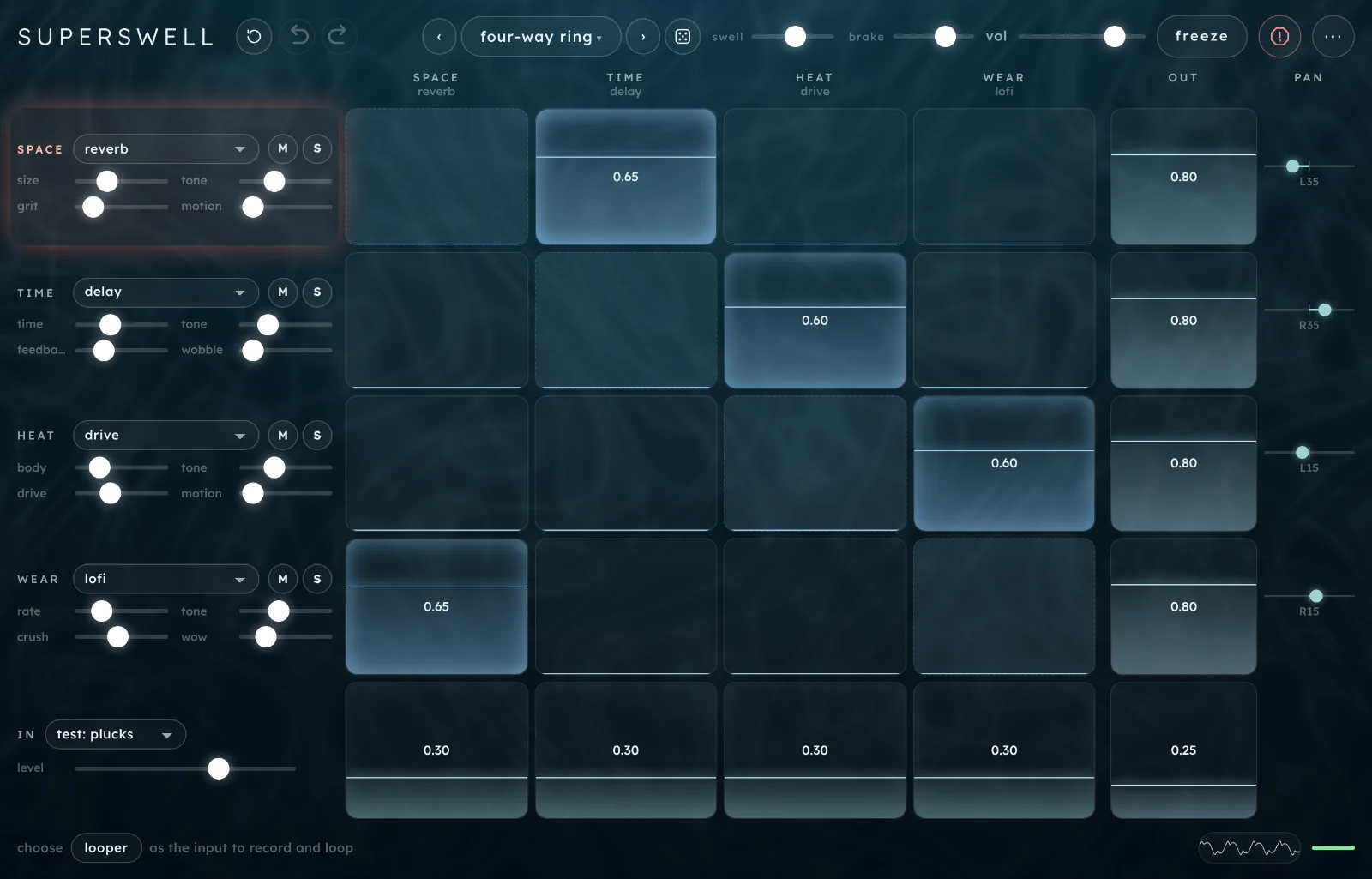
Superswell is a matrix mixer for four effects that feed each other. Every send is a cell you drag, so you can patch one effect into another, or into itself, and let it run away.
Start here
Five steps from opening Superswell to a sound that feeds back on itself. It runs in Chrome, Edge and Safari, on a computer or an iPad. Headphones help, and you need them with the mic.
Open Superswell and tap begin. The first time, a one-screen intro shows the gestures; tap begin to start. Browsers only allow sound after a tap, so nothing plays until you do. It starts on the preset four-way ring, fed by a test sound of plucked notes.
Drag a cell up. Each cell in the grid sends the effect on its row into the effect in its column. Drag one up and that send gets louder; drag it down to 0 and it stops. The fill shows the level and the cell glows when sound is passing through it.
Make one effect feed itself. The dashed cells running corner to corner are the self-sends. Drag one up towards 0.8 and that effect starts to hold a sound on its own (HEAT's drive gets there sooner, at about 0.6).
Turn up swell. It's at the top, and it scales every send between the effects at once: turn it up and the loops get longer and louder, pull it down and they die away. If it gets too loud, the brake pulls it back, and panic (esc) stops the feedback.
Try the presets.‹› step through them; the name opens the list, and the die rolls a random one.
TipDrag a cell sideways to make it wobble. Every cell and every pan can move on its own, at its own speed, so a patch can keep changing without you touching it.
The screen
Everything is on one screen: the header along the top, the four effects down the left, the grid of sends in the middle, the outputs on the right and the looper along the bottom.
Clear sends, undo, redo. Clear sends sets every send between the effects to 0. Undo and redo step back and forward through your changes.
Presets.‹› step through them; the name opens the list. More.
Random preset: the die rolls a new, playable patch with a made-up name.
swell scales every send between the effects: how hard the whole thing feeds back.
brake catches it when it runs hot, by pulling every send down for a moment.
vol, the volume.
freeze loops the last few seconds of the output and stops every wobble.
Panic cuts the effects and stops the feedback. So does esc.
⋯ has tempo and sync, hide ui, this guide and the intro.
The effect strips. One per effect: its family, its module, mute and solo, and four settings. A coral glow marks the effect leading a runaway.
Sends. Each cell sends the effect on its row into the effect in its column.
The diagonal: the dashed cells, where each effect feeds itself.
out: how much of each effect you hear.
pan: where each effect sits, left to right.
IN: what goes in (a test sound, the mic, the looper or nothing) and its level. The row of cells beside it feeds IN into each effect.
in → out: the dry input, straight to the output.
The footer holds the looper when IN is set to looper. Otherwise it offers a looper button. A cell you tap shows its wobble and delay here.
Scope and brake meter. The output's waveform, and a bar that turns amber, then red, as the brake pulls the sends down.
On a phone or a narrower window
Under 1200 px wide (most iPads in landscape), swell, brake and vol move to a labelled second row under the wordmark. In a narrower window clear sends folds into ⋯, and on a phone undo and redo fold in too.
On a phone each effect strip shrinks to its family name with M and S. Tap the strip (anywhere but M and S) to open its module and settings over the footer; tap IN the same way for the input and its level. done closes them.
On a phone.
How Superswell works
Four effects, wired to each other. Superswell has four effect slots, named for what they do: SPACE (reverb or shimmer), TIME (delay, pitch or grains), HEAT (drive, ring or shift) and WEAR (lofi, reson or blur). Sound comes in at the bottom, from a test sound, the mic or the looper, and you choose how much of it reaches each effect.
Every cell is a send. The grid has a row for each effect and a column for each effect. The cell where a row meets a column sets how much of that row's effect goes into that column's effect. The diagonal sends each effect back into itself. A send at 0 connects nothing, so a new path opens as soon as you drag one up. See the matrix.
It's built to run away. When sends form a loop (one effect into another and back, or into itself), sound keeps travelling round it, coloured by every effect on the way. Turn the loop up and it holds a note, grows into a drone, or screams. swell sets how hard every loop feeds back at once. The brake watches the output and, when it runs hot, pulls every send down until it settles.
Nothing moves unless you move it, or give it a wobble. Nothing in the patch changes by itself. Each cell and pan can have a wobble of its own, which moves it either side of where you set it, in one of seven shapes, at its own speed.
You hear the outputs. The out column sets how much of each effect reaches the speakers, and the pan sets where. The dry input has its own cell, in → out. An effect can be feeding the others hard while you hear none of it.
Playing it
Superswell is an effect: it needs something going in. The IN menu at the bottom left picks it.
Test sounds
Three built-in sources, so you can play without a mic:
test: plucks: short plucked notes at random, in a minor pentatonic scale on A, with gaps between them. The default, and the easiest way to hear what the feedback adds.
test: drone: a low, held chord that slowly opens and closes.
test: noise: short bursts of filtered noise at random pitches.
The mic
Choose mic / interface under IN and allow the browser to use the microphone. Any input your device offers works, including an audio interface; Superswell turns off the browser's echo cancelling, noise suppression and automatic gain so the sound stays as it is.
HeadphonesWith the mic on and speakers playing, Superswell hears itself through the air and feeds back even with every send at 0. Use headphones. If the mic is refused or missing, a message says so and IN goes back to the source you had before.
Files
load… in the footer loads an audio file into the looper and switches IN to looper. WAV, AIFF, CAF, MP3, FLAC, OGG and Opus load at any length (the last four where the browser can decode them), other kinds (such as M4A) up to 20 MB; the looper keeps the first 60 s. Each file is levelled as it loads, so a loud file doesn't drown the matrix. See load.
Nothing at all
IN can be none. A loop that's already feeding back keeps going on its own; one that isn't fades away. Silence never starts feedback by itself, so a patch needs a little input to get going (the preset no input keeps a trickle of the test sound going in for that reason).
BrowsersThe mic only works over https or on localhost, so open the online version (or a local server), not a copy saved to disk. Superswell has no MIDI, and doesn't need a keyboard: everything is played with a pointer or a finger.
The matrix
The grid is the instrument. Read it row by row: each row is where sound comes from, each column is where it goes.
The preset swarm: two sends and every pan wobbling (the pale bands and the ∿ marks).
Reading the grid
Rows are sources: SPACE, TIME, HEAT and WEAR, then IN underneath.
The first four columns are destinations: the same four effects, in the same order. Each column header shows the effect's family and the module it's running.
The diagonal (dashed) runs from the top left to the bottom right: each effect into itself.
out and pan sit to the right, a little apart from the grid. They don't feed anything back; they're what you hear.
The bottom-right cell is in → out, the dry signal.
So TIME → HEAT is the cell on TIME's row, in HEAT's column. When you tap a cell, its name shows in the footer.
Gestures
On a cell
Does
drag up or down
sets the level
drag sideways
sets how far it wobbles (right for more); a pale band shows the reach
tap
opens its wobble shape and speed (and, on a send between effects, its delay) in the footer
double-tap
sets it to 0; double-tap again to bring back the level it had
On a pan
Does
drag sideways
places it left or right
drag up or down
sets how far it wobbles (up for more), so the effect moves round the stereo field
tap
opens its wobble shape and speed
double-tap
centres it
A cell shows its level as a number and a fill. A ∿ after the number means it's wobbling. A double-tap on a cell at 0 with no level to bring back sets it to about a third of the way up.
Glows
Sends that are carrying sound glow faintly from inside: the brighter the glow, the more is passing through, after swell and the brake. The IN row glows with the input. There are no level meters.
When the whole machine runs hot, a coral glow lights the strip of the effect that's leading the runaway, swelling in and out slowly. It's a hint for where to pull a send down. It goes when things settle.
How much one effect can send
Each effect can send a total of 1.2 across its row. If its sends add up to more, they're all turned down together to fit, so a new send takes a share from the others rather than adding on top. A single send or self-send at 1.0 still passes unity at the default swell: it can run away on its own.
The cells
send0.00 to 1.00
How much of the row's effect goes into the column's effect. Two sends that point at each other (TIME → HEAT and HEAT → TIME) make a loop; higher sends make it louder and longer.
Most loops start to hold on their own between 0.6 and 0.95; drive and reson get there sooner, shift, grains, blur and ring need more.
self-send0.00 to 1.00, the diagonal
An effect into itself. A delay repeats its own repeats, a reverb grows a longer and longer tail, a resonator rings on. The fastest way to a sustained sound.
in → SPACE … WEAR0.00 to 1.00
The bottom row: how much of IN goes into each effect. An effect with nothing coming in from IN can still be fed by the others.
out0.00 to 1.20
How much of each effect you hear. It doesn't change what the effect sends on, so an effect at out 0 still feeds the loop.
Turn a harsh effect's out down and leave its sends up: you hear its colour on the others without hearing it directly.
panL100 to R100, C in the middle
Where each effect sits left to right. Wobble it for an autopan.
in → out0.00 to 1.00
The dry input, straight to the output, so you hear what's going in. Panic leaves it playing.
Wobble and delay
Tap a cell or a pan and its settings lie over the footer. The grid doesn't move. Tap the cell again, or done, to close them.
TIME → HEAT selected: its wobble shape, reach and speed, and its delay.
How the cell moves. sine and tri swing evenly, saw↑ climbs and drops, saw↓ falls and jumps back, square flips between two levels, s&h jumps to a new random level each cycle, and wander glides between random levels, so it never repeats.
square on the IN sends gates the input on and off; it's how the preset tidal gate works.
wobblenone to full, no number shown
How far the cell moves either side of where you set it. The same as dragging the cell sideways, and the pale band on the cell shows it. Where the movement would go past 0 or the top, it folds back.
speeda cycle every 100 s to 4 Hz, or 16 bar to 1/16
The slider without a name: its label shows the time for one cycle (41 s), or the rate in Hz once it's faster than once a second. With wobble synced (⋯ › tempo & sync) it counts in bars and beats instead.
Each cell starts at a slightly different speed, so wobbling cells drift in and out of step.
delay3 to 90 ms
Sends between effects only: a short delay on the way. Short delays tune and colour the feedback (a loop rings at a pitch set by its delays); longer ones turn it into a flutter or an echo. Most of the slider is in the short end.
Move a self-send's delay slowly while it's ringing and the pitch of the ring slides.
done
Closes the settings and brings the footer back.
Tipfreeze stops every wobble where it is. Freeze, then let go, and they carry on.
The header
Presets, the two masters that set how wild it gets, and the whole-output controls.
app actions
clear sendsthe ↺ button
Sets every send between the effects to 0 and stops their wobble. The IN sends, outs and pans stay as they are, so you can start building loops again from the same input. It can be undone.
undo⌘Z or Ctrl+Z
Steps back through your changes, up to 60, and glides the levels back so nothing clicks. It covers the cells, pans, wobbles, delays, modules and settings, mute and solo, the key, swell, presets, random and clear sends.
IN and its level, brake, vol, freeze and the looper aren't undone.
redo⇧⌘Z or Ctrl+Y
Steps forward again after an undo, until you change something.
presets
‹ name ›[]
The arrows step through every preset, the factory banks then yours; the name opens the list, where you can also save. A new preset glides in over 0.8 s.
random presetthe die, r
Rolls a new patch that stays playable: a module for each slot, settings near their resting points, three to six sends, a little wobble, and a two-word name such as brine lantern. It keeps IN, the brake and the volume.
masters
swell×0 to ×3, ×1.5 in the middle
Scales every send between the effects at once. At the bottom the effects don't feed each other at all, and you hear only what IN sends straight into them. Turn it up and every loop gets longer and louder. It's saved with presets.
Set the sends by ear with swell in the middle, then ride swell as the one fader that takes the whole patch from tame to wild.
brakeoff to full, starts a little over two-thirds up
Automatic. When the output gets loud, the brake pulls every send down, and it lets go slowly as things settle. This slider sets how hard it pulls: off lets the feedback do what it likes; full holds it down hard. The bar at the bottom right shows it working.
Turn it down to let a runaway get louder before it's caught; turn it up to keep loud patches in check while you set them up.
volsilent to full, starts at 80%
The overall volume. It isn't saved with presets.
the whole output
freezeon / off; reads frozen while on
Takes the last few seconds of the output and keeps playing them, in overlapping pieces, under whatever comes next. Every wobble stops where it is. Tap again to let it fade.
Freeze a good moment, then change the patch completely and play over the top of it.
panicthe red button, esc
Cuts the effects and stops the feedback for about a second, then lets them back in from silence. It also lets go of freeze. The dry in → out keeps playing.
If a loop comes back after panic, turn swell down or clear sends: the patch is still set to run away.
⋯
Back up and restore presets, tempo and sync, hide ui, this guide and the intro, and anything the header has folded away at this width. See ⋯ and tempo.
swell, brake and vol show no numbers, so the ranges on their cards say what the ends and the middle of each slider mean. Double-tap one to put it back where it started.
The effects
Down the left, one strip per effect: its family, its module, mute and solo, and four settings.
Each slot has a family and a choice of modules. Every module has four settings in the same places: top left is its size (a time, a space or a frequency), top right its tone (dark to bright), bottom left its character (feedback, dirt or intensity) and bottom right its motion. So when you swap a module, the sliders keep roughly the same meaning. Swapping crossfades to the new module and puts its four settings back to their resting points.
every strip
modulethe menu beside the family name
Which effect the slot runs. SPACE: reverb, shimmer. TIME: delay, pitch, grains. HEAT: drive, ring, shift. WEAR: lofi, reson, blur.
Mmute
Takes the effect out of the matrix: it stops sending to the others, to itself and to the output. Its cells dim.
Ssolo
Lets you hear only the soloed effects. The matrix keeps running as before; solo only changes what reaches the output. Solo two to hear a pair.
SPACE
reverbsize · tone · grit · motion
A room. size goes from a short room to a long hall; tone from dark to bright; grit drives the sound into the reverb harder, so it distorts on the way in; motion sways the tone slowly.
shimmersize · tone · shimmer · drift
A reverb whose tail is fed back an octave up, so it climbs. shimmer sets how much climbs; drift detunes the octave a little for a slow waver.
TIME
delaytime · tone · feedback · wobble
Echoes that bounce left and right. time runs from 20 ms to 1.5 s, or from a 1/16 note to a bar when delay time is synced; feedback sets how many repeats (up to 95%); wobble bends the repeats like worn tape. Moving time while it echoes bends the pitch.
pitchtime · tone · cascade · interval
A pitch-shifted echo. interval picks the shift: +12, +7, +5, −5, −7 or −12 semitones. cascade feeds each repeat back through, so it shifts again and climbs or falls like a staircase. time is the gap between repeats, from 80 ms.
grainsgrain · tone · density · scatter
Cuts the sound into short grains and replays them, spread across the stereo field. grain sets their length (and how far back they reach); density how many play at once; scatter how often a grain plays at another speed or backwards.
HEAT
drivebody · tone · drive · motion
Distortion. drive goes from warm to fuzz; body trims the low end, thinner as you turn it up; motion sways the tone.
Drive in a loop holds on its own from sends of about 0.6, sooner than most modules.
ringfreq · tone · mix · motion
A ring modulator: metallic, bell-like sidebands. freq runs from 20 Hz (a fast tremble) to 2.5 kHz (clangour); mix blends from the dry sound to all ring; motion wobbles the frequency.
shiftshift · tone · feedback · motion
A frequency shifter: moves every partial up by the same number of hertz (2 Hz to 400 Hz), so the sound goes out of tune with itself. feedback shifts it again and again into a rising spiral; motion wobbles the amount.
WEAR
lofirate · tone · crush · wow
Old digital and old tape. rate lowers the sample rate, for aliasing; crush cuts the bits from 16 to 2; wow adds tape wow, flutter and a little hiss.
resonpitch · tone · ring · detune
Four tuned strings that ring when sound hits them: a root, a fifth, an octave and an octave and a fifth. pitch picks the root from the notes of the key, from A1 to A4; ring sets how long they ring; detune wobbles their tuning.
Reson in a loop turns any input, even noise, into a chord in the key.
blursmear · tone · wash · sparkle
Smears the sound into a pad. smear sets how long it blurs over, from 50 ms to 8 s; at the very top it stops listening and holds what it has. wash smooths it into a softer, wider wash; sparkle makes parts of it flicker.
key (under reson)
keyC to B, starts on A
The resonator's key. It only shows when WEAR is running reson. Saved with presets.
Which notes reson's pitch steps through. fifths gives only the root and its fifth; chromatic every note.
In a window under 720 px tall, the four settings sit on one line with their names hidden. With a mouse, hover over one to see its name; on a touch screen, they run in the same order as above: size, tone, character, motion. On a phone they open over the footer when you tap the strip:
TIME's settings, on a phone.
IN and the looper
IN is one choice: a live source, the looper or nothing. The looper's controls fill the footer when IN is set to looper.
What feeds the matrix. A live source (a test sound or the mic) goes straight in. looper feeds in the loop's playback instead. none feeds nothing. See playing it.
level0 to 1.5×, no number shown
How loud IN is, whichever source it is. 1× is two-thirds of the way up, where it starts; double-tap to put it back there. It isn't saved with presets.
The looper
When IN isn't the looper, the footer shows a hint with a looper button: tap it to switch. The loop records from its own source, set by record from. While you record or overdub from a live source, you hear that source through the matrix too.
What the loop records. output (resample) records everything you're hearing, so the matrix's own sound goes round again through the effects.
load…
Loads an audio file as the loop and switches IN to looper. The first 60 s are kept. WAV, AIFF, CAF, MP3, FLAC, OGG and Opus load at any length; other kinds up to 20 MB. It plays from the top, and dub, speed and reverse all work on it.
reload
Brings the last file back as the loop, after a clear or an overdub. It shows once you've loaded a file.
recthen dub
Tap to start recording (● rec); tap again to close the loop, and it plays. After that the button reads dub: tap to overdub on top (● dub) and again to stop overdubbing. Each pass of an overdub fades the older layers a little. A loop can be up to 60 s; recording stops there by itself.
stopthen play
Stops the loop. The button then reads play, which starts it again from the top. While you're recording, it closes the loop, as a second tap on rec does.
clear
Empties the loop. The progress line beside it shows where the loop is, and the label its state and length (empty, play 3.1 s).
speed×0.25 to ×2
Plays the loop slower or faster, and lower or higher with it, like tape. It snaps to ×0.25, ×0.50, ×1.00 and ×2.00 as you pass them.
reverse
Plays the loop backwards.
scope and brake meterbottom right
The output's waveform, and a bar for the brake: green while it's resting, amber, then red as it pulls the sends down. Hidden on a phone.
TipRecord from output (resample) while a loop is playing and overdub: each pass runs the matrix's sound back through the matrix.
⋯ and tempo
The ⋯ menu at the top right. At narrower widths the buttons the header has folded away (clear sends, then undo and redo) are listed at the top of it. Under them come back up presets and restore presets….
tempo & syncshows the tempo
Opens the tempo and the two sync switches.
tempo40 to 240 bpm, starts at 100
The tempo that synced wobbles and synced delays follow. Type a number. It isn't saved with presets.
wobblefree · sync
sync locks every wobble's speed to the tempo, from 16 bars to a 1/16 note per cycle.
delay timefree · sync
sync snaps the delay's and the pitch echo's time to note lengths: 1/16, 1/8, dotted 1/8, 1/4, dotted 1/4, 1/2, dotted 1/2 and a bar.
hide uii
The controls fade and only the sea is left; the sound carries on. Tap anywhere, press i or esc, or tap the ⋯ in the corner to bring them back.
guidehow to play ↗
Opens this guide in a new tab.
intro1 screen
The intro from the first time you opened Superswell: the idea and the three gestures.
hide ui: only the sea. It brightens and moves faster as the effects hold more sound.
Presets and sharing
Fourteen factory presets in four banks. Your own go in yours.
Bank
Presets
classic chains
tape room, shimmer pad, dub echo, crushed hall. Effects in a line: they colour the input and fade when it stops.
feedback loops
four-way ring, tuned wires, pitch spiral, figure eight. Loops that keep sounding on their own.
noise & drone
no input, static weather, frozen sea. Self-sustaining textures; no input needs almost nothing going in.
moving
tidal gate, swarm, breathing. Built round wobbles: gated input, pans that circle, self-sends that swell and fall.
Saving
Open the list, type a name under save this preset and press save (or enter). Saving with the same name again overwrites it; ✕ beside one of yours deletes it, after asking.
A preset holds the four modules and their settings, every send, out and pan with its wobble, the route delays, mute and solo, swell and the key. It doesn't hold IN or its level, the brake, the volume, the tempo and sync switches, or the loop.
Where they liveYour presets are saved in this browser, on this device. Clearing the site's data or using a private window loses them, so back up presets (in ⋯) now and then to keep a copy. There's no share code. If the browser won't keep them, the list says so: Saved for this session only.
Backing up
back up presetsin ⋯, shows how many
Saves every preset in yours as one file, superswell-presets-backup- and the date. Keep it somewhere safe, or send it on. It says nothing saved yet if there's nothing to save.
restore presets…in ⋯
Opens a file picker: choose a backup and its presets come back under their own names. A preset you already have is skipped; one with the same name but a different sound is added as name 2. A file that isn't a Superswell backup is refused and nothing changes.
Recipes
Starting points. Values are the numbers the cells show. Use headphones, and keep vol low until you know how loud a patch gets.
A loop that outlives its input
Load dub echo, then press clear sends.
Set TIME → HEAT to 0.70 and HEAT → TIME to 0.65.
Raise swell to about three-quarters.
Set IN to none.
The echoes keep circling between the delay and the drive after the plucks stop, getting grittier each time round, and the brake meter shows the brake at work. To let it die away, pull swell down to about a quarter.
A chord out of noise
Load tuned wires.
Set IN to test: noise.
Under WEAR's reson, leave key on D and set the scale beside it to fifths.
Drag WEAR → WEAR up to 0.70.
Each noise burst sets the strings ringing as a chord of fifths and octaves, and the self-send holds them into a drone. Move reson's pitch slider slowly to step the chord between D and A.
The matrix, an octave down and backwards
Load pitch spiral and let it build for a while.
Tap looper in the footer. The test sound stops going in, but the spiral keeps going on its own.
Set record from to output (resample).
Tap rec, wait about 8 s, tap again.
Set speed to ×0.50 and tap reverse.
You hear the spiral played back at half speed and backwards, going back into the pitch echo and on into the shimmer. Tap dub to layer the result back onto itself.
Your voice, frozen and played over
Put headphones on. Set IN to mic / interface.
Load frozen sea; set in → out to 0.50.
Sing or play a long note, and tap freeze while it's ringing.
Sing over the top.
The held moment keeps playing under you while the live voice goes through the reverb and blur. Tap frozen to let it go, or panic to stop everything but the dry voice.
Echoes and movement in time
Load dub echo.
⋯ › tempo & sync: tempo 90, wobble sync, delay time sync.
Tap TIME → HEAT, choose square, drag wobble a little past halfway, and set the speed to 1/4.
The echoes land on the beat and the drive is fed in quarter-note bursts. Try s&h instead of square for a send that jumps to a new level every beat.
A sound that moves round you
Load four-way ring.
Drag each pan up a little way, so all four wobble.
Tap each pan in turn and choose wander.
Drag TIME → HEAT a little to the right, then tap it and choose wander too.
The four effects drift round the stereo field at different speeds, and the loop thickens and thins on its own. Freeze stops it all where it is.
Shortcuts
Superswell is played with a pointer or a finger, so the keys are few.
Key
Does
[]
previous, next preset
r
random preset
⌘Z / Ctrl+Z
undo
⇧⌘Z / Ctrl+Y
redo
i
hide ui, show it again
esc
close a menu; then leave hide ui; then panic
enter
save, in the preset name field
On the grid: double-tap a cell to zero it or bring it back, double-tap a pan to centre it. Double-tap swell, brake, vol or the IN level to reset it. In this guide, / jumps to find.
On iPad planned
An iPad version of Superswell is planned. Until then, the web version runs in Safari or Chrome on an iPad: open the online version so the mic works, and the screen has a touch layout of its own (larger M and S, and the swell, brake and vol row under the header).
Tips and limits
In a browser
The mic works only over https or on localhost. Saved to disk and opened as a file, the test sounds and the looper work, but the mic doesn't.
Sound starts only after a tap.
Your presets are stored in that browser on that device, with no export.
The web version can't save audio. Record your computer's output in another app.
No MIDI.
If it stutters, close other tabs and apps.
Playing
It's loud by design: sends go to 1.0 and a single loop can pass unity. Start with vol low, and keep panic handy.
The brake isn't a limiter: it slows a runaway down. A final limiter on the output keeps it from clipping harshly.
Swapping a module puts its four settings back to their resting points.
The looper holds 60 s. Files that aren't WAV, AIFF, CAF, MP3, FLAC, OGG or Opus load up to 20 MB.
IN, its level, the brake, vol, freeze and the looper aren't undone and aren't saved with presets.
A brand-new loop with no input stays silent: feedback needs a little sound to start from.
Questions
I can't hear anything
Tap begin: browsers stay silent until you do. Check vol at the top, your device's volume and, on an iPad or iPhone, Control Centre's mute. Then check the path: IN shouldn't be none, its level shouldn't be at 0, at least one IN cell (or in → out) needs to be up, and the out cells of the effects it reaches need to be up too. A lit S somewhere means you only hear the soloed effects.
It's screaming and won't stop
Press panic (esc). If it comes back, the patch is still set to run away: pull swell down, raise the brake, or press clear sends. The coral glow shows which effect is leading it; turn down that effect's sends, or mute it.
The sound keeps going after I stop the input
That's feedback: a loop of sends is feeding itself. It's what Superswell is for. To stop it, lower the sends in the loop or swell, or use panic. Check freeze too.
A cell keeps moving by itself
It has a wobble (a ∿ after its number, and a pale band). Drag it sideways to the left until the band goes, or tap it and set wobble to 0. Freeze stops every wobble at once.
Adding a send turned the others down
Each effect can send a total of 1.2. Past that, all its sends are scaled down together. See how much one effect can send.
The mic doesn't work
Open the online version (the mic needs https or localhost), and allow the microphone when the browser asks. If you said no, allow it in the site settings and reload. If the mic can't start, a message says so and IN goes back to the source you had.
Where are the record controls?
The looper shows only when IN is set to looper. Tap looper in the footer, or choose it in the IN menu.
My presets have gone
They're stored in the browser you made them in, so they won't appear in another browser, a private window or another device, and clearing site data removes them.
Does it work offline?
Once it has loaded, it doesn't need the internet: nothing is sent anywhere, and it makes no network requests.
How is it different from Subswell?
The two share their effects and their sound. In Subswell (its guide) you play boxes, each of which moves a handful of sends and settings at once, and the matrix stays out of sight. Superswell shows every send and leaves each one to you.