Subswell is an effect and looper made from four effects that feed back into each other. You play boxes, and each box opens several of the paths between the effects at once. A brake pulls the feedback back before it runs away.
Start here
Five steps from opening Subswell to a sound feeding back on itself. It runs in Chrome, Edge and Safari, on a computer, an iPad or a phone.
Open Subswell and tap begin. The first time, a three-screen intro shows you around; you can skip it. Browsers only allow sound after a tap, so nothing plays until you do. It opens on the tidepool scene, and a test tone of random plucks starts playing straight away.
Drag up on a box. The fuller a box is, the more it sends between the effects, and the plucks start to ring, repeat and smear. Drag it back down to let the sound go dry.
Drag sideways on the same box to make it wobble: its level moves up and down on its own, inside the faint band you drew.
Step through the scenes with ‹› at the top, or tap the scene's name for the list. Each scene is a new set of boxes, effects and settings, and the change glides over two seconds.
Play your own sound. Open mix and set source to mic / interface, or load a file into the looper from loop. Use headphones with the mic.
TipIf it gets too loud or too wild, pull the boxes down, or press panic (the red octagon, or esc). The brake is already riding the feedback down for you; panic silences the effects for about a second.
The screen
Tabs and their drawer on the left, the boxes in the middle, the transport along the bottom. Everything on screen, numbered:
undo again, and a line reminding you of the gestures. When you select a box, its controls take this row's place.
The transport: rec, stop, clear and freeze.
The loop bar and the loop's length.
The scope shows what you hear; the short bar beside it is the brake.
On a phone or a narrow window
The tabs move above the boxes and run across the screen, and a drawer opens between them and the boxes. The scene browser and tame / wild get a row each. To save room, vol, the meters, the loop's length and the box count are left out (use your device's volume), and ⚄ is hidden below 900 px wide (the seeds bank in the scene list has one too). Everything else is the same.
On a phone.
How Subswell works
Four effects feed each other. Sound comes in from the test tones, the mic or the looper and reaches four effects, one in each slot: space (a reverb), time (a delay, pitch or grains), heat (drive, ring or frequency shift) and wear (lo-fi, a resonator or blur). Every effect can send its output into any of the four, itself included. Those sixteen paths are the matrix, and the more of it is open, the more the sound feeds back on itself. The fx tab picks the effects; the engine tab shows the matrix.
You play boxes, not the matrix. Each box holds a hidden recipe: a few paths through the matrix, and sometimes a nudge to an effect's character or tone or to how tightly its loops repeat. Fill a box and it opens all of them together. Each path starts at its own point on the way up and takes from a fraction of a second to a few seconds to arrive, so one drag sets off a small chain of changes. Split a box and its recipe is shared between the halves; merge two and their recipes add up. The boxes has the gestures.
Every effect has a resting point. Each effect has four settings (size, tone, character and motion, under names that suit the effect). On the fx tab you set where they rest; the boxes, temper, tilt and wild push them away from there and they drift back when you let go. A ring on each slider shows where it has been pushed. Pin a setting to keep it where it rests.
The whole machine has its own controls. On mix, feed sets how much sound enters the effects and sustain how much the matrix feeds back; temper and tilt change the character and tone of all four at once. tame / wild, at the top, pushes all of that further in one move. Drift lets the machine change the boxes by itself.
It is built to get gnarly without hurting. Each effect has a soft ceiling, the output has a compressor and a clipper, and the brake rides the feedback down when it gets loud. When the machine runs hot, the box most responsible glows coral. Under all of that is a 60-second looper, and anything you record goes round the machine like the live sound.
Playing it
Give Subswell sound, then play the boxes. Three ways in: the test tones, a mic or audio interface, and a file in the looper.
Test tones
Choose them from source on the mix tab. Subswell starts on plucks.
test: plucks: short notes at random, about one a second, spread across the stereo field.
test: drone: a low held chord with a filter slowly opening and closing.
test: noise: short bursts of filtered noise, each at a different pitch.
none: no live sound. Choose it to hear only the loop.
Mic or audio interface
Choose mic / interface. The browser asks permission the first time. Subswell takes the input as it is, with the browser's echo cancelling, noise reduction and automatic level all turned off, so set the level with in. The browser picks the input device: on a computer, choose it in the browser's site settings or your system's sound settings.
HeadphonesFeedback is what Subswell does, and a mic near your speakers adds a loop of its own. Use headphones with the mic. On an iPhone, sound may come out of the earpiece while the mic is on; headphones fix that too.
BrowsersThe mic needs a secure page: the site over https, or localhost. Opened as a file from your computer, Subswell plays but the mic is refused. If you say no to the permission, the source goes back to what was playing; allow the mic in the site settings and choose it again.
A file in the looper
On the loop tab, load… puts an audio file into the looper. It becomes the loop, as if you had recorded it: it plays at once, and speed, reverse, dub and clear all work on it. So you hear only the file, the source switches to none.
The loop holds 60 s; a longer file keeps its first 60 s, and its name shows (first 60 s).
Files are brought to an even level as they load, about as loud as the drone test tone, so a loud file doesn't swamp the effects.
WAV, AIFF and CAF load at any length in every browser: Subswell reads only the first 60 s, so a long recording loads quickly. MP3, FLAC, OGG and Opus load at any length where the browser can decode them. Other kinds, such as M4A, are read whole and load up to 20 MB.
reload puts the same file back after you clear the loop.
The loop is an input too
The loop goes into the effects through feed and into the dry sound, alongside the live source, which keeps playing under it. Record something and set the source to none, and the loop is all you play the boxes with. With rec: output the looper records the machine itself, so you can print a sound and play it through another scene.
The boxes
The middle of the screen. Every gesture works on the box under your finger; selecting a box brings up its controls.
Gestures
filldrag up or down
How hard the box pushes. Empty, it does nothing; full, it opens its paths as far as its recipe goes. The full height of the box is the whole range.
Most sounds live in the bottom third. Small moves there are the most playable.
wobbledrag sideways
Makes the box's level move up and down by itself, around where you filled it. Drag right for a wider swing. The faint band shows its range and a bright line shows where it is right now. At the top and bottom the movement folds back.
selecttap
Brings up the box's controls in place of the transport. Tap it again, or done, to go back. The looper keeps running.
splitdouble-tap
Splits the box in two, side by side or one above the other, whichever way it's longer. Its recipe is shared out between the halves, and both keep its fill. A box shakes when it can't split: it's too small (under about 128 px each way), or there are already 16 boxes.
mergehold, then drag onto another box
Hold a box until it lifts (under half a second), then drag it onto another; the target shows a dashed outline. The box you dragged goes into the target: their recipes add up, the target takes the fuller of the two fills, and a neighbour takes the empty space.
throwa second finger on the box
While you hold a second finger on a box you're touching, it pushes almost as if it were full, two and a half times harder, and the whole matrix feeds back more. Let go and it falls back over a couple of seconds. On a computer, hold alt (option) as you click a box. The box shows a bright outline while you throw.
Short throws on the beat work like a dub engineer's send: a burst of feedback that rings out after you let go.
What a box shows
The level line is the fill. With a wobble, a faint band shows the range and a second line moves inside it. The look can change: see fill in ⋯.
The shade. Pale boxes mostly feed space and time; deeper blue ones feed heat and wear, or push an effect's character.
A coral glow marks the box that's driving the feedback hardest, when the machine as a whole is running hot. Pull it down, or let the brake catch it.
A pale outline that fades: drift has changed that box.
The box controls
Select a box and these take the transport's place, in the same space, so the boxes don't move. undo moves to the start of the row.
A box selected: its controls replace the transport.
change the box
+ new
Halves the selected box's space and puts a new box, with a new recipe, in the other half, then selects it. New recipes are made to differ from the boxes you have.
split
The same as a double-tap, except the first half stays selected.
merge
Then tap another box to merge the selected one into it, as the hold-and-drag gesture does. Tap merge again to change your mind.
simplify
Takes out the box's weakest path and softens any character or tone nudges a little. A box with one path left can't simplify.
grow
Adds one path, choosing one that closes a new loop or reaches an effect the box didn't touch. Now and then it adds a character, tone or loop nudge instead. It stops at ten paths.
reroll
A new recipe for this box, different from the others. Its fill and wobble stay.
tidetide · draw a tide · recording… · clear tide
Records a fill movement and loops it. Tap tide (it reads draw a tide), then drag the box up and down; it reads recording… until you lift your finger, and from then on the box replays that movement by itself.
Touch a tided box to take over; it carries on when you let go. clear tide removes it. A tide can be up to about four and a half minutes long, and with box wobble synced (tempo & sync) its length snaps to 1, 2, 4, 8, 16 or 32 beats. Tides are saved in scenes.
delete
Removes the box; a neighbour takes its space. The last box can't go.
6/16 boxes
How many boxes there are, out of 16. It also shows short messages, such as what to tap while merging.
How the level moves: a smooth swing, a straight up and down, a ramp up or down, a jump between two levels, a new random level each cycle (s&h), or a smooth glide between random levels that never repeats (wander).
wobble0 to 100%
How far the level swings, the same as dragging sideways on the box.
speedonce every 100 s to 4 Hz, or 16 bar to 1/16
How fast it swings. The label over the slider shows the time of one cycle (31 s, 1.2 Hz). With box wobble synced to the tempo, it counts in bars and beats instead.
strength
depth0 to 100%
It sits at the end of the wobble row, but it isn't the wobble's depth: it scales everything the box does, at any fill. At 50% the box pushes half as hard; at 0 it does nothing. New boxes start at 100%, and some scenes turn a few down. The fill shows fainter as you lower it.
Turn a box's depth down to keep its recipe in reserve without deleting it.
Undo
undo (in the bottom row) and the curved-arrow icon at the top both step back through the last 40 changes to the boxes and scenes: new, split, merge, simplify, grow, reroll, delete and changing scene. Undoing a box change leaves fills, wobbles, tides and the drawer sliders as they are; undoing a scene change brings the whole previous scene back. There's no redo. ⌘Z (ctrlZ) does the same.
Explain
The recipes are hidden on purpose. To see one, turn on explain: ⋯ › explain · i overlays, or the i at the top of any drawer. Each box then shows a small map of its paths (four dots: space at the top, time on the right, heat at the bottom, wear on the left; a ring is an effect feeding itself), the family it came from (ring, chain, pair, star, self, fig8, sparse or merged), and its paths in words, strongest first. Small boxes show only the map. You can keep playing the boxes through it.
Explain on: what each box does.
The transport
Along the bottom: the looper's buttons, freeze, and the meters. They stay here so you can play them in time. The looper's settings are on the loop tab.
Above them, until you select a box, is a line of reminders: tap to select · double-tap splits · up/down fills · sideways wobbles · hold & drag to merge · two fingers throws.
recrec · ● rec · dub · ● dub
With the loop empty, rec starts recording (● rec) and a second tap closes the loop, which plays straight away. From then on the button reads dub: tap it to record over the loop (● dub) and again to stop.
While you dub, each pass lowers what's already there a little, so old layers fade as new ones go on. The loop is up to 60 s long; recording stops itself there.
stopstop · play
Stops the loop; play starts it again from the top. Pressed while recording, it closes the loop like a second tap on rec.
clear
Empties the loop. A loaded file can come back with reload.
freezefreeze · frozen
Holds the last few seconds of everything you hear and keeps them sounding as a smooth bed, fading in over a moment, while the machine carries on above it. Every box's wobble stops while it's frozen. Tap again to let the bed fade out. Panic lets go of it too.
Freeze a moment you like, then change scene: the bed holds while the new boxes glide in.
the loop barempty · 3.2 s · play 6.0 s
Where the loop is. The label beside it says empty, counts up while recording, then shows the state and the loop's length (play, dub or stop).
scope and brake
The scope draws what you hear. The short bar beside it is the brake: full and green when it's relaxed, shorter and amber or red while it's holding the feedback back. On a phone the meters are hidden.
The top bar
Across the top: the one control for the whole machine's mood, undo, the scenes, volume, panic and ⋯.
tame / wildtame to wild, the middle is neutral
How gnarly the whole machine is, in one move. Towards wild it raises feed, sustain and temper without moving their sliders (a ring on each on the mix tab shows where they've gone), makes every box push harder and wobble further, and gives every effect more character and motion. Towards tame it does the opposite. The safety chain stays as it is.
Leave the mix sliders where a scene puts them and play wild instead: one slider takes the whole scene calmer or rougher, and back.
Step back and forward through the factory scenes, then yours. The name (tidepool when Subswell opens, untitled for a scene without one) opens the scene list. ⚄ grows a new scene from two random words, such as salt lantern.
vol0 to 100%
The output volume. Scenes don't change it. Hidden on a phone.
panicesc
Silences the effects and the feedback for about a second, then lets them back in, and lets go of freeze. The dry sound and the loop keep playing.
⋯
explain · i overlayson · off
Shows what each box does, and the short notes at the top of each drawer. See explain.
tempo & sync40 to 240 bpm
Opens a small panel:
tempo: type the bpm (100 to begin with).
box wobble: free or sync. Synced, every box's wobble speed counts in bars and beats, and tides snap to whole beats.
delay time: free or sync. Synced, the delay and the pitch effect's time snap to note lengths from a sixteenth to a bar.
There's no MIDI clock: the tempo is only what you type.
fill · tap to switchclarity · liquid
How the boxes draw their fill. clarity: the fill sits where you set it, and a bright line shows where the wobble has it now. liquid: the water itself rises and falls with the wobble, and its surface sloshes as the level moves; a small mark at the edge shows where you set it. The sound is the same.
hide uii
Fades out everything but the water, which gets a little brighter; the sound carries on, tides and drift included. One tap anywhere, i or esc brings the controls back.
guidehow to play ↗
Opens this guide in a new tab.
intro · what's new
The three intro screens again, or the card of recent changes.
tempo & sync.
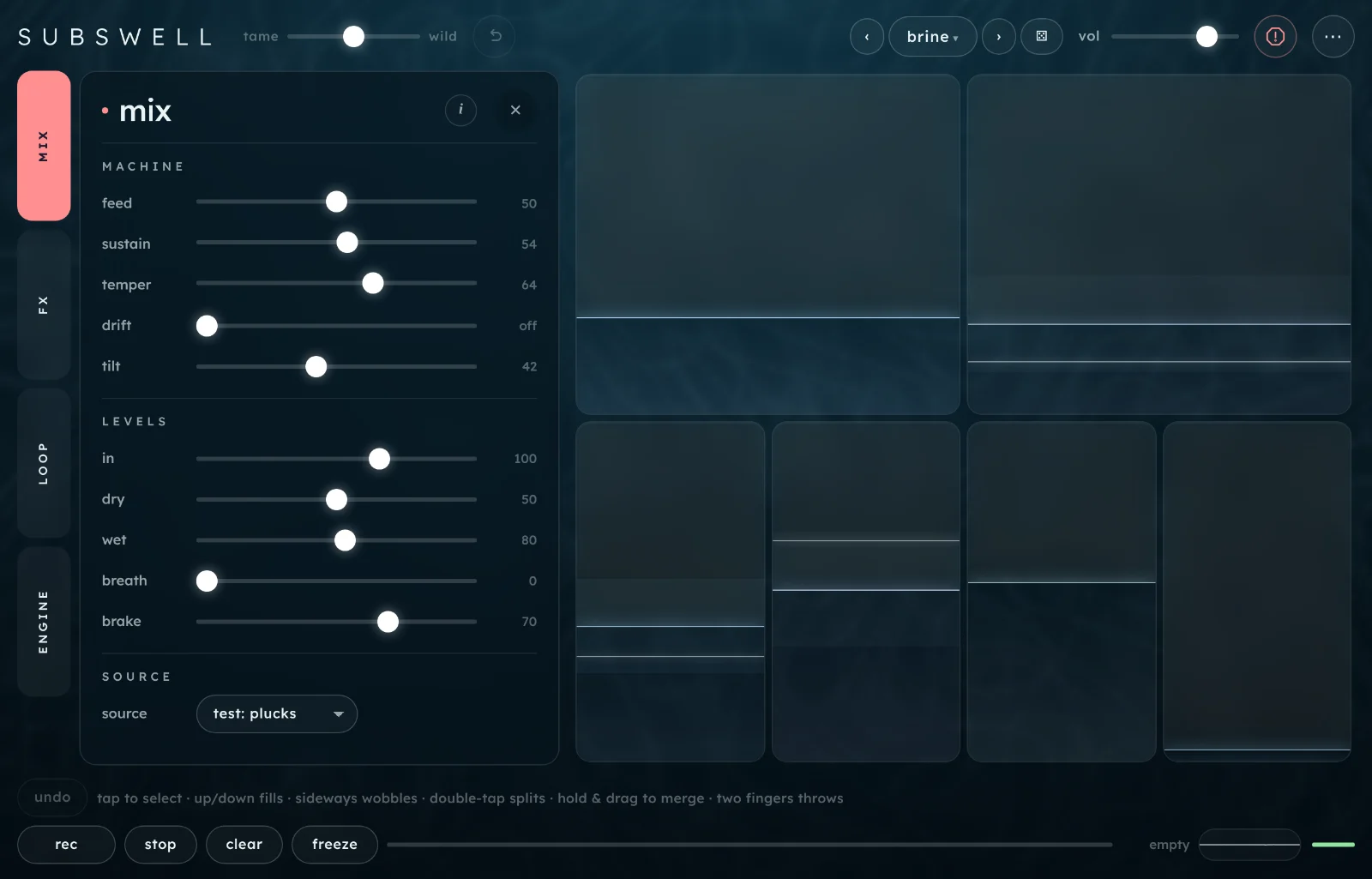
mix tab 1
Controls for the whole machine, its levels, and the sound going in. Each slider shows its value from 0 to 100 (in and wet go to 150); double-tap one to put it back. With tame / wild away from the middle, a ring on feed, sustain and temper shows where it has pushed them.
machine
feed0 to 100, 35 to begin with
How much sound enters the four effects. At 0 nothing reaches them and you hear only the dry sound. The boxes decide what happens to it after that.
sustain0 to 100, 40 to begin with
How much the matrix feeds back into itself: every open path is turned up together. Low, sounds die away; high, they ring on and build.
Sustain is where runaways come from. Raise it slowly and let the brake do its job.
temper0 to 100, 0 to begin with
Changes the character of all four effects together: more grit, drive and crush, and bigger rooms and longer times, each arriving over a few seconds.
driftoff, or 1 to 100
Lets the machine change the boxes by itself, every minute or so at low settings and every few seconds near the top. Mostly it glides a fill somewhere new or nudges a wobble; now and then it rerolls or grows a box, and it splits and merges to keep between three and seven boxes.
It never touches a box with a tide, the selected box, or anything while you're touching a box, and it doesn't fill up undo. The box it changed shows a pale outline for a moment.
tilt0 to 100, 50 to begin with
Brightens all four effects as you raise it. It also sets a few of the paths and every effect's position in the stereo field slowly drifting, and above the middle it adds motion inside each effect. At 0 each effect sits at its own resting tone and nothing drifts.
levels
in0 to 150, 100 to begin with
The level of the live sound going into the machine and the dry mix. The mic isn't levelled for you, so this is where you set it. It doesn't change what the looper records.
dry0 to 100, 50 to begin with
The sound without effects, live and loop together, in what you hear.
wet0 to 150, 80 to begin with
The four effects' level in what you hear.
breath0 to 100, 0 to begin with
Holds the machine back while sound is coming in, and lets it bloom when you stop. The higher it is, the more the feedback and the effects duck under what you play.
With a mic or an instrument, breath keeps your playing clear and lets the tails fill the gaps.
brake0 to 100, 70 to begin with
How hard the brake rides the feedback down when the machine gets loud, then lets it recover slowly. At 0 only the clipper and compressor are left to catch it; at 100 it can pull the feedback down to under a third. The bar beside the scope shows it working.
The four effects, one card per slot. Pick each slot's effect from the menu at the top of its card, and set where its four settings rest.
every card
the effect menuone per slot
SPACE: reverb or shimmer. TIME: delay, pitch or grains. HEAT: drive, ring or shift. WEAR: lofi, reson or blur. A new effect fades in over the old one, with its own resting points and no pins. The boxes keep working: they push the slot, whatever's in it.
the sliders0 to 100%
Each slider's thumb is where that setting rests. The boxes, temper, tilt and wild push it from there; a ring on the track shows where it is right now, with a tinted line back to the thumb, and disappears when the two agree. Double-tap a slider to put it back to the effect's own resting point.
pinon · off
Holds that setting where it rests. Nothing pushes it: not the boxes, temper, tilt or wild.
Pin a reverb's size or a delay's time to keep the space steady while everything else moves.
keyC to B · minor, major, dorian, pentatonic, fifths, chromatic
Tunes the resonator. It shows only in the reson card, under its pitch. A scene can set it.
SPACE
reverbsize · tone · grit · motion
size: from a small room to a long hall.
tone: dark to bright.
grit: drives the sound into the reverb, for a rougher tail.
motion: slowly moves the tone of the tail.
shimmersize · tone · shimmer · drift
size and tone as for reverb.
shimmer: feeds the tail back an octave up, so it climbs.
drift: lets that octave wander slightly out of tune.
TIME
delaytime · tone · feedback · wobble
time: 20 ms to 1.5 s, or a sixteenth to a bar when delay time is synced. Echoes bounce left and right.
tone: dark to bright echoes.
feedback: how many echoes come back.
wobble: a slow tape wobble on the echoes.
pitchtime · tone · cascade · interval
time: how long before the shifted sound arrives, 80 ms to 1.5 s (or synced).
tone: dark to bright.
cascade: feeds each repeat back through the shift, so it climbs or falls step by step.
interval: an octave up, a fifth up, a fourth up, a fourth down, a fifth down or an octave down, from left to right.
grainsgrain · tone · density · scatter
grain: the length of each grain (30 to 400 ms) and how far back they reach.
tone: dark to bright.
density: from a few grains a second to a thick cloud, with a little feedback.
scatter: how often a grain plays faster, slower or backwards.
HEAT
drivebody · tone · drive · motion
body: cuts the bass before the drive, more as you turn it up, for a thinner, sharper edge.
tone: dark to bright.
drive: from warm to fuzz.
motion: slowly moves the tone.
ringfreq · tone · mix · motion
freq: the ring modulator's pitch, 20 Hz (a flutter) to 2.5 kHz (metal).
tone: dark to bright.
mix: how much of the ringing replaces the sound.
motion: wobbles the freq.
shiftshift · tone · feedback · motion
shift: moves every frequency up by 2 to 400 Hz, which puts harmonic sounds out of tune with themselves. Small shifts beat slowly.
tone: dark to bright.
feedback: sends the shifted sound round again, so it spirals upward.
motion: wobbles the shift.
WEAR
lofirate · tone · crush · wow
rate: lowers the sample rate, for aliasing and grit.
tone: dark to bright.
crush: fewer bits, from clean to 2-bit, with a little hiss.
wow: tape wow and flutter.
resonpitch · tone · ring · detune
pitch: the note it rings at, from A1 to A4, on the notes of the key. It rings at that note, a fifth, an octave and an octave and a fifth above.
tone: soft to bright ringing.
ring: how long it rings.
detune: slowly pulls the notes out of tune.
blursmear · tone · wash · sparkle
smear: blurs the sound over time, from 50 ms to about 8 s. At the very top it stops listening and holds what it has.
tone: dark to bright.
wash: from a tonal smear to a noisy wash.
sparkle: a slow glitter across the frequencies.
loop tab 3
The looper's settings. Its buttons (rec, stop, clear) are in the transport, so you can play them in time.
recording
load…
Puts an audio file into the looper as the loop, and switches the source to none. The file's name shows beside it. See A file in the looper.
reload
Puts the last file you loaded back in the looper, after a clear or a recording over it.
rec: inputrec: input · rec: output
What the looper records. rec: input records the live source, before any effects. Tap it for rec: output, which records everything you hear, the whole machine included, so you can print a sound into the loop and dub over it with more of itself.
reverseon · off
Plays the loop backwards. Scenes set it.
playback
speed×0.25 to ×2.00
The loop's speed, and with it its pitch, like tape. It catches at ×0.25, ×0.50, ×1.00 and ×2.00 as you pass them. Scenes set it.
×0.50 turns a phrase into a slow, low pad: try it with the fogbank scene.
level0 to 150, 80 to begin with
How loud the loop is, into the effects and in the dry sound.
engine tab 4
What the boxes are doing underneath: who feeds whom, and where every setting sits right now. Nothing here changes the sound; it's for looking.
routing
routingrows send into columns
The matrix as a grid. Each row's effect sends into each column's: the cell fills with the send level and shows it as a number, with the short delay on that path underneath (27 ms). Dashed cells are an effect feeding itself. Rows and columns are named by slot and effect.
out
The last column: each effect's output level.
inthe bottom row
How much of the incoming sound reaches each effect. feed sets it.
settings
settings
One card per slot, with its four settings and its pan. The bar is the live value and the small tick is where it rests; the number is the live value out of 100. Pan reads L or R.
safety
holding back
How hard the brake is working right now.
ducking
How far breath is holding the machine back right now.
Scenes and sharing
A scene is a whole setup: the boxes and their recipes, fills and wobbles, the effects with their resting points and pins, and the machine's settings. There are 22 factory scenes in three banks, calm, rough and strange; scenes you grow from a word go in seeds, and the ones you save go in yours.
‹› (or []) step through the factory scenes, then yours.
The name opens the list: pick a bank on the left, then a scene.
Calm scenes have fewer, emptier boxes and gentle wobbles; rough ones have more boxes, fuller fills and more temper; strange ones lean on the resonator, ring and pitch effects. fogbank is built to turn a loop into a smeared pad: it sets the loop to ×0.50 and the brake to 50.
Glide
glidecut, or up to 12 s; 2.0 s to begin with
How long a change of scene takes. The old boxes fade out underneath the new ones while the machine's settings drift across. At cut it changes at once.
A long glide between two scenes is a slow transition you can play over.
Seeds
In the seeds bank, type any word or phrase and press grow (or return): the same word always grows the same scene, on any device. ⚄ beside it picks two random words. The bank lists the last 12 seeds you've grown in this session; save one to keep it.
Saving
Type a name under save current scene and press save. Saving with the same name again overwrites it; ✕ beside a saved scene deletes it. Factory names are taken. You can keep up to 500.
A scene sets the boxes (recipes, fills, depth, wobbles and tides), the four effects with their resting points and pins, the key, feed, sustain, temper and tilt, the loop's speed and reverse, and the brake. A scene you save also keeps tame / wild, drift, dry, wet, breath and the tempo settings; factory and seeded scenes leave those as they are (fogbank also sets wild and the levels).
A scene never changes the volume, in, the loop's level, the source, or what's in the looper: the loop's audio isn't saved.
Where they liveYour scenes are saved in this browser, on this device. Clearing the site's data or using a private window loses them, so back up scenes (in ⋯) now and then to keep a copy.
Sharing
copy code
Copies the current scene as a line of text starting SW1.. Paste it into a message, a note, anywhere. If the browser won't copy, the code appears in a box for you to copy by hand.
paste code
Opens a box: paste a code and press load code. The scene is called pasted until you save it.
export file
Saves all your scenes as subswell-scenes.json, or the current scene if you haven't saved any.
import file
Adds the scenes from a file. Ones with the same name are replaced; any that can't be read are skipped, and Subswell says how many.
back up scenesin ⋯, shows how many
Saves every scene you've saved as one file, subswell-scenes-backup- and the date. Keep it somewhere safe, or send it on. It says nothing saved yet if there's nothing to save.
restore scenes…in ⋯
Opens a file picker: choose a backup and its scenes come back under their own names. A scene you already have is skipped; one with the same name but a different sound is added as name 2, and a factory name is skipped. You can keep 500 scenes: once the library is full, the rest aren't added and Subswell says how many. A file that isn't a Subswell backup is refused and nothing changes.
Recipes
Starting points. Each one says where to begin.
A slow pad from a short phrase
Source test: plucks (or play into the mic). Press rec, wait about 6 s, press it again.
Set source to none.
Load the fogbank scene. It sets the loop to ×0.50 and the brake to 50.
Raise the boxes slowly, one at a time.
The phrase turns into a low, smeared bed. For a still version, open fx and push blur's smear to the top.
Bursts of feedback on demand
Load mooring. Source test: plucks.
Fill one box to about a quarter and leave the others low.
Rest one finger on it and tap a second finger on the beat (or alt-click).
Raise sustain to 60 if the tails are short.
Each throw bursts into feedback and rings out after you let go. Set breath to 50 to keep the plucks clear between throws.
A machine that plays itself
Load kelp, with source test: drone.
Select a box, tap tide, then drag it slowly up and down for about 10 s and lift.
done, then mix: drift 40.
⋯ › hide ui.
The tided box keeps its movement while drift changes the others every half minute or so. Raise drift for faster change.
Noise that rings in a key
fx: set WEAR to reson, key D, fifths, ring 80%.
Double-tap its pitch slider to put it back to its resting point, then pin it.
Source test: noise.
Fill the boxes whose explain lines mention wear.
The noise bursts ring at an A, with its fifth and octaves above it. Unpin pitch and raise temper, and the note climbs through the Ds and As of the key.
Print a scene into the loop and play it through another
Load wreck and get it going with the plucks.
loop: tap rec: input so it reads rec: output.
Press rec, wait about 8 s, and press it again.
Source none, then load lagoon.
The rough recording plays through a calm machine. Press dub to layer the result over itself.
A scene from your own word
Open the scene list and choose seeds.
Type a word, say the name of your street, and press grow.
Play the boxes. If you like it, save it under save current scene.
The same word grows the same scene anywhere, so a word is a scene you can share without a code.
Shortcuts
Double-tap a slider on mix, loop or fx, or tame / wild or vol, to put it back.
Key
Does
[]
previous, next scene
r
grow a random scene
⌘Z or ctrlZ
undo
i
hide ui, show it again
alt + click a box
throw (a second finger, with a mouse)
esc
close a popover or menu, then leave hide ui, then panic
There's no key for the looper: its buttons are played on screen. In this guide, / jumps to find.
On iPad planned
An iPad version of Subswell is planned. Until it's out, Subswell runs in Safari or Chrome on an iPad from the website, with everything in this guide, including the mic. See Tips and limits for what's different in a browser.
Tips and limits
In a browser
The mic needs the site over https (or localhost), and on an iPhone or iPad it can move the sound to the earpiece. See Mic or audio interface.
Sound starts only after a tap.
Your scenes are stored in that browser on that device. Export a file to keep them.
There's no MIDI and no MIDI clock.
Subswell can't save what you play to a file (more).
Playing
Up to 16 boxes. The loop is up to 60 s, and scenes don't keep its audio.
If it stutters
Blur is one of the heaviest effects, along with reverb and shimmer. If it stutters with blur on, swap it for lofi or reson.
Close other tabs, and keep the box count down.
hide ui leaves less to draw.
Questions
I can't hear anything
Tap begin: browsers stay silent until you do. Check vol at the top, your device's volume and, on an iPhone, the silent switch. On mix, check that source isn't none with an empty loop, and that in, dry and wet aren't at 0.
If you hear the dry sound but no effects, fill a box: empty boxes send nothing between the effects, and with feed at 0 nothing reaches them.
It's running away and getting loud
Press panic or esc, then pull down the box that's glowing coral. Lower sustain or move tame / wild towards tame, and keep brake at 70 or above. If you're on the mic with speakers, the howl may be the mic hearing the speakers: use headphones.
The mic doesn't work
Subswell needs the site over https (or localhost) for the mic, and your permission. If a message says the mic is unavailable, the source goes back to what was playing: allow the mic in the browser's site settings, then choose mic / interface again. If it's working but quiet, raise in.
The sound keeps changing by itself
That's wobble on a box, a tide, drift (mix), or tilt setting the paths drifting (at 0 they stay still). Set drift to off, drag sideways to the left on a box to stop its wobble, and clear any tides (boxes marked ≈). freeze also holds every wobble still.
A box shakes when I double-tap it
It's too small to split, or there are already 16 boxes. Merge or delete a few, or split a bigger box.
My scenes have gone
They live in the browser and device you saved them in: another browser, a private window or clearing site data won't have them. back up scenes in ⋯ keeps a copy and restore scenes… brings them back.
Can I record what I play?
Not to a file. rec: output records the whole machine into the loop, so you can build on it inside Subswell. To keep it, record your device's output with another app.
My file won't load
A file over 100 MB is refused, and a format the browser can't read shows Could not decode that file. Try a WAV or MP3. Only the first 60 s is used.
Does it work offline?
Once it has loaded, it doesn't need the internet: nothing is sent anywhere, and it makes no network requests.