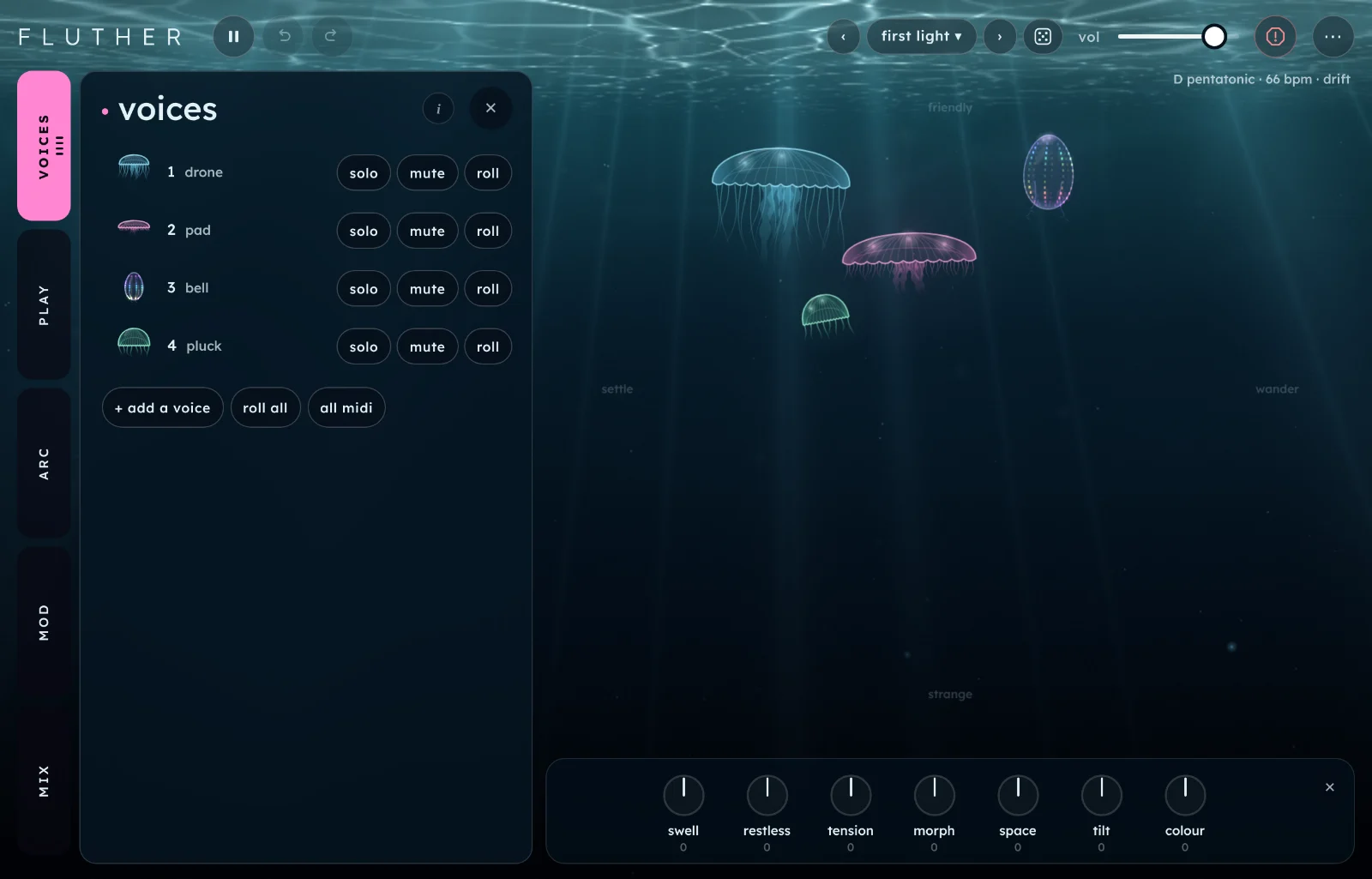
Fluther is a group of synth voices that play themselves. Each is a creature in deep water, and you steer the whole group by dragging.
Start here
Two minutes from opening Fluther to a sound you steer yourself. It runs in the browser, and the sound needs a first tap.
Open Fluther and tap begin. The first screen is the idea, the second lets you poke the creatures, the third maps the tabs. Skip it any time. The voices start playing as soon as you leave it.
Listen for a minute. Four voices play a drone, a pad, a bell and a pluck. They choose their own notes in the key and scale shown top right.
Drag a creature. Across moves it from settle to wander. Down moves it from friendly, near the light, to strange, in the dark.
Tap a creature to hear its next note. Double tap it to open it in the voices tab, where you can roll it for a new one.
Turn a tweak knob. The seven knobs along the bottom move every voice at once. Tension is a good first one.
Try another scene. Open the scene name at the top and pick a bank: still, drift, night, weather, strange, dirt or pulse.
TipLeave it alone for ten minutes. Fluther is built to play unattended, and it changes slowly on its own.
The screen
The water is the instrument. The controls sit around it and can be hidden.
Tabs.voicesplayarcmodmix. Tap one to open its panel, and tap it again to close it. The dots under voices count the voices, and under mod the mods that are running.
The creatures. One per voice. Across is wander, down is strange. The labels friendly, strange, settle and wander sit at the edges of the water.
Tweak. Seven knobs that move every voice together.
Scenes. Back and forward arrows, the scene's name, and a dice that rolls every voice.
Play, undo and redo. Next to the wordmark. vol and panic sit beside the scene controls.
The menu (⋯). Roll the patch, add a voice, midi in, hide ui, the seeds, back up and restore scenes, this guide, the intro and what's new.
The line under the header shows what is playing: key, scale, tempo, the arc's shape, and just when just tuning is on.
How Fluther works
You don't build a voice. You grow one, then steer it.
A voice grows from a seed. A seed decides the voice's engine (drone, pad, bell, pluck, breath, cluster, organ, swarm, prism, choir, dust, bowed or glass), its phrase, its effects and its temperament. The same seed always grows the same voice, so a scene is its seeds and its settings. Roll replaces a voice with a new one. Similar grows one close to it. Hold keeps it safe when you roll the others. Find them in voices.
Two directions to steer.Wander is what a voice plays and when: settled, it loops its own phrase on the beat; wandering, the phrase changes and drifts off the tempo. Strange is how far it goes from friendly: odder intervals, odder sounds, heavier effects. Each is a slider per voice, and the creature's place on the water.
Voices listen to each other. Each has a temperament: it leads, answers, follows, keeps clear or goes its own way. Leaders start phrases, answerers reply, followers harmonise, and the shy ones keep out of the way. The voices tab says which a voice is. A voice on its own always leads, whatever its seed grew, and goes back to its own temperament when a second voice joins.
Two rooms. Every voice has its own effects, and sends some of its sound to a small room it shares. Its space sends more to the far hall, which you shape in mix.
Time on two scales.Mods move controls over seconds to minutes, in mod. The arc moves the whole group over minutes or hours, in arc. Both turn real controls: watch the tweak knobs and the dots move.
Playing it
Touch and mouse
Drag a creature to move it. Tap to hear its next note, double tap to open it in the voices tab. Hold on empty water to add a voice there. Drag a creature to the ✕ in the bottom right corner to remove it. One voice is the least. Six is the most.
Hide ui
Choose hide ui in the menu, or press i. The controls fade and the creatures stay playable. Two fingers on the water, or the menu, bring them back. Turn off tweak alone with t.
MIDI
Choose midi in in the menu. It opens a short list: off, all inputs, or one device. From off, a tap turns MIDI on with every input and opens the list. Each voice has its own channel: channel 1 is voice 1, channel 2 is voice 2, and so on. A channel above the number of voices does nothing.
Steering is the default. A note you hold tells that voice what to play next, and it carries on in its own way when you let go. Only notes count.
Playing hands a voice to its channel. Open the voice and press midi plays, or press all midi on the voices list to do every voice at once (a second press hands them all back). While a voice is played, its own phrase rests, and picks up where it was when you hand it back. Then the channel is a small synth, with up to 4 notes at once:
Notes sound at the pitch you play, as hard as you play them. A fifth note lets the oldest go.
Pitch bend moves the notes up or down by 2 semitones.
Sustain pedal holds the notes after you let go of the keys.
Mod wheel turns the voice's morph.
Aftertouch swells the voice: brighter and louder the harder you press.
The creature strokes on every note you play. Tapping it still plays its next step. Whether a voice is played is saved with your session, not with a scene, so loading a scene never takes your keyboard away.
BrowsersMIDI works in desktop Chrome and Edge. Safari and the iPad's browser have none, so midi plays and all midi don't show there.
Rooms
Fluther plays unattended, so it also opens as a room: a scene from a link, the controls hidden, one tap to start. See Rooms.
voices tab 1
Every voice, then one at a time. Tap a voice in the list, or double tap its creature, to open it. Tap ‹ voices to come back.
the list
+ add a voice1 to 6 voices
Adds a voice, rolled in the next free channel. A new voice is a new engine each time.
roll allr
Replaces every voice you haven't held, with its effects. The key, scale and tempo stay.
solo, mute, roll
On each row of the list. Solo plays only that voice. Mute silences it, and its creature goes dark and see-through. Roll replaces it.
all midioff or on
Hands every voice to its MIDI channel, and turns midi in on with every input if it was off. Press again to hand them all back. It lights when every voice is played. Only where the browser has MIDI.
one voice
roll1 to 6
Replaces the voice and its effects with a new seed. The line under the name tells you what you got: its engine, its temperament and the seed's code.
Rolling keeps the channel's settings: where it sits, level, space, morph, solo and mute.
similar
Grows a voice close to this one: the same family of sound, a different seed.
hold
Keeps the voice when you roll all, roll the patch, or the arc evolves. A thread of light rises from a held creature.
solo
Plays only this voice. The other creatures dim.
mute
Silences the voice. Its creature goes dark.
midi playsoff or on
Hands this voice to its MIDI channel (voice 1 is channel 1) so you play it: notes, pitch bend, sustain, mod wheel and aftertouch. Its own phrase rests meanwhile. Played voices show midi on their row in the list. Only where the browser has MIDI.
With midi plays off, the channel only steers the voice's phrase. See MIDI.
wander0 to 100
What the voice plays and when. Settled, it loops its own phrase on the beat. Wandering, the phrase changes, branches and drifts off the tempo.
This is the creature's left to right.
strange0 to 100
How far the voice goes from friendly: harsher intervals, odder sounds, heavier effects.
This is the creature's depth. Down is strange.
level0 to 100
The voice's loudness. Its creature glows to match.
space0 to 100
Dry to drenched. The middle is where the seed put it. Higher sends more to the far hall.
morph0 to 100
How much the voice's sound and effects move over time. At 0 it holds still. Its creature sways more as it rises.
pansigned
Where the voice sits, left to right. 0 is where its seed put it.
coloursigned
Darker to the left, thinner to the right. 0 leaves it as it grew.
variation0 to 100
Nearby versions of the same voice: its tuning, its timbre and its chords move a little, then more. Back at 0 it is the voice its seed grew.
Each voice has three effect slots. The menu on each one swaps it for another effect, or back to what the seed chose. Every slot has a light on its creature, as bright as its push.
pushsigned
How hard an effect works. 0 is as the seed set it, all the way left is off, all the way right is double.
remove this voice
Takes the voice away. The ones after it move up. You can go down to one voice, which plays by itself as a lead.
play tab 2
What the voices share: the notes they choose from and the pulse they drift on and off.
keyC to B
The key the voices play in.
scale9 scales
The notes they choose from: pentatonic, minor pentatonic, major, dorian, aeolian, lydian, mixolydian, in or whole tone.
Pentatonic is the safest. Whole tone is the floatiest.
tempo40 to 120 bpm
The shared pulse. Wandering voices drift off it and back.
just tuningoff or on
Every note is a pure ratio of the chord's root, instead of the usual equal steps. Held notes stop beating against each other and lock into place. Some intervals sound strange.
roll the patch⇧R
Rolls the key, scale, tempo, tuning and arc shape as well as every voice you haven't held.
Hold the voices you like first.
arc tab 3
A shape over time. The arc turns the tweak knobs, which you can watch moving, and changes how busy the voices are.
arcoff or on
Turns the arc on. Off, the voices play to whatever the knobs say.
shapedrift, rise and fall, dawn, dusk, tide
Drift wanders at random. Rise and fall swells once over the length. Dawn builds from sparse to full. Dusk thins out and ends in silence. Tide comes and goes three times.
length10 min to 8 hours
How long one arc takes. Ten steps run from 10 minutes up to 8 hours.
Dusk at 8 hours is a night's playing that ends in silence.
depth0 to 100
How far the arc turns the tweak knobs and changes how busy the voices are.
chordsoff or on
A new chord every half minute or so.
key changesoff or on
The key moves by a fourth or a fifth every few minutes.
come and gooff or on
Voices drop out as the arc quietens and come back as it builds. The shortest-lived go first, and drones stay.
evolveoff or on
Now and then the arc rolls a new voice in place of one you haven't held.
start again
Begins the arc from its start. The line above it says how far through you are. An arc that has ended stays quiet until you do.
mod tab 4
Mods, each moving one control: a tweak knob, or a voice's wander, strange, level, space, morph, pan or an effect's push.
onoff or on
Starts the mod. A mod on wander or strange moves that voice's creature.
shapesine, tri, square, up, down, s&h
The wave it moves in. s&h (sample and hold) jumps to a new random value each cycle.
destination
What the mod moves, named by voice and control: 1 wander, 2 morph, and so on. The tweak knobs are listed by their own names. none does nothing.
sync1 beat to 64 bars
Locks the rate to the tempo. A control called every then picks how many beats or bars one cycle takes.
clampclamp or fold
What happens at the end of a control's range. Clamp stops there. Fold bounces back off it.
rateabout 8 min to 4 Hz
How fast the mod cycles, from several minutes a cycle to a few cycles a second.
Slow is the Fluther way. 30 seconds and up barely sounds like a mod.
depth-100 to +100
How far it moves the control, and which way. Negative flips it.
+ add a modup to 6
Adds a mod, switched on.
randomise
Sends every mod somewhere new.
mix tab 5
A fader per voice, the far hall, and what everything goes through last.
the faders
m and s
Each voice has a fader (voice 1 level), a pan dot (voice 1 pan) and m (mute) and s (solo). The bright line is what it is playing now.
reverb
size0 to 100
The far hall's size and how long it rings. Voices send to it as their space rises.
shimmer0 to 100
An octave above the hall's tail.
everything
glue0 to 100
Gentle compression over everything, so the voices sit together.
tape0 to 100
Wow, flutter, saturation and hiss.
tonesigned
Darker to the left, brighter to the right.
width0 to 200%
Narrower to the left, wider to the right. 100% is as it plays.
tweak the knobs
Seven knobs along the bottom of the water, each over every voice at once. The middle changes nothing. A ghost mark shows where a mod or the arc has turned one.
swell
Busier and brighter to the right, sparser and darker to the left.
restless
Every voice wanders more to the right, or settles to the left.
tension
Every voice towards strange to the right, or friendly to the left.
morph
Every voice's sound moves more to the right, or holds still to the left.
space
Every voice wetter to the right, or drier to the left.
tilt
The mix leans to the high voices on the right, or the low ones on the left.
colour
Every voice darker to the left, or thinner to the right.
✕t
Hides the knobs, leaving a small tweak button to bring them back. The menu and t do the same.
Scenes and sharing
A scene is the seeds of up to six voices and every setting except the volume. Scenes are Fluther's presets.
Banks. Open the scene's name at the top. There are 29 factory scenes in seven banks: still, drift, night, weather, strange, dirt and pulse. Each says in a line what it plays. The arrows beside the name step through them, and so do [ and ].
Search and stars. The search line on top finds a scene by name in every bank. The star beside a scene puts it in a starred bank at the top of the list, in this browser only; tap it again to take it off.
Saving. Name the scene in the browser and save it. Your scenes stay in this browser, and a saved scene remembers each voice's seed, so it grows the same voices again. The notes a voice has already mutated into are not saved: a reload goes back to each voice's start.
Backing up.back up scenes in the menu (⋯) saves every scene you've made to one file, fluther-scenes-backup-YYYY-MM-DD.json, and says backed up 4 scenes when it's done. Its number is how many you have. With none saved it says nothing saved yet. It only holds your own scenes, and it's the one to keep or send.
Restoring.restore scenes… in the menu opens a file picker for a backup. Scenes you already have are left alone and counted as skipped. One with a name you already use but different settings comes in as name 2, and a factory name is skipped. A file that isn't a Fluther backup changes nothing.
Rolling. The dice next to the scene's name rolls every voice you haven't held, like roll all. On narrow screens the dice is hidden: use r or the menu.
Seeds. The menu's seeds row shows each voice's seed as a short code.
Recipes
A night's playing
Open the scene after hours in the night bank.
In arc, set shape to dusk and length to 8 hours.
Turn come and go on, so the voices leave one by one.
Press i to hide the controls, then leave it.
It thins out over the night and ends in silence. For a shorter one, pick 90 min.
One voice goes wrong
Open the scene first light.
Drag the pluck's creature straight down, into the dark.
In the voices tab, set its variation to about 40.
Hold it, then press r a few times.
The others change round it while the odd one stays. Hold two to make a pair.
A drone that locks
In play, turn just tuning on and set the scale to pentatonic.
Set tempo to 40 bpm.
Drag every creature to the left edge, so each wander sits near 0.
Set tweak morph a little under the middle.
Held notes stop beating and sit still. Nudge restless up to let them move again.
A slow tide
In mod, set mod 1 to sine, destination swell, rate near 60 s and depth +60.
Add a mod: tri, destination space on voice 1, rate near 120 s.
Turn both on.
The music gets busier and sparser in a slow wave while the first voice drifts in and out of the hall. Turn sync on to lock them to the tempo.
Lost in the hall
Open the scene fog bank in the weather bank.
In mix, raise size to about 80 and shimmer to about 40.
Set tweak space to the right.
Every voice moves into the far hall and the shimmer climbs above it. Bring glue up to keep them together.
Shortcuts
Key
Does
space
Play or pause. Pausing fades out and stops time.
esc
Panic: everything goes quiet. When the controls are hidden, it brings them back instead.
r
Roll every voice you haven't held.
⇧R
Roll the whole patch.
1 to 6
Roll that voice.
[]
Previous and next scene.
t
Hide or show tweak.
i
Hide or show the interface.
⌘Z⇧⌘Z
Undo and redo.
On iPad planned
An iPad version is planned. For now, open Fluther in Safari on the iPad: the water, the knobs and the double tap all work by touch. The iPad's browser has no MIDI.
Tips and limits
Fluther is a sketch for listening. The picture and some controls may change.
Six voices, chords and two halls are a lot to run at once. If the sound breaks up, remove a voice or turn shimmer down.
Low voices lose weight on small speakers. Headphones show what the drones are doing.
The scale's notes are all the voices will play. For anything else, change the scale or the key.
Your scenes are stored in this browser. Clearing its site data clears them.
Questions
I can't hear anything
Tap begin or the start pill: the browser keeps sound off until you do. Then check that vol is up, that the page isn't paused (the play button at the top), and that no voice is muted. If you pressed esc, press space or play.
It plays by itself. Is it supposed to?
Yes. Leave it alone, or steer it. Every control changes what the voices do next, and none stops them.
How do I keep a voice I like?
Open it and press hold. Held voices stay when you roll all, roll the patch, or let the arc evolve. Save the scene to keep its seed.
Nothing seems to change
Fluther moves slowly. Drag a creature, or turn restless and tension to the right. The arc changes things over minutes, and a mod's rate is in seconds.
Why does it sound out of tune?
With just tuning on, some intervals are pure ratios and sound odd next to equal steps. Turn it off for the usual tuning. The strange end of the water also picks harsher intervals on purpose.
MIDI isn't doing anything
MIDI needs desktop Chrome or Edge. Choose midi in in the menu and allow it. Channel 1 steers voice 1, channel 2 voice 2, and so on, and a channel above the number of voices does nothing. To play a voice from your keys rather than steer it, press midi plays on the voice, or all midi on the list.
The controls vanished
Hide ui is on. Touch the water with two fingers, press i or esc, or open the menu.
Fluther is inspired by generative ambient music, and by the slow drifting of Reich's phase pieces and Pärt's circling chords. Its voices share the family's synth engines and effects with the other Tinkerhaus apps.