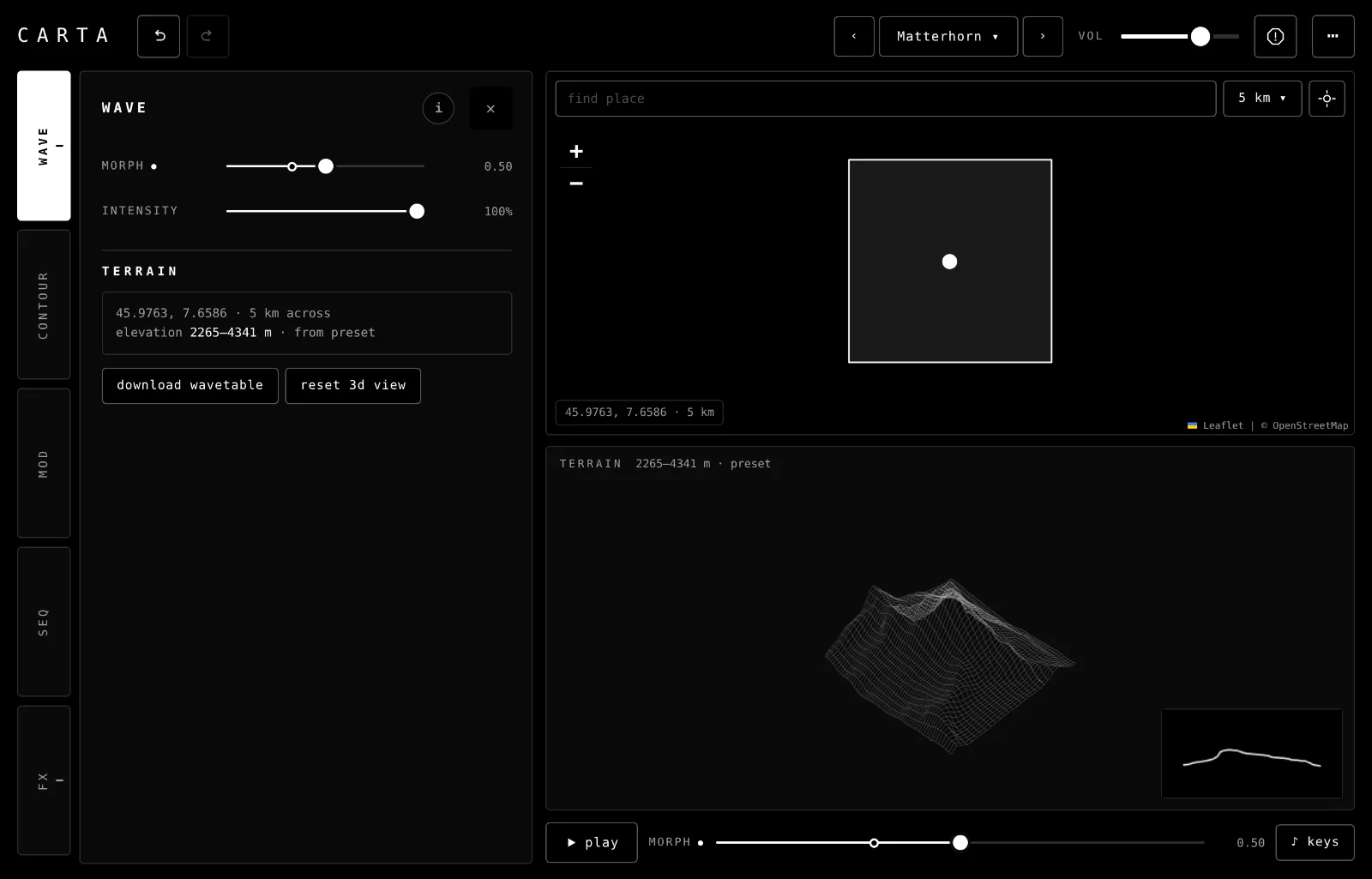
Carta is a wavetable synth made from real terrain. Pick a place on the map and the ground there becomes 32 waves, one for each row of ground, read from west to east. Morph walks you from north to south.
Start here
Five steps from opening Carta to the sound of a place you chose. It runs in Chrome, Edge and Safari, on a computer or an iPad, and needs the internet to load new places.
Open Carta and tap begin. The first time, a short intro shows you around; you can skip it. Carta starts on the Matterhorn, so there's something to play straight away. Browsers only allow sound after a tap or a key press.
Play a note. Press the keys a to l on a computer keyboard, use a MIDI keyboard, or tap ♪ keys for a keyboard on screen. Or press play (space) and let the sequencer play for you.
Move morph. The morph slider under the terrain moves through its rows, from north to south. Each row is a different wave, so the tone changes as you go. The blue line on the terrain shows the row you're hearing.
Pick a place. Tap anywhere on the map, or type a name in search a place, or lat, lng. The terrain loads in about a second and you play it straight away.
Step through the presets with ‹› at the top, or open the list to pick one. Each is a real place, from the smooth slopes of Mauna Kea to the sandstone pillars of Zhangjiajie.
TipRough ground makes bright, buzzy waves and smooth ground makes round, soft ones. If a place sounds harsh, turn intensity down on the wave tab.
The screen
The tabs and their drawer on the left; the map and the terrain on the right, side by side when there's room and stacked when the drawer is open; play, morph and keys under them. Everything on screen, numbered:
The tabs move to the bottom and the drawer opens above them, under the map and the terrain. When the drawer leaves only a short strip, the map and the terrain sit side by side. Undo and redo move into ⋯, and the volume slider loses its label. Everything else is the same.
On a phone.
How Carta works
The sound is the ground. When you pick a place, Carta reads the elevation of a square of ground around it: 32 rows from north to south, each one 256 points from west to east. Each row, drawn as a line, is one wave, and Carta plays that wave over and over at the pitch of each note. A sharp ridge gives a bright, buzzy wave; one smooth hill gives a round, soft one. The whole set of 32 waves is called a wavetable.
Morph moves through the rows.morph picks which row you hear, from the northern edge of the square (0) to the southern edge (1), and blends between neighbouring rows as it moves. Sweep it slowly and the tone travels across the terrain; point a mod at it and it moves by itself. That's the wave tab, and the slider under the terrain.
The area sets the scale. The square can be 5, 10 or 50 km across. A small square over a mountain gives one big shape; a big one takes in valleys and ridges, so the waves get busier. Every row is scaled to the square's lowest and highest point, so a quiet hill and Everest play at the same level.
Then it's a synth. Each note goes through a filter and an envelope (contour). Mods move morph, the filter and most effects for you (mod). A sequencer plays notes on its own, and its terrain pattern plays a melody read from the ground (seq). The effects come last (fx).
Places travel with presets. A preset keeps the elevations it was made from, so it sounds the same every time and loads without the internet. A new place needs the internet: the map, the search and the elevation all come from online services.
Playing it
Four ways in: MIDI, the computer keys, the keys on screen, and the sequencer. Carta plays up to 16 notes at once, counting notes still fading out.
MIDI
Plug in a MIDI keyboard and play; Carta listens to every MIDI input, and picks up devices you plug in later. ⋯ › midi shows the names of the devices it can hear, or none.
Notes and velocity. When 16 notes are sounding, a new one takes the place of the oldest fading note, or else the oldest held one.
The mod wheel (CC 1) drives any mod set to ◐ mod wheel.
Pitch bend, the sustain pedal and MIDI clock aren't used.
BrowsersMIDI works in Chrome and Edge. Safari doesn't support it, so on a Mac use Chrome, and on an iPad use the computer keys or the keys on screen. Chrome asks permission the first time; if you said no, allow MIDI in the site settings and reload.
Computer keys
The middle row plays the notes of the sequencer's scale, one key per note: asdfghjkl;'. a is the root around middle C and each key goes up one step of the scale, so with a major scale on C, a to k is an octave of white notes. With chromatic, every key is a semitone. They all play at the same loudness.
♪ keys
Tap ♪ keys for a one-octave keyboard on screen, from C to C. Play with several fingers and slide between keys. Where you touch matters: lower on a key plays louder. ‹› beside it change the octave, from C0 to C8 (C4 is middle C).
Dots mark the notes of the sequencer's scale, with a bigger one on the root; with chromatic there are none. Every key plays, in the scale or not. On a tablet the keys are on to begin with (on a phone they start off), and Carta remembers whether you leave them on.
♪ keys: one octave under the map and the terrain. The dots are the scale.
play
play under the terrain (or space) starts the sequencer, which plays notes from the scale on its own; press it again to stop. What it plays is set on the seq tab. Play along on the keys, or move morph while it runs.
No terrain?Until a place has loaded, the keys and play do nothing and Carta says "pick a place on the map, or a preset".
The map and the terrain
The right-hand side of the screen: where you choose a place, and what its ground looks like.
The map
tap the map
Chooses a place: a dot marks it and a square shows the ground Carta reads. The terrain loads (loading terrain… covers the map for a moment) and the sound changes to it. Drag to move the map; pinch, scroll or use +− to zoom.
Zoom in before you tap: a square at the right scale is easier to aim at a single peak or valley.
search a place, or lat, lng
Type a name and press return to go there. If several places share the name, a list of up to 8 lets you pick one. Coordinates such as 27.9881, 86.925 go straight there.
area5 km · 10 km · 50 km
How much ground the square covers. Changing it reloads the terrain at the same place and zooms the map to the new square. Small squares give simpler waves; big ones take in more ridges and valleys.
my location
Plays the ground where you are. The browser asks permission the first time.
The label at the bottom left of the map says where you are: the place's name if you searched for it, its coordinates and the area.
The terrain
The blue line is the row you're hearing; the orange line is the sequencer's step.
the 3D view
The square of ground as a wireframe, seen from the south-east, so north and west are at the back. The blue line is the row morph is on. When the sequencer plays its terrain pattern, an orange line shows the column it's reading. Drag to turn it; scroll to move closer. reset 3d view puts it back.
the wave
The box in the corner draws the wave you're hearing now: the row under the blue line.
the status line
Next to terrain at the top. It shows the lowest and highest point in metres and where the elevations came from: tiles (downloaded for this place), preset (kept with a preset) or saved (kept from your last session). If the tiles can't be reached it names the backup service it used, or demo. It also says what's happening: loading, searching, or what went wrong.
hide ui
⋯ › hide ui (or i) takes the controls away so the map and the terrain fill the screen. The sound carries on, and you can still tap the map for new places and play the keys or MIDI. To bring the controls back, press i or esc, tap the ⋯ in the corner, or touch with two fingers (a pinch on the map does it too).
hide ui: the map and the terrain only.
wave tab 1
Which row you hear, how harsh it is, and the terrain you're playing.
morph0.00 to 1.00
Which row of the terrain you hear: 0 is the northern edge of the square, 1 the southern. Between two rows it blends them, so a sweep sounds smooth. The same slider sits under the terrain, so you can reach it with the drawer closed.
A slow mod on morph is the quickest way to hear a whole place. Try ∿ sine at 0.05 Hz.
intensity0 to 100%
Softens harsh terrain by rolling off the wave's upper harmonics. At 100% you hear the raw terrain; lower is gentler, down to the fundamental and a few harmonics at 0%. Smooth places change little; bumpy ones (deserts, cliffs, pillars) a lot. It changes the tone, not the level. The pictures and the download follow it.
Intensity can't be moved by a mod. For a moving filter, use cutoff.
terrain
terrain
A card with the place's name (if you searched for it), its coordinates, the area, and its lowest and highest point. from says where the elevations came from, as in the status line.
download wavetable
Saves the 32 waves as a .wav file for other wavetable synths: one after another, each 2,048 samples long, mono, 32-bit, at 44.1 kHz, with the marker wavetable synths read to find the wave length. It's named after the place you searched for, or else the preset, plus the coordinates: carta_matterhorn_45.9763_7.6586.wav. Intensity is included. Also in ⋯.
reset 3d view
Turns the terrain back to where it started.
contour tab 2
The filter and the envelope, as two graphs you drag, with a slider for each value under them.
filter
the filter graph
A low-pass filter: it takes the top off the sound. Drag the handle: left and right is cutoff, up and down is resonance. The shading behind it is the sound playing now. When a mod moves the filter, a dashed line shows where it is and the readout adds - - modulated. Double-tap to reset.
cutoff20 Hz to 20 kHz
Where the filter starts cutting. At 20 kHz it's open and you hear the raw wave; lower is darker.
resonance0 to 20
A peak at the cutoff; high values ring and whistle, especially when a mod sweeps the cutoff.
envelope
the envelope graphA · D · S · R
How each note's volume rises and falls, in straight lines. Three handles: the first sets attack, the second decay (sideways) and sustain (up and down), the last release. Double-tap to reset.
attack1 ms to 2 s
How long a note takes to reach full volume.
decay1 ms to 2 s
How long it takes to fall to the sustain level.
sustain0 to 100%
The level it holds while the key is down. At 0, every note is a pluck.
release1 ms to 10 s
How long it rings after you let go.
mod tab 3
Mods move other controls by themselves. Each row is one mod, up to six; a preset keeps as many as it was saved with.
When a mod is on, the control it moves shows a ring on its slider where the value sits right now, a small dot by its name, and a mark on its tab.
on / off
Next to the mod's name. Off keeps its settings, so you can hear a sound with and without it.
shape
How it moves: ∿ sine, ⋀ tri, ⊓ square (flips between two values), ⟋ saw ↑ (rises, then drops back), ⁘ s&h (a new random value each cycle) and 〰 wander (glides between random values, so it never repeats).
Or follow your playing: ◐ mod wheel follows a MIDI keyboard's mod wheel (in the middle until you move it), and ▮ velocity follows how hard the last note was played, from any keys or the sequencer. These two have no rate.
→ destination
What it moves, grouped by tab: morph; cutoff and resonance; and in fx drive, squash, phaser mix, phaser rate, resonator, structure, delay send, delay time, delay feedback, reverb mix, reverb size, reverb decay, damping, shimmer and width.
Two mods on the same control add together.
sync
Locks the mod to the sequencer's tempo, even while the sequencer is stopped. rate becomes division.
rate0.02 Hz to 10 Hz
How fast it cycles, when it isn't synced. 0.02 Hz is once every 50 seconds.
division4 bars, 2 bars, 1 bar, 1/2, 1/4, 1/8, 1/16
The length of one cycle, when synced.
depth−100 to +100
How far it moves the control, either way round. At 100 it can swing the control across its whole range, half each side of where you set it, stopping at the ends. Below 0 it moves the other way.
✕
Removes the row. There's always at least one.
+ add a modup to 6
Adds a row, already on and pointed at something no other mod is moving. At six it greys out. A preset saved with more rows keeps them all.
randomise
Sends every mod somewhere new: a new shape, rate, depth and destination for each row, most of them on and no two on the same control. It keeps the number of rows, never picks the mod wheel or velocity, and is one undo.
Press it a few times on a preset you like, then undo back to the one that worked.
seq tab 4
A generative sequencer: it picks notes from a scale, one step at a time. play under the terrain (or space) starts and stops it.
patternrandom · up · down · pendulum · terrain
How it walks the scale: random notes, up or down through it, pendulum up and back, or terrain, which reads the notes from the ground (below).
length1/16 · 1/8 · 1/4 · 1/2 · 1
How long each step lasts, from a sixteenth note to a whole bar at the tempo. A note holds for its whole step.
rootC to B
The scale's first note. The computer keys and the dots on the touch keys follow it too.
scalechromatic · major · minor · dorian · phrygian · lydian · mixolydian · pentatonic · blues
Which notes it can play. The computer keys and the touch keys' dots follow it.
tempo30 to 240 bpm
The sequencer's speed, and the clock that synced mods follow.
probability0 to 100%
The chance that each step plays. Lower leaves more rests.
lowest oct2 to 6
The bottom of the range (4 is the octave from middle C).
highest oct2 to 6
The top of the range. Moving one past the other moves both.
terrain
These show when pattern is terrain. The sequencer walks across the square from west to east, one column per step. Each column's average height picks its note (higher ground, higher note, within the range and the scale), and rougher columns play louder. A step that rests doesn't move it on. The orange line on the terrain shows the column.
steps8 · 16 · 32
How many columns it reads across the square before it starts again.
arpon / off
On: each step plays a quick run of notes read from points down its column, north to south, instead of one note.
arp notes2 · 3 · 4 · 8
How many notes in each run. A point lower than the lowest column's average has no note, so a run can be shorter.
arp rate1/32 · 1/16 · 1/8
How fast the run plays, whatever the step length.
arp dirup · down · up-down · random
The order of the run: up reads the column north to south, down south to north, up-down there and back, random shuffles it.
fx tab 5
Effects, in the order the sound goes through them. A mix or send at 0 is off.
drive0 to 100%
Saturates the whole synth: a little warmth at low settings, grit at the top. The level stays about the same.
squash0 to 100%
Then compresses it. Low settings even out the notes; high ones flatten everything to one level.
phaser
mix0 to 100%
How much of the phaser you hear. It sweeps notches through the sound.
rate0.05 Hz to 4.0 Hz
How fast it sweeps, from once every 20 seconds to four times a second.
depth0 to 100%
How wide the sweep is.
feedback0 to 100%
Sharper, more metallic notches as it rises.
resonator
mix0 to 100%
Rings at the pitch of each note, like a string or bar struck in sympathy. It follows the last 4 notes you played, so chords ring too.
structure0 to 100%
What it's made of: a string at 0, moving towards a bell at 100%.
decay200 ms to 6 s
How long it rings.
tone0 to 100%
Darker or brighter; darker also shortens the ringing of the high overtones.
tape delay
send0 to 100%
How much goes into the echoes, which bounce between left and right.
time20 ms to 2 s
The time between echoes. Move it while it's echoing and the pitch bends, like tape.
feedback0 to 95%
How many echoes come back.
tone0 to 100%
Dark to bright echoes.
wow0 to 100%
Tape wobble and flutter on the echoes.
reverb
mix0 to 100%
How much reverb. At 100% the dry sound is still there, at half its level.
size0 to 100%
A small room to a big hall.
decay0.1 s to 5.0 s
How long the tail lasts.
pre-delay0 to 100 ms
A gap before the reverb starts, which keeps notes clear of their tail.
damping0 to 100%
Darkens the tail as it fades.
shimmer0 to 100%
Feeds the tail back an octave up, so it rises into a bright halo as it fades.
width0 to 100%
How wide the reverb spreads between left and right.
warmth0 to 100%
A touch of tape saturation in the tail. Subtle even at 100%.
Presets and sharing
Fifteen factory presets, each a real place, in the factory bank. Your own go in yours.
‹› (or []) step through every preset, factory then yours.
The name opens the list: pick a bank, then a preset. Each factory preset says what you'll hear.
Loading a preset is one undo step, so ⌘Z takes you back to what you had.
The factory presets
Preset
Area
What you hear
Alpine Peaks
5 km
Jagged Swiss peaks: bright waves, with a slow sweep through the rows
Grand Canyon
10 km
Layered canyon walls: a dark, resonant filter that sweeps up and down
Mount Fuji
10 km
One volcanic cone: slow-swelling notes that morph back and forth
Himalayan Ridge
5 km
Steep ridges over 5 km: jagged waves in plenty of reverb
Scottish Highlands
10 km
Rolling hills: rounder waves and a rising mixolydian line
Matterhorn
5 km
One clean pyramid: a bright, simple wave that swells as you cross the peak
Yosemite Valley
10 km
Granite walls and a flat valley floor: hollow, square-edged tones
Geirangerfjord
10 km
Sea to clifftop in a few hundred metres: steep steps, like a square wave
Table Mountain
10 km
Ocean, then a flat-topped wall above Cape Town: a pulse with a long plateau
Fitz Roy
10 km
Patagonian granite spires: jagged, glassy harmonics that change with every row
Kilimanjaro
50 km
One vast volcano rising from the plains: a slow, swelling hump of a wave
Death Valley
50 km
Badwater Basin to Telescope Peak: rough, dense waves, driven hard
Mauna Kea
50 km
A shield volcano, sea floor to 4,200 m: the smoothest, roundest wave here
Zhangjiajie
5 km
Thousands of sandstone pillars: the busiest waves, and the most change as you morph
Monument Valley
10 km
Flat desert broken by sheer-sided buttes: sudden jumps between long flats
Saving
Type a name under save this preset and press save. Saving with the same name again replaces it; ✕ next to one of yours deletes it, after asking. Factory names are taken.
A preset holds the place, the area, every sound and sequencer setting, the mods, and the terrain itself, so it loads without the internet and always sounds the same. It doesn't hold the volume.
Where they liveYour presets are saved in this browser, on this device. Clearing the site's data or using a private window loses them. Back up presets in ⋯ saves them to a file you can keep. There's no way to share them as a code yet.
Backing up
back up presetsin ⋯
Saves all your presets, terrain included, to one file in your downloads: carta-next-presets-backup- and the date. The row shows how many. With none saved it says nothing saved yet · save a preset first.
Do it before you clear the site's data, or move to another device.
restore presets…in ⋯
Pick a backup file and its presets are added to yours. A preset that is already saved is skipped; one with the same name but a different sound is added as name 2; a name that exactly matches a factory preset is skipped. The toast says how many came back and how many were skipped. A file that isn't a Carta backup is refused and nothing changes.
Carta also remembers your last session, terrain included, so a reload picks up where you left off, without the internet.
Starting points. Each one starts from the preset it names.
A slow walk across a mountain
Load Matterhorn.
mod: mod 1 to 〰 wander → morph, rate 0.05 Hz, depth +100.
contour: attack 800 ms, release 5 s.
fx: reverb mix 50%, decay 4.0 s.
Hold a chord.
The blue line drifts across the peak and the chord changes tone as it goes, never quite the same way twice. Set the area to 50 km for busier ground.
A melody read from the ground
Load Monument Valley.
seq: patternterrain, steps 16, arp off.
scalepentatonic, probability 100%, length 1/8, tempo 100 bpm.
Press play.
The orange line walks west to east: the buttes jump up to high notes, the flat desert stays low, and the rough edges play louder. Turn arp on with 4 arp notes and up-down for runs down each column.
A soft pad from rough ground
Load Zhangjiajie.
wave: intensity 25%.
mod: mod 1 to 〰 wander, sync off, rate 0.1 Hz; mod 2 off.
Short glassy plucks that ring like struck metal, with echoes trailing off left and right. Point a mod at structure to move between string and bell.
A filter that follows how hard you play
Load Matterhorn.
contour: cutoff 1 kHz, resonance 8.
mod: + add a mod, then ▮ velocity → cutoff, depth +60.
Play the touch keys, low on a key, then high; or a MIDI keyboard, hard, then soft.
Hard notes come out bright and ringing, soft ones dark. Set the depth to −60 to turn it round.
The sound of where you are
In the map bar, press my location and allow it.
Set the area to 5 km.
Play a to l, then move morph slowly from 0 to 1.
Save it under save this preset with your town's name.
Your own streets and hills as a wavetable. If you live somewhere flat, the small rises and dips are stretched to fill the wave, so expect something thin or buzzy: try 50 km to take in the nearest hills, or download wavetable to keep it for another synth.
Shortcuts
Also in ⋯ › how to play. On sliders: tap to jump, drag (hold shift for fine), double-tap to reset, scroll, or use the arrow keys.
Key
Does
asd … l;'
play the scale, from the root
space
start or stop the sequencer
[]
previous, next preset
⌘Z⇧⌘Z
undo, redo (Ctrl+Z, Ctrl+Y on Windows)
i
hide ui, show it again
esc
close a menu, leave hide ui, or panic
return
in the search box: go
In this guide, / jumps to find.
On iPad planned
An iPad version of Carta is planned. Until it's out, Carta runs in Safari on an iPad: use the touch keys or a computer keyboard, since Safari has no MIDI. This guide will say what's different when the iPad version is ready.
Tips and limits
In a browser
New places, the map and search need the internet. Presets and your last session don't.
MIDI works in Chrome and Edge, not Safari.
my location needs your permission, and only works on a secure (https) page.
Your presets are stored in that browser on that device, and can't be exported yet.
The web version can't record what you play. Record your computer's output in another app.
Sound starts only after a tap or a key press.
Playing
Up to 16 notes at once, counting notes still fading out; a new one takes the place of the oldest fading note, or else the oldest held one.
MIDI brings notes, velocity and the mod wheel. Pitch bend, the sustain pedal and MIDI clock aren't used, so the sequencer can't follow another app's tempo.
Every row is stretched to the same height, so flat ground isn't quieter: its small bumps fill the wave. A row with no rise or fall at all has no wave and is silent.
Every place plays at about the same level, however high or low it is. Intensity changes the tone, not the volume.
Intensity, the envelope and the sequencer can't be moved by mods.
On a touch screen, one finger turns the terrain; zooming it needs a mouse wheel or trackpad.
Volume stays as you set it when you change preset.
Questions
I can't hear anything
Tap begin (or any key): browsers stay silent until you do. Check that a place has loaded (the terrain shows a wireframe), vol at the top, your device's volume and, on an iPad or iPhone, the silent switch. Then play a note or press play.
If it played before and has stopped, press panic (esc) and play again, or reload the page.
The map is blank
The map's pictures come from the internet. Without a connection the map stays empty, but the square, the presets and your last place still play. Tapping the empty map still picks a place, though its terrain needs the internet to load.
The terrain won't load
The status line says why: usually the connection. If the elevation service can't be reached, Carta tries two others; if those fail too, it plays made-up demo terrain so you still hear something, and the status line says so. Try again when you're back online.
A flat place sounds thin or buzzy
Every row is stretched to fill the wave, so on flat ground you hear its small bumps, and a slope that rises from west to east plays as a ramp, which buzzes like a saw wave. A row that's perfectly flat has no wave at all, so morph can pass through silence. Pick somewhere hilly, or set the area to 50 km to take in more. Over the sea, Carta reads the sea floor, so coasts and islands work well.
My MIDI keyboard does nothing
Use Chrome or Edge (Safari has no MIDI). ⋯ › midi shows the devices Carta can hear; none means it can't see the keyboard (check the cable, that no other app has it, and that MIDI is allowed in the site settings, then reload).
The sequencer skips steps
That's probability: below 100%, some steps rest. In the terrain pattern with arp on, a point lower than the lowest column's average has no note, so some runs are shorter.
The sound keeps changing by itself
A mod is moving it. Most presets use one or two; a mark on a tab shows where. Turn them off on the mod tab.
A note won't stop
Press panic or esc. If it's a long, slow fade, it may be a long release (up to 10 s), the delay's feedback or the reverb.
My presets have gone
They're stored in the browser you made them in, so they won't appear in another browser, a private window or another device, and clearing site data removes them.
Can I use the waves in another synth?
Yes: download wavetable saves the 32 waves as a .wav file that wavetable synths can load.
Can I record what I play?
Not inside the web version. Record your computer's output with an audio app.