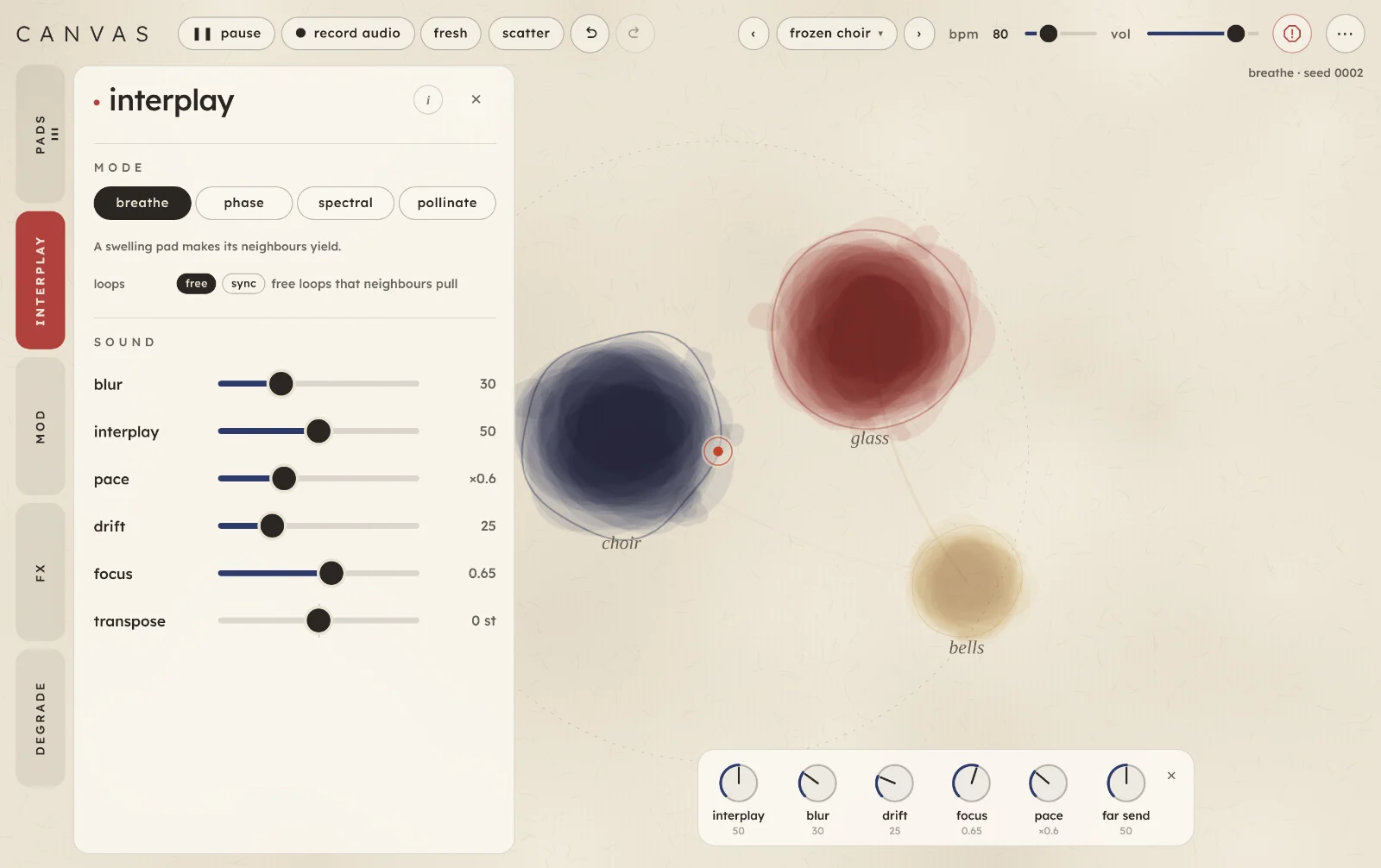
Canvas is an ambient instrument that turns sounds into pads on paper, where they play off each other. Add a recording, the mic or a sound from a bank, and drag the pads and the red listener to change what you hear.
Start here
Five steps from opening Canvas to a sound you like. It runs in a browser on a computer or an iPad.
Open Canvas and tap begin. The first time, a two-screen intro shows you around; you can skip it. Browsers only allow sound after a tap or a key press, so nothing plays until you do.
Load a scene. Canvas opens on an empty sheet called fresh patch. Press › at the top to load first wash: four pads made from the built-in demo sounds.
Drag the red listener. Pads near it are louder and drier; far ones are quieter and sit further back in the hall. Pads that sit close together affect each other.
Add a sound of your own. Tap an empty bit of paper and choose sound bank, file… or ● mic. On a computer you can also drop a file onto the paper.
Tap a pad to shape it. Its settings open in the pads drawer. Try the territories (stretch, infinite, grains, tape, reverse), then the four modes on interplay (keys 1 to 4).
TipA tap on the paper while a drawer or menu is open only closes it. Tap again to add a sound.
The screen
The paper fills the screen. The header runs along the top, the tabs down the left, and the open tab's drawer sits over the paper. Everything on screen, numbered:
Tabs. Five tabs, each in its own colour. Tap one to open its drawer; tap it again to close. Dots on a tab count its pads or running mods.
The drawer holds the open tab's controls. Its i shows a few short lines about the tab; ✕ closes it.
▶ play and ❚❚ pause start and pause all the sound. More.
● record audio records what you hear to a WAV file.
fresh clears the paper for a new start.
scatter moves the pads and rolls new values.
Undo and redo.
Scenes.‹› step through them; the name opens the list. More.
bpm, the master clock. Its name lights on each beat.
vol, the output volume.
Panic stops every sound and clears the tails.
⋯ has re-capture every pad, the seed, hide tweak (or show tweak), the look, hide ui, this guide and the intro.
A pad: one sound. Its size follows how loud it is. The paper.
The listener, the red point, with a dotted ring showing how far it hears.
Mode and seed. The current mode and seed code. Scatter and fresh roll a new seed.
The dials. Six sound controls as dials along the bottom of the paper, so you can turn them while the pads play. More.
At the bottom right, the tweak button; it goes while the dials are showing, and their ✕ brings it back. Pointing at a slider also shows what it does, in a line at the bottom.
On a tablet in portrait
The tabs move to the bottom and the drawer slides up from there, under the paper. Everything else is the same, except the dials: in a window narrower or shorter than about 560 px (a phone) they and the tweak button aren't shown, so the paper keeps its room; the same controls are in the interplay and fx tabs. Canvas keeps the same sound whichever way round the screen is: only the picture changes.
In portrait, on a tablet.
How Canvas works
Each sound is a pad. Canvas takes a moment from a sound and holds it as a pad: stretched into a wash, frozen, broken into grains, played as a tape loop or swelled backwards. Each of those is a territory, and a pad can sit anywhere between them. Up to six pads share the paper.
Where you put things is the mix. The red listener is where you hear from. The further a pad is from it, the quieter it gets and the more of it goes into the hall; left and right of it sets the pan. focus sets how far the listener hears. No pad ever drops into silence, however far away it is.
Close pads play off each other. How they do it is the mode on interplay: they take turns to swell, swell on loops of their own, share out the frequency bands, or borrow moments from each other's sounds. The closer two pads are, the more they affect each other.
Pads keep moving on. Every so often a pad re-captures: it takes a new moment from its sound and fades it in. It can roam through the sound, or stay on a moment you choose on its waveform. Pads can also wander on the paper, follow a move you record, or be moved by the three slow mods on mod.
The canvas can age. Press play on degrade and every sound slowly wears like an old tape loop, on one clock for the whole canvas. Shared tape delay, hall and grain cloud effects are on fx.
The paper
Everything on the paper can be dragged, and most of what you see is the sound at work.
The bell orbit scene: four wandering pads, each tied to its home by a dotted line, and the listener's dotted focus ring.
Dragging and tapping
Drag a pad to move it. Moving it nearer the listener or nearer another pad changes the sound as you go.
Tap a pad to open its settings in the pads drawer. A right-click on a pad does the same.
Tap empty paper to add a sound there: ● mic, ● resample, file… or sound bank. If a drawer or menu is open, the first tap only closes it.
On touch screens a pad's hit area is at least a fingertip wide, and a touch has to move a little before it counts as a drag, so a tap doesn't nudge anything.
A tap on empty paper: the new pad lands where you tapped.
The listener
The red point in a thin ring is where you hear from. Drag it anywhere. Distance from it sets each pad's level and how much hall it gets (far pads are quieter and wetter, by up to about 18 dB); a pad to its left is panned left. The dotted ring around it shows its focus: how far it hears. Mods can move it (mod, destinations listener x and listener y), and so can a recorded move.
Moving by themselves
A pad can wander around its home, shown as a small circle with a dotted line to where the pad is now. Set it on the pad's movement page. A pad or the listener can also loop a move you record:
Press g, or tap ● record on a pad's movement page, or on the listener in the mod tab.
Drag a pad or the listener along a path. Up to 60 s is kept.
Let go. The move plays forwards on a loop, gliding back to its start each time round.
❚❚ pause moves (p) holds every recorded move where it is, so a moving pad is easy to tap; ▶ play moves sets them going again. It sits in the mod tab, in the listener move row beside ● record and clear, and appears once there's a move to pause. Press esc to cancel a move you've armed but not started.
What the paper shows
Size and depth of ink: how loud a pad is right now.
A faint outline outside a pad: how big it was a moment ago, before it fell back (in breathe, when it yields to a neighbour).
A coloured line between two pads: who is pushing whom (breathe), or which pads are fighting over the same frequencies (spectral). A paler pad has lost bands to its neighbours.
An ink arc round a pad: how far through its loop it is (phase mode).
A thread of another pad's colour inside a pad, with a line to that pad: it is playing a moment borrowed from that pad's sound (pollinate).
· muted or · missing after a pad's name: it's muted, or its sound isn't in this session.
Phase mode: each arc is a pad's own loop.Degrade: holes open as the tape wears.
Only the paper
Press i (or ⋯ › hide ui) to hide everything but the paper. The sound carries on, and you can still drag pads and the listener and record moves; taps don't open anything. Touch with two fingers, press i or esc, or tap the ⋯ in the corner to bring the controls back.
How pads meet
The four modes are four ways for pads to play off each other. Pick one at the top of interplay, or press 1 to 4. In every mode, pads only affect pads near them, and interplay sets how strongly. A fresh patch starts with interplay at 0, so turn it up before you listen for the modes.
breathe1
Each pad swells and falls back on its own slow urge, and when one swells, the pads near it yield. Close pads take turns rather than piling up. The urges come every 12 to 60 s or so, never quite repeating; pace speeds them up or slows them down.
Put two pads almost on top of each other and turn interplay up to hear them hand over.
phase2
Each pad swells and fades on a loop of its own, 7 to 30 s long, so the pads drift in and out of step. Neighbours pull each other's timing. At the end of each loop a pad re-captures a new moment, so every time round is a little different. The ink arc round each pad shows where it is in its loop.
With loops set to sync, each loop rounds to whole bars of the bpm and re-captures land on bar lines; neighbours stop pulling.
spectral3
Close pads compete for frequency bands. Where two overlap, the louder takes the band and the other thins out there, so a crowded patch of paper stays clear instead of muddy. A pad that has lost bands looks paler.
pollinate4
When a pad re-captures, it may take its new moment from a nearby pad's sound instead of its own, so a choir can briefly sing with a bell's timbre. Closer pads and higher interplay make it more likely. Pads re-capture a little more often in this mode.
Worn tape travels with the sound: a pad that borrows from a worn neighbour plays its holes too.
Playing it
Canvas plays itself once there are pads on the paper. You play it by choosing sounds, placing them, and moving things. Each sound comes from one of four places.
Sound banks
Open pads and pick a bank on the left, then a sound on the right; or tap the paper and choose sound bank, and the next sound you pick lands where you tapped. The demos bank holds four sounds made inside Canvas (glass, rain, choir, bells); the other banks are loaded from the website. Bank sounds come back when you reopen Canvas.
Files
file… opens a file picker (you can choose several). On a computer you can also drop audio files straight onto the paper, and each lands where you drop it. A file can be up to 10 minutes long; Canvas keeps the first 3 minutes, in mono. A new file starts as a clean loop: the whole sound at normal speed, on a loop, with no effects.
● mic
Tap ● mic, make your sound, and tap ■ stop. A take lasts up to 60 s. The canvas pauses while the mic is open, so the take is only the room, and picks up where it was afterwards. A take you start from the paper turns into a stop button where you tapped, and the new pad lands there.
● resample
The same, but it records the canvas's own output, effects and all, into a new pad. It needs at least one pad to listen to. Resample a few pads into one, then start again from that.
Not keptFiles, mic takes and resamples aren't saved between visits. After a reload their pads come back marked missing. Keep the original file, or record the output.
In a browser
Canvas runs in a current browser on a computer or an iPad. Sound starts after a tap or a key press.
The mic needs a secure page: the website is fine; a copy opened from your own disk isn't. The browser asks permission the first time.
The sound banks come from the website. Opened from a file on your computer, Canvas has only the demos.
Canvas has no MIDI. Everything is played on the paper and the controls.
The header and the stage
The buttons along the top, and the few at the bottom of the paper.
the header
▶ play / ❚❚ pausespace
Pauses all the sound with a short fade and holds everything where it is: the pads, the effect tails and the clocks. Play picks up from there.
● record audioup to 10 min
Records what you hear, in stereo with the effects and the volume, to a WAV file. It doesn't pause the canvas or make a pad. While it runs, the button reads ■ stop audio and a timer counts up to 10:00.
When you stop, the timer shows the take's length. Where the browser can ask where to save (Chrome and Edge on a computer), the button reads save WAV…: pick a place and the take clears once it's saved; cancel and it's kept. Elsewhere it reads download WAV and the file goes wherever your browser puts downloads. The take stays after a download, so you can try again; tap discard when you're done. A take you haven't saved is lost when the page reloads.
fresh
Clears every pad and puts the mode, bpm, interplay, fx, degrade and mod settings back to how they start. It also unlocks every slider, moves the listener to the middle and sets the age back to new. Your volume stays. One undo brings back the pads and settings, but not the age.
scatterr
Moves every pad to a new place and rolls new values for the interplay and fx sliders, and gives each pad a new wear pattern. It leaves the returns, transpose, degrade and anything you've locked alone. The seed code at the top right of the paper changes with each scatter.
Tap a slider's name to lock it before you scatter; tap again to unlock.
undo · redo⌘Z⇧⌘Z
The curved arrows step back and forward through your changes: pads added, moved or removed, settings, scenes loaded, scatter and fresh. The degrade age and the header's play / pause aren't undone.
bpm30 to 200
The master clock. Anything you set to sync follows it: mods, a pad's wander and recorded moves, the listener's move, phase loops and the degrade clock. Everything starts free, so the bpm only matters once you sync something. It's saved with a scene.
vol0 to 100
The output volume. Scenes, fresh and scatter leave it alone.
panicesc
The round red button. Silences everything and clears the delay, hall and cloud tails, then fades the pads back in. esc closes whatever is open first, and panics only when nothing is.
⋯
re-capture every pad (c): every pad takes a new moment at once.
seed: the current seed code.
back up scenes and restore scenes…: your saved scenes to a file and back. See backing up.
hide tweak / show tweak: the dials along the bottom of the paper. See tweak.
look · Ink wash: the drawing style. It's the only one so far.
guide: this page. intro and what's new: the first-run screens and the latest changes.
the stage
● recordg
Arms a recording: the next pad or listener you drag records its path, which then loops. See moving by themselves.
tweakshows or hides the dials
Six dials above the buttons: interplay, blur, drift, focus, pace and far send. They are the same controls as in the tabs, so turning one moves its slider. Drag a dial up or right to turn it up, down or left to turn it down; double-tap it for its starting value, or focus it and use the arrow keys (⇧ for small steps). The tweak button, at the bottom right of the paper, shows them and goes while they show; the ✕ at the strip's corner hides them again, and ⋯ › hide tweak. Whether they're showing is remembered, and isn't part of a scene. Hide ui takes them away too.
❚❚ pause movesp
Holds every recorded move still, so a pad is easy to catch. It lives in the mod tab, in the listener move row beside ● record and clear, and shows once there is a move. It isn't saved and isn't undone.
■ stop
Appears while a mic take or resample is running, with the seconds so far. Tap it to finish the take.
pads tab 1
Your sounds, and where you add new ones. Tap a pad's name (or the pad on the paper) to open its settings.
your pads
a pad's name
Opens its settings. The coloured dot is its colour on the paper. A word after the name says if its sound is loading, missing or unavailable; an unavailable bank sound has a retry button.
mute
Silences the pad; it reads unmute to bring it back. A muted pad still sits on the paper.
solo
Plays only the soloed pads. You can solo several at once; mute wins over solo.
✕
Removes the pad. Undo brings it back.
add new pad
banks and sounds
Banks on the left, the bank's sounds on the right. Tap a sound to add it. So far there are soft tones (Slow bloom, Glass pulse), soft textures (Filtered rain, Wind wash) and the built-in demos.
file…
Adds one pad per audio file you choose. See files.
● mic
Records a take of up to 60 s into a new pad. See mic.
● resample
Records the canvas's output into a new pad. See resample.
Canvas holds six pads at most. A seventh is refused with a short message.
A pad's settings pads
Everything about one pad, inside the pads drawer, on three pages: sound, mix and movement. Canvas remembers which page you were on as you go from pad to pad.
‹ name ▾ ›1 of 4 pads
The arrows step to the previous or next pad. The name opens a list of every pad, each with mute and solo. Tap the pads heading at the top of the drawer to go back to the list.
The sound page
source
the waveform
The pad's whole sound. Tap or drag to choose the moment it plays from (the red marker): when you let go it re-captures from there and switches to stay, so later re-captures come back to it. The shaded part is the loop that plays from the moment, span long, and the black line is where it's reading now.
Drag the handle at the end of the shaded loop (its tab is at the bottom) to set the loop's length. It can wrap past the end of the sound. Near the marker, only the lower half of the waveform grabs the handle.
Dotted lines are older moments still sounding as layers. On worn tape the bars go pale and short.
new moment · repeat moment
Re-captures now. With roam it takes a fresh moment; with stay it reads repeat moment and starts again from yours.
roam
Each re-capture picks a new moment in the sound. It goes for lively spots over silent ones.
stay
Each re-capture comes back to the moment you chose on the waveform.
clean loop
Plays the whole sound at normal speed on a loop, with its fx sends and wander at 0. Files, mic takes and resamples start this way. Choosing a territory, or moving any slider on the sound page or under layers, leaves it; tap it again to come back.
A sound that doesn't loop smoothly clicks at its join in a clean loop; a territory hides it.
territory
stretch · infinite · grains · tape · reverse
Five ways for a pad to hold its sound. A tap sets all the pad's sound settings for that territory; the slider underneath slides smoothly between neighbours. After that, move any setting on its own; the tiles' shading shows how close you still are.
stretch: the sound slowed to a crawl and smeared into a long, soft wash.
infinite: one short moment frozen and held, with older moments fading underneath.
grains: the real sound in short, scattered grains, some an octave or a fifth away.
tape: a loop at normal speed, a little dark and worn, with pitch following speed.
reverse: backwards swells that gather into a moment you choose. See reverse.
texture
size10 ms to 2 s
How big a piece of sound each grain or frame takes. Small sizes keep detail and rhythm; large ones blur it into a smoother wash.
speed−×2 to ×2, frozen in the middle
How fast the pad moves through its loop. ×1 is normal speed, the middle is frozen, and below it plays backwards.
span50 ms to 60 s
How long the loop is, from the moment. Short spans repeat a fragment; long ones travel through the sound. The same as dragging the waveform's handle.
smear0 to 100
Blends between the sound's real grains (0) and the smeared stretch (100). The middle has some of both.
spray0 to 100
How far ahead of the read point each grain or frame can jump, up to the whole loop. More spray is more diffuse; at 0 it reads exactly at the read point. The global blur scales it, so with blur at 0 spray does nothing.
colour
tonedark 100 · flat · bright 100
Tilts the pad darker or brighter.
wear0 to 100
A fixed tape character: duller highs, a little saturation and, on grains, wow and flutter. It doesn't change over time; for tape that ages, see degrade.
pitch
pitch−24 to +24 st
Moves the pad's pitch, without changing its speed.
spread0 to 100
Sends more grains an octave or a fifth up or down.
noteC1 to B5
The note tune rings at.
tuneoff to 100
Rings the pad at the harmonics of its note and pushes down what's in between, so a noisy sound starts to sing a pitch. It works on the stretch side of the sound, so on a pad that's mostly grains it's greyed, with a note saying why.
Tune two pads a fifth apart, then use transpose to move them together.
varispeedoff · on
Pitch follows speed, like tape: half speed is an octave down.
reverse
swell0.5 to 12 s
How long each backwards phrase lasts. A piano or bell note becomes a crescendo into its attack.
arrivaldiffuse to exposed
How each phrase ends: fading out softly before the attack (diffuse), or landing on it clearly (exposed).
spacing50% to 200%
Time between swells, as a share of swell. Below 100% they overlap; above, there's a gap.
In reverse, tapping the waveform chooses the arrival: the phrase starts in the sound right after it and reads backwards into it. Roam picks a new strike for each phrase; stay repeats yours. Reverse has no loop handle (its length is swell), and the texture sliders, spread and varispeed are dimmed because they don't apply. The reverse sliders are dimmed in the other territories.
The mix page
mix + fx sends
leveloff to 200%
The pad's own volume, on top of Canvas's balancing and the listener's distance.
panL 100 · centre · R 100
Adds to the pan the pad gets from sitting left or right of the listener. All the way over overrides its place.
tape0 to 100
How much of the pad goes to the shared tape delay.
hall0 to 100
How much goes to the hall, on top of what distance adds.
cloud0 to 100
How much goes to the grain cloud.
Give each pad a different space: one dry, one in the tape, one lost in the cloud.
The movement page
movement
wander0.005 to 0.5 Hz, or 64 bars to 1/8
How fast the pad wanders. Synced, it's one turn every division of the bpm.
depth0 to 100
How far it wanders from home (or, with spray, how much its spray moves).
movesx / y · spray · recorded
x / y wanders around its home on the paper. spray keeps it still and moves its spray instead. recorded plays a move you recorded; choosing it with no move yet arms a recording.
timingfree · sync
Free, or locked to the bpm. Wander and the recorded move each keep their own choice. A synced recorded move loops over a whole number of beats, from 1 beat to 64 bars, nearest to its length.
recording● record · clear
● record arms a move for this pad only (● now drag it); drag the pad on the paper. clear removes the move. The note says how long it is.
speed×0.25 to ×4
With a recorded move: how fast it plays back.
depth0 to 200%
With a recorded move: how big it is, around home. 200% doubles it.
layers
layers1 (crossfade) to 5
With 1, a re-capture crossfades to the new moment. With more, the old moment keeps sounding as a held layer underneath while the new one fades in, so moments stack up.
fade50 ms to 30 s
How long a new moment takes to fade in.
hold1 s to ∞
How long a held layer takes to fade away. At the top it holds forever.
On sliders in the drawer: drag (hold shift for fine), double-tap to put one back, or use the arrow keys. Scrolling up and down scrolls the drawer; hold shift or scroll sideways to nudge a slider. On touch, swipe up and down to scroll and sideways to set a value.
interplay tab 2
How the pads affect each other, and the settings every pad shares.
mode
breathe · phase · spectral · pollinate1 to 4
How the pads play off each other. The line under the buttons says what the mode does. All four are in how pads meet.
loopsfree · sync
Applies in phase mode; in the other modes it changes nothing. free: loops of 7 to 30 s that neighbours pull. sync: loops of whole bars, re-capturing on bar lines.
sound
blur0 to 100
Scales every pad's spray. At 50 each pad's spray is as set and at 100 it's doubled. At 0 there's none, so each pad reads exactly at its read point (unless its movement is set to spray).
interplay0 to 100
How strongly nearby pads affect each other, in every mode. At 0, they ignore each other. A fresh patch starts at 0 (with blur, drift and far send at 0 too); the scenes set their own.
pace×0.25 to ×4
The speed of breathing and of phase loops.
drift0 to 100
How often pads re-capture a new moment by themselves: about every 90 s at 0, every 8 s at 100, each pad on its own timing. (In phase mode, pads re-capture at the end of each loop instead.)
focus0.20 to 1.60
How far the listener hears: the dotted ring around it. Low focus lets far pads fall away within a short distance; high focus brings the whole paper in.
transpose−12 to +12 st
Moves every pad's note together. You hear it only on pads with tune up. Scatter leaves it alone.
Every slider here except transpose can be locked against scatter: tap its name.
mod tab 3
Slow modulators that can move almost any interplay, fx or degrade slider, or the listener: three to start, up to six. Then a move you record for the listener.
When a mod is on, the slider it moves shows a ring where its value is right now, and the tab gets a dot for each mod that's running.
the mods
on / off
Off keeps its settings, so you can hear a scene with and without it. All three start off.
shape
∿ sine, ⋀ tri, ⟋ saw ↑, ⟍ saw ↓, ⊓ square (flips between two values), ⁘ s&h (a new random value each cycle) and 〰 wander (glides between random values, never repeating).
→ destination
What it moves: listener x or listener y, any interplay slider, the hall, tape and cloud sliders, or degrade's worn in and intensity. none parks it.
Send one mod to listener x and another, slower, to listener y and the listener walks the paper by itself.
What happens when the mod would push a slider past its end: fold bounces back, clamp stops there.
rate0.005 to 2 Hz
How fast it cycles, when free. 0.005 Hz is once every 200 s.
division64 bars to 1/8
The length of one cycle, when synced.
depth−100 to +100
How far it moves the slider, either way round. The number at the top right of the row is the mod's output now.
✕
Removes the mod. There's always at least one.
+ add a modup to 6
Adds a mod under the others, already on and pointed at something no other mod is moving. At six it greys out.
randomise
Sends every mod somewhere new: a new shape, rate (or division), depth, fold and destination for each, most of them on and no two on the same slider. It keeps the number of mods, leaves degrade alone, and is one undo.
A quick way to find a moving scene: randomise, listen for a while, and undo if it isn't working.
listener move
● record · clear
● record arms a move for the listener (● now drag the listener); drag it on the paper and let go. clear removes it. Mods on listener x and y add on top of the move.
timingfree · sync
Free, or looped over a whole number of beats of the bpm.
speed×0.25 to ×4
How fast the listener's move plays back.
depth0 to 200%
How big the move is, around where the listener started.
fx tab 4
Three effects that every pad shares. Each pad sets how much it sends to them on its mix page. Tape and cloud also feed the hall a little, so everything sits in one space.
tape
time0.05 to 2 s
The delay time. Echoes bounce between left and right.
feedback0 to 95
How many times it repeats. Each repeat gets darker.
tone0 to 100
Dark to bright repeats.
wow0 to 100
Tape wow and flutter: the echoes' pitch wobbles.
return0 to 100
How loud the tape comes back.
hall
size0 to 100
The size of the hall.
far send0 to 100
Extra hall for pads far from the listener, on top of each pad's own send. At 0, far pads are only quieter, not wetter.
decay1 to 30 s
How long the hall rings.
tone0 to 100
Dark to bright.
shimmer0 to 100
Feeds the hall back an octave up, so its tail climbs.
return0 to 100
How loud the hall comes back.
cloud
density1 to 50 /s
Grains per second, scattered from the last few seconds of what's sent to it.
grain30 to 800 ms
How long each grain is.
pitch0 to 100
How many grains jump an octave, or a fifth, up or down.
return0 to 100
How loud the cloud comes back.
Scatter rolls every fx slider except the three returns. Lock any of them by tapping its name.
degrade tab 5
The whole canvas ages on one clock, like old tape loops. Press play and leave it.
agenew to worn
How far the canvas has aged. It moves by itself while the clock plays. Drag it back to make the canvas younger, or forward to jump ahead; double-tap it for new tape.
clockplay · pause
Runs or stops the ageing. The line under it says how long until the frailest pad is fully worn. The tab shows a dot while the clock plays.
How long the clock takes to wear out a pad of fragility 100%. Less fragile pads take longer.
intensityclean to 120%
How hard the wear bites. 100% is the tuned character; at 0 the tape stays clean however old it is.
fragility
one slider per padnever ages to 100%
How fast each pad ages, named after the pad. At 0 it never ages.
Keep one pad at 0 as an anchor while the rest fall apart around it.
What wear sounds like
As a pad ages its sound smears, wobbles, squashes, gets gritty and loses its top and bottom. Then the tape wears through in patches: the holes fill with a dark drone made from the loop itself, and the hall rises into the gaps. Some of the tape always survives, so a fully worn pad still plays.
Each sound wears in its own pattern. Scatter gives every pad a new one.
The damage belongs to the sound, not the pad. A pad that borrows a worn neighbour's sound (pollinate) gets its holes; a pad set to roam drifts towards the good tape.
A new sound added to an old canvas starts on new tape, and ages from there.
On the paper, worn pads get holes in their ink; on the waveform, worn tape is pale and short.
The age is saved with a scene and kept between visits, but undo doesn't wind it back.
Scenes
A scene is a whole canvas: its pads, where they sit, every setting, the mods, the listener, the seed and the age. Ten factory scenes use the demo sounds; your own go in yours.
‹› (or []) step through the factory scenes, then yours.
The name opens the list: banks on the left, scenes on the right, each factory scene with a line on what you'll hear.
A · after the name means you've changed something since loading it.
Loading a scene is one undo step. Your volume and locked sliders stay as they are.
The factory scenes
Scene
What you hear
first wash
The four demos, each in a different territory.
reverse blooms
Bells swell backwards into their attack, over a dark glass pad.
frozen choir
Choir, glass and bells held in layers, in a long hall with shimmer.
rain grains
Grains in pollinate mode, taking moments from each other.
tape garden
Four tape loops in phase mode, each on its own cycle.
glass cathedral
Spectral mode in a big hall: the pads share out the bands.
bell orbit
Two slow mods walk the listener between four wandering pads.
low tide
Every pad an octave or two down, in slow phase mode.
static radio
Worn tape and fast grains in pollinate mode.
old reel
Starts a little worn, with the degrade clock playing.
Saving
Type a name under save this scene and press save. Saving with a name you already have overwrites it; ✕ deletes one (after asking). Saving under a factory name adds (mine).
The canvas you're working on is also kept between visits, so a reload brings it back. fresh patch is the empty canvas.
Backing up
back up scenesin ⋯
Saves every scene you've saved as one file, canvas-scenes-backup- and the date. The number beside it in ⋯ is how many. With none saved, it says so and writes nothing. A scene that can't be read is left out of the file, and a second message says how many. A scene keeps file, mic and resample pads by name only, so those still come back as missing.
Back up before you clear a browser's data, and keep the file somewhere safe.
restore scenes…in ⋯
Opens a file picker for a backup. A scene that is already there is skipped. A scene with the same name but different settings is added as name 2, so nothing of yours is overwritten. A scene whose name exactly matches a factory one is skipped. A file that isn't a Canvas backup is refused and nothing changes.
Where they liveScenes are saved in this browser, on this device. Clearing the site's data or using a private window loses them, so back up scenes now and then. A scene remembers file, mic and resample pads by name only, so they come back as missing in a later visit.
Recipes
Starting points. Begin from fresh patch (press fresh) unless it says otherwise.
A slow wash from your own recording
Drop a file on the paper, or tap the paper and choose file…. It plays as a clean loop.
Tap the pad, then the stretch tile.
spray 40; on the mix page, hall 70.
interplay: blur 50, drift 30.
You hear your recording slowed to a soft wash that moves to a new part of it every minute or so. For held moments that stack up instead, tap infinite and set hold to ∞.
Two sounds that take turns
From demos, add choir and glass.
Drag them close together, with the listener between them.
interplay: breathe, interplay 90, pace ×0.5.
As one swells, the other backs off, and the coloured line between them shows who's pushing. Drag them apart and they stop taking turns.
Bells that swell backwards
From demos, add bells and tap the pad.
Tap the reverse tile.
Tap the waveform on one of the spikes: a strike.
swell 4.0 s, arrival 70%, spacing 120%.
Each strike gathers out of nothing into its attack, with a short breath between. Tap roam to have every swell arrive on a different strike.
A listener that walks by itself
Load first wash.
mod: mod 1 on, 〰 wander → listener x, rate 0.02 Hz, depth +60.
Mod 2 on, ∿ sine → listener y, rate 0.01 Hz, depth +40.
interplay: focus 0.40.
The listener drifts round the paper and each pad comes forward as it passes. Raise focus to hear more of the paper at once.
Loops that land on the bar
Load tape garden.
Set bpm to 70.
interplay: loopssync.
Record the result with ● record audio.
Each pad's loop is now a whole number of bars, so every new moment arrives on a bar line. Set loops back to free to let them drift apart again.
A canvas that falls apart in ten minutes
Load frozen choir.
degrade: worn in 10 min, intensity 100%.
Fragility: choir 0, glass 60%, bells 100%.
Press play on the clock, and ● record audio.
Bells go first, then glass, while the choir holds steady underneath. Drag age back at any point to hear it younger.
Shortcuts
Keys don't work while you're typing a scene name, or while the intro is open.
Key
Does
1 … 4
mode: breathe, phase, spectral, pollinate
space
play or pause
c
re-capture every pad
g
record a move
p
pause or play recorded moves
r
scatter
[]
previous, next scene
⌘Z⇧⌘Z
undo, redo (Ctrl on Windows)
i
hide ui, show it again
esc
close a menu, then disarm a move or close the drawer, then leave hide ui, then panic
In this guide, / jumps to find.
On iPad planned
An iPad version of Canvas is planned. Until then, play the web version in Safari on the iPad: everything in this guide applies, and the notes in in a browser and tips and limits cover what's different.
Tips and limits
Sounds
Six pads at most.
Files up to 10 minutes; Canvas keeps the first 3, in mono. Very large files are refused before they load.
Mic takes and resamples last up to 60 s, one at a time, and not while ● record audio is running. A take under half a second isn't kept.
Files and recordings aren't kept between visits; bank sounds and demos are.
In a browser
The mic needs the website (a secure page), not a copy opened from your disk.
The hosted sound banks need the website; offline or from a file, you have the four demos.
Scenes and the working canvas are stored in that browser on that device.
● record audio records up to 10 minutes of 16-bit stereo WAV. Save it before you reload.
No MIDI, and no tap tempo: set the bpm with its slider.
Playing
Turning the screen or resizing the window changes the picture, never the sound. In portrait, pads side by side are further apart to the ear than they look.
A clean loop has no crossfade at its join, so a sound that doesn't loop smoothly clicks there.
No pad ever goes fully silent from distance or turn-taking. To silence one, mute it.
If it stutters
Six pads with all three effects is the heaviest load, and degrade adds a little more. Remove or mute pads you aren't using.
Close other tabs and apps.
Questions
I can't hear anything
Tap begin (or any key): browsers stay silent until you do. Canvas starts on an empty fresh patch, so add a sound or load a scene with ›. Then check the header button reads ❚❚ pause (it's playing), vol is up, no pad is muted and nothing is soloed, and your device's volume and silent switch. While a mic take is running the canvas is paused on purpose.
A pad says missing
Its sound was a file, a mic take or a resample, and those aren't kept between visits. Remove the pad and add the file again. Pads from the sound banks and the demos always come back.
The mic doesn't work
The mic needs a secure page, so use Canvas on the website, not a copy opened from your disk. Allow the mic when the browser asks; if you said no, allow it in the site settings and reload. A mic take can't start while ● record audio is running.
One pad is much quieter than the rest
It's probably far from the listener: drag it closer, or turn focus up. In breathe mode it may be yielding to a neighbour. Or turn up its level.
The sound keeps changing by itself
That's re-capturing: drift sets how often, and in phase mode each loop ends with one. To keep a pad on one moment, tap its waveform (it switches to stay) or set drift to 0. Mods, wander and recorded moves move things too.
My sounds have gone dull and full of holes
The degrade clock is playing. Press pause on degrade, then restore for new tape, or drag age back. Set a pad's fragility to 0 to stop it ageing.
Some sliders are greyed out
They don't affect this pad as it is. tune and note only work on the stretch side of a sound, the reverse sliders only in reverse, and in full reverse the texture sliders step back.
How do I record what I hear?
Tap ● record audio in the header, play, then stop and save the WAV. It records the stereo output with the effects, up to 10 minutes.
My scenes have gone
They're stored in the browser you made them in, so they won't appear in another browser, a private window or another device, and clearing site data removes them. Back up scenes (in ⋯) keeps a copy, and restore scenes… brings them back.
Does it work offline?
Once it has loaded, yes, with the demos and any files you add. The other sound banks come from the website. Nothing you play or record is sent anywhere.
Phase mode is inspired by tape loops of different lengths drifting in and out of step. The tape delay and hall are shared with Murmur8, another Tinkerhaus synth.
The sounds in the banks are original sounds made for Canvas, released under CC0.