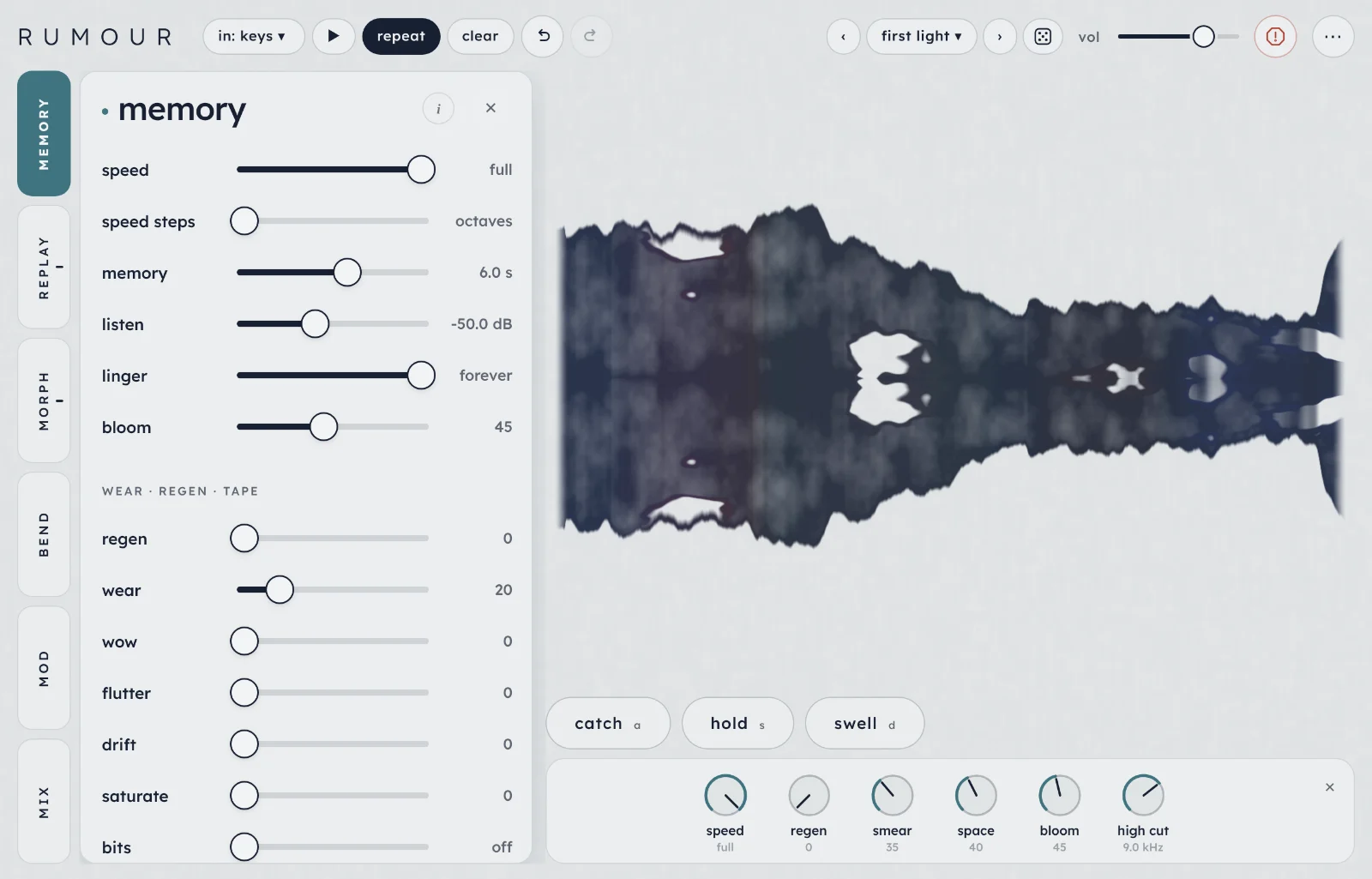
Rumour is an always-listening effect that keeps the last few seconds of whatever you play and retells them as loops drifting out of phase, grains and spectral washes. Stop playing and it carries on, a little different each time.
Start here
Five steps from opening Rumour to hearing what it does. It runs in Chrome, Edge and Safari, on a computer or an iPad.
Open Rumour and tap begin. The first time, a short intro shows you around; you can skip it. Browsers only allow sound after a tap or a key press, so nothing plays until you do.
Listen through a gap. A test phrase on keys plays into Rumour, stops for a few seconds, then plays again. Listen to the gaps: that's where Rumour carries on with what it remembers.
Step through the presets with ‹› at the top, or tap the name to open the list. Start with the start here and tides banks.
Play your own sound. Tap in ▾ and choose mic / input (live) to play into it with a mic or an instrument, or sound bank for a sound that plays on its own. Use headphones with the mic: speakers feed back into it.
Open a tab and move things.replay sets the loops; mix has every level as a fader. Double-tap any slider to put it back.
TipLeave gaps. Most of what Rumour does happens after you stop playing, and with linger at forever (where it starts) it keeps going until you play again or press clear.
The screen
Controls on the left, the inkblot on the right, the input along the top. Everything on screen, numbered:
Tabs. Six tabs, each in its own colour. Tap one to open its drawer; tap it again to close it. A dot on replay or morph counts the stages on it that are sounding, on mod the mods that are running, and on mix it means a stage is soloed.
The drawer holds the open tab's controls. Its i shows a few short lines about the tab; ✕ closes it.
in ▾ chooses what plays into Rumour. It shows what's playing in now, such as in: keys. More.
▶ plays a test phrase (or the sample), and repeat plays the test phrases over and over. More.
clear empties the memory. So does c.
Undo and redo (the two arrows), for any change to the settings.
Presets.‹› step through them, the name opens the list, ⚄ rolls random settings. More.
vol, the volume. It isn't saved in presets.
Panic empties the memory and silences everything for a moment, then fades back in. esc does too, once no menu is open and the controls are showing.
⋯ has copy settings, back up presets, restore presets, hide tweak (or show tweak), the visual, hide ui, how to play (the keys), this guide, the intro and what's new.
The inkblot: the memory drawn as ink, with the loops moving through it. More.
The dials. Six controls as dials, so you can turn them while you play: speed, regen, smear, space, bloom and high cut. More.
catch, hold and swell, to play Rumour like a pedal, with the tweak button beside them. More.
On a phone or a tall window
The tabs move to the bottom and the drawer slides up from there, under the inkblot. Everything else is the same, except the dials and the tweak button: they step aside while a tab is open in a tall window, and in a window narrower or shorter than about 560 px (a phone) they aren't shown, to leave the inkblot its room. The same six controls are in the tabs.
On a phone.
How Rumour works
It's always listening. Everything you play goes into a short memory, up to 10 seconds of it. When the input stays below the listen level for a second and a half, Rumour decides you've stopped: the memory stops recording and holds on to what you played. There's no record button and nothing to start or stop. The memory tab sets how far back it reaches and what time does to it.
Five stages retell it. Two of them replay the memory as it was: loops and grains, on the replay tab. Three change the sound: follow plays your playing back at another pitch, smear blurs it into a wash, and resynth rebuilds its strongest notes with oscillators. They're on the morph tab. Each stage has a fader in mix; a stage at 0 is off.
The loops drift out of phase. Up to six loops play at once, each a slightly different length, so they line up differently on every pass and the pattern never quite repeats. By default each new note you play starts a new loop, replacing the oldest one.
It carries on after you stop. With linger at forever, the loops keep finding new moments in what you played, so it changes slowly for as long as you leave it. Bloom keeps the effect quiet while you play and lets it open up when you stop, and regen records the effect back into the memory, so it turns into a wash that keeps shifting.
You can play it like a pedal. Rumour captures on its own, but catch, hold and swell under the inkblot let you step in.
Playing it
Rumour is an effect, so something has to play into it. in ▾ at the top chooses what, and shows what's playing in now.
in ▾, with the sound bank open.
mic / input (live)
Plays your mic, or your computer's audio input, into Rumour as you play: a voice, or a guitar or synth through an audio interface. The browser asks for permission the first time. Rumour takes the input as it is, without the noise reduction and level control browsers apply to calls. Choose it again to turn the mic off.
The input control in mix sets how much goes in, and listen sets how loud it has to be to count as playing.
FeedbackWith the mic on and speakers up, Rumour can hear itself and build up. Use headphones, or record a take instead (below): the take goes straight into the memory, not through the speakers.
A sample, straight into the memory
The other three choices put one sound into the memory, so Rumour plays on its own, like an ambient generator:
mic / input (record)up to 10 s
Records a take from the mic. A red ■ at the top counts the seconds; tap it to stop (it stops by itself at 10 s). The take doesn't go through the speakers, so it can't feed back.
load file
Any audio file your browser can read. Rumour uses the first 10 seconds of sound.
sound bank
Ready-made sounds: glass, rain, choir and bells are always there, and more appear when Rumour is online. The test phrases are at the bottom of the same list.
Rumour trims the silence at either end, sets a steady level and fills the whole memory with it (a short sound is repeated to fill 10 seconds). The loops spread across it at once, and hold turns on by itself so your playing doesn't record over it. Release hold to let new playing in; choosing the mic or a test phrase releases it too.
With a sample in, repeat becomes loop. On, the sample also plays round and round into Rumour, so you hear it as it is as well as retold. Off, it only sits in the memory; ▶ (or space) plays it through once. Turning loop off lets the pass that's playing finish. The sample is gone when you reload the page.
Test phrases
Four short phrases built into Rumour, so you can hear it without a mic: keys, synth, guitar and pad. Pick one at the bottom of sound bank.
▶space
Plays a phrase now (or, with a sample in, plays the sample once). With the mic on, it switches back to the test phrases.
repeaton / off
On, the phrase comes back by itself after a gap of 5 to 9 seconds, often a little higher or lower. Off, it plays once per ▶. The gaps are where you hear what Rumour does when the playing stops.
The phrase and repeat are remembered on this device, not in presets. Rumour doesn't use MIDI; the browser's limits are under Tips and limits.
Catch, hold and swell
Three big buttons under the inkblot, for playing Rumour like a pedal. They change what's happening now, and they aren't saved in presets.
catcha
Every loop takes the last few moments of what you played at once, each its own length, so they still drift apart. While you play they end now; once you've stopped they end with your last notes, so a catch a few seconds later still takes what you played (with regen up, after about two seconds they end now again). The resynth listens again at the same moment.
Set capture to on catch and nothing changes until you press it.
holds, tap or press
Keeps the memory as it is and lets you play over it. Tap to latch it on and tap again to let go; or press and keep holding, and it lets go when you release.
While it's on, nothing new goes into the memory, the loops keep changing inside what's held, your new playing doesn't reach the smear or the resynth, and the effect stays open as if you'd stopped. With regen up, the memory keeps reworking itself.
Hold turns on by itself when you load a sample.
swelld, while held
While you hold it, the effect gets up to about 6 dB louder, more of it goes into the space, and the space rings up to three and a half times longer. It opens in half a second and falls back over about two seconds when you let go.
Try the swell pad preset, which stays quiet while you play.
Tweak
tweakshows or hides the dials
Six dials below the catch, hold and swell buttons: speed, regen, smear, space (the send), bloom and high cut. They are the same controls as on the tabs, so turning one moves its slider. Drag a dial up or right to turn it up, down or left to turn it down; double-tap it for its starting value, or focus it and use the arrow keys (⇧ for small steps). The tweak button beside swell, at the right end of the row, shows them and goes while they show; the ✕ in the strip's corner hides them again, and so does ⋯ › hide tweak. Whether they're showing is remembered, and isn't part of a preset. Hide ui takes them away too.
memory tab 1
What Rumour remembers, how long it carries on, and what time does to it.
memory
speed×0.13 to full
Slows the memory. What's already in it drops in pitch, new playing comes out grainier, and it holds more time: at half speed, an octave down, the memory lasts twice as long. It slows the loops, grains and follow; the smear and the resynth keep running at full speed.
speed stepsoctaves · fifths · smooth
How speed moves: in octaves (full, half, a quarter, an eighth), in fifths and octaves, or smoothly. With octaves or fifths, the number beside speed still shows the smooth value, but you hear the nearest step.
memory0.50 s to 10 s
How far back the loops and grains can reach. Short keeps them close to what you played last; long lets them find moments from further back.
listen−70 dB to −20 dB
The level that counts as playing. Below it for a second and a half, the memory stops recording and holds what you played, and the after-you-stop behaviour starts.
With a mic in a noisy room, raise it until the background alone doesn't count as playing.
linger0.50 s to forever
How long Rumour carries on after you stop. At the top, forever, it keeps going, and after a couple of seconds the loops start picking new moments from what you played, so it slowly changes. Below the top, the effect fades out over that time and comes back when you play again.
bloom0 to 100
Holds the effect back while you play and opens it up over about two seconds once you stop. At 100 the effect is down to a fifth of its level while you play; at 0 it stays the same.
High bloom keeps your playing clear and saves the wash for the gaps.
wear · regen · tape
regen0 to 0.95
Records the effect, space and all, back into the memory, kept at the level you played at. While you play it's added to what you play; after you stop, the memory keeps recording over itself, so it becomes a wash that shifts and never quite repeats. The number beside it rounds to 0 or 1, so go by the slider.
wear0 to 100
Each pass of a loop comes back a little darker and quieter, and so does what regen records.
wow0 to 100
A slow pitch wobble, about once every two seconds, its speed wandering a little.
flutter0 to 100
A fast pitch wobble, about seven times a second.
drift0 to 100
The tape speed wanders slowly at random, so the pitch sags and recovers.
saturate0 to 100
Tape saturation, a little uneven between the top and bottom of the wave, so it warms and thickens.
bitsoff, then 16 bit to 5 bit
Bit reduction. Gentle near the bottom of the slider; gritty and broken near the top.
hiss0 to 100
Tape hiss under the sound. It follows the level, so silence stays silent.
tape onwet · everything
Where the six tape controls work. wet: on the effect only, before the space and regen, so with regen up the tape builds up pass after pass. everything: on the whole output, your dry playing included, like a lo-fi pedal at the end of the chain.
replay tab 2
Two ways to replay the memory as it was: loops and grains. Their levels are the loops and grains faders in mix; grains start at 0, so raise their fader to hear them.
loops
loops1 to 6
How many loops play at once.
length0.03 s to 4.0 s
The loops' base length. Short loops are grainy and buzzy; long ones hold whole phrases.
unequal0 to 100
How different the loops' lengths are. At 0 they're all the same length and stay in step; higher, they drift in and out of phase.
jitter0 to 100
On each pass a loop is cut short by a random amount, so it never quite repeats.
edges0 to 100
How each loop fades at its ends. Low is sharp and rhythmic; high fades all the way in and out, so the loops become swells.
harmony0 to 100
The chance a new loop plays an octave up, an octave down, a fifth up or a fourth down.
reverse0 to 100
The chance a new loop plays backwards.
captureplaying · scatter · walk · on catch
Where the loops come from.
playing: each new note starts a loop at its attack, replacing the oldest loop. Long notes and pads have no new attacks, so while one sounds the oldest loop is refreshed every second and a half or so (longer with long loops).
scatter: the loops jump to other moments in the memory now and then.
walk: each loop's starting point walks slowly through the memory.
How much scatter and walk move, and how often the loops find new moments once you've stopped.
faults0 to 100
The chance a pass goes wrong: it stutters (repeats a half to a sixteenth of itself), plays backwards or drops out. The glitch side of Rumour.
grains
density0.5 /s to 80 /s
How many grains start each second. Low is sparse drops of sound; high is a continuous cloud.
size0.01 s to 1.5 s
How long each grain is. Short grains crackle; long ones overlap into a blur.
octaves0 to 100
The share of grains played an octave up, an octave down or a fifth up.
reach0.10 s to 10 s
How far back the grains are taken from. Short keeps them on what you played last.
morph tab 3
Three stages that change the sound. The switch at the top, follow · smear · resynth, picks which one you're editing; a dot on a name means that stage is sounding. Any of them can sound at once: their levels are faders in mix. Smear starts at 35; follow and resynth start at 0.
follow
Follow keeps sampling what you're playing now and plays it back at another pitch, so a copy trails behind you. It works on your live playing, not on the memory, so it goes quiet soon after you stop.
interval−24 st to +24 st
How far up or down the copy plays, in semitones. +12 is an octave up, +7 a fifth.
directionforward · reverse
Forward, or each sample played backwards.
sample0.02 s to 2.0 s
How long each piece it plays back is. Short, it works as a pitch shifter; long, whole phrases trail behind you at the interval.
feedback0 to 0.9
Feeds follow back into itself, so the intervals stack up: an octave, then two. Its number rounds to 0 or 1; go by the slider.
smear
Smear averages the sound's spectrum over a stretch of time and rebuilds it with new, random phases, so notes blur into a wash without any attack.
frominput · loops · both
What it listens to: your playing, the loops (with the grains and follow), or both.
time0.03 s to 30 s
How long the spectrum is averaged over. Short follows you closely; long is a slow cloud that changes over many seconds.
synthetic0 to 100
Low keeps the smear tonal, close to the notes you played. High makes it noisier and more artificial, like a distant memory of them.
shift−24 st to +24 st
Moves the wash up or down in pitch.
sparkle0 to 100
A slow glitter across the wash, as single frequencies rise and fall.
freezeoff · on
Holds the wash as it is, however you play.
resynth
Resynth listens for the strongest frequencies in the sound and plays them again on a bank of up to 33 oscillators, spread left and right. Each time it listens again, each oscillator glides to the nearest new frequency, so the chord moves rather than jumps. It keeps going after you stop when it listens to the loops.
frominput · loops · both
What it listens to: your playing, the loops (with the grains and follow), or both.
voices1 to 33
How many oscillators. One follows the loudest frequency; 33 rebuild most of the sound.
refresh11 ms to 6.4 s
How often it listens again. Short tracks you as you play; long gives a chord that steps to a new one every few seconds.
blur0 to 100
How slowly what it hears may change. At the top it stops changing.
glide0 to 100
How slowly each oscillator slides to its new pitch.
wavesine · triangle · saw · pulse
The oscillators' shape. Sine sounds closest to the original; saw and pulse add harmonics of their own, for a brighter, more synthetic chord.
octave−2 to +2
Moves the whole bank up or down in octaves.
tune−7 st to +7 st
Moves it up or down by up to a fifth.
centre20 Hz to 12 kHz
The middle of the band it listens to.
width0.2 oct to all
How wide that band is, in octaves. At all it hears everything.
Narrow it to about 1.5 oct and move the centre slowly for sounds like vowels.
feedback0 to 1.05
Feeds what it plays back into what it listens to. Near the top it keeps itself going, a held chord that drifts on its own. Its number rounds to 0 or 1; go by the slider.
snap0 to 100
Pulls every oscillator towards the nearest note of the key and scale below. At 100 they land in key.
keyC to B
The key's root note for snap.
scalechromatic · major · minor · pent · minor pent
The scale snap pulls towards. pent is the major pentatonic.
freezeoff · on
Holds the chord it has now.
bend tab 4
Four macros, A to D, on two XY pads. Each macro moves up to four controls at once, so one drag can change the whole sound.
the pads
the padsA → · B ↑ · C → · D ↑
The top pad plays A (left and right) and B (up and down); the bottom pad plays C and D. Each axis is named in the corner it points to.
The middle is the preset as saved. Right or up adds each of the macro's amounts to its controls; left or down takes them away. So the pads work with any preset, and where several macros move one control, their moves add up. Double-tap a pad to put it back in the middle.
A slider a macro has moved shows a ring at the value you're hearing.
one macro
‹ A dissolve ›1 of 4 macros
Below the pads, one macro at a time. ‹› step through A to D and round again. Tap the name to rename it. The number at the left (+0) shows where the pad has it, from −100 to +100.
+ add
Opens a picker: stages on the left, with a count of how many of the macro's controls are in each, and that stage's controls on the right. Tap a control to add it or take it out. It stays open, so you can pick several; a macro holds four at most.
learn
Tap learn, move up to four controls in any tab, then tap learn again (or done in the bar at the top; cancel forgets it). The controls you moved most replace the macro's, each with the amount and direction you moved it. They go back to where they were and the macro goes to its full amount (the right or top edge of the pad), so what you hear doesn't change.
macro ▾
Loads a ready-made macro (below), or clear to empty it.
⚄
Rolls a random macro: three or four controls, mostly from different stages, each with an amount of 25 to 60 either way.
a control's slider−100 to +100
Each control in the macro has a slider, named stage › control, for how far and which way the macro moves it. ✕ takes it out.
The ready-made macros
A starts as dissolve, B as distance, C as age and D as unrest.
Macro
Moves
dissolve
length (down), edges, smear, time
distance
send, pre-delay, decay, bloom
age
regen, wear, wow, high cut (down)
unrest
roam, jitter, faults, drift
octaves
harmony, octaves, grains, shift
spectral
resynth, refresh, blur, smear (down)
grit
speed (down), bits, saturate, drive
cloud
grains, density, size, loops (down)
Switches can't be in a macro: the choices such as capture, wave or tape on, the freezes, interval, octave and speed steps, and volume, input and solo.
Your macros and where the pads sit are saved with your own presets. The factory presets have no macros of their own, so loading one keeps your macros and puts both pads back in the middle.
mod tab 5
Slow modulators, up to six: a preset keeps as many as it was saved with. Point one at a control and it moves it for you, so a sound keeps changing while you leave it.
on / off
Beside each mod's name (mod 1, mod 2 and so on). Off keeps its settings. The number at the right of a running mod is where it is now.
shape ▾
∿ sine, ⋀ tri, ⊓ square (flips between two values), ⟋ saw ↑, ⟍ saw ↓, ⁘ s&h (a new random value each cycle) and 〰 wander (glides between random values, so it never repeats).
→ destination ▾
What it moves, by stage: memory · speed; tape · wow and drift; loops · length and roam; grains · density and size; follow · sample; smear · time and shift; resynth · refresh, blur and centre; space · send and size; clean-up · low cut and high cut.
foldfold · clamp
What happens when the mod would push past the end of a control's range: fold bounces back off it, clamp stops there.
rate0.01 Hz to 4.0 Hz
How fast it cycles, from once every 100 seconds to four times a second. Slow rates suit Rumour best.
depth−100 to +100
How far it moves the control, and which way. 0 is no movement.
✕
Removes the mod. There's always at least one.
+ add a modup to 6
Adds a mod under the others, already on and pointed at a control no other mod is moving. At six it greys out.
randomise
Sends every mod somewhere new: a new shape, rate, depth, fold and destination for each, most of them on and no two on the same control. It keeps the number of mods and is one undo. The random preset (⚄ or r) leaves the mods alone.
A slider a mod is moving shows a ring where the mod has taken it. Many presets come with their own mods, often a slow 〰 wander on the loops' length.
mix tab 6
Every level as a fader, then the space (the reverb) and the clean-up.
One fader per stage. Drag up or down; double-tap to put it back. The bright line inside each one is what that stage is putting out right now.
dry is your playing, untouched. loops, grains, follow, smear and resynth are the five stages; at 0 a stage is off. wet is everything the stages make together, after the space and the clean-up.
Tap a name under its fader to hear that stage on its own; the others dim. Tap it again, or tap wet, to hear everything. The solo slider at the bottom of the tab does the same. Solo is for listening and isn't saved in presets.
space
send0 to 100
How much of the effect goes into the space.
size0 to 100
Small at the bottom; bigger than a cathedral at the top.
decay0.50 s to ∞
How long the space rings. At the top, ∞, it never dies away.
bright0 to 100
Dark at the bottom, where the top end dies first; bright at the top.
pre-delay0 ms to 300 ms
A gap before the space answers.
dry in0 to 100
Sends your playing into the space as well, so you're playing in the same room as the effect.
shimmer0 to 100
Feeds the space back an octave up, so its tail climbs in pitch.
clean-up
low cut10 Hz to 2.0 kHz
Takes the low end off the effect, so the smear doesn't turn to mud. Your dry playing isn't touched.
high cut1.5 kHz to off
Takes the fizz off the top of the effect. Low, it gives dark, distant washes. It comes before the space and regen, so each regen pass gets softer.
tone−100 to +100
Tilts the effect darker or brighter, around 800 Hz.
drive0 to 100
Saturation on the effect: warm it up, or ruin it. Quiet sounds pass through clean; loud ones thicken.
duck0 to 100
The effect dips while you play and comes back up in the gaps.
input×0 to ×2
How much goes in: the test phrases, the mic or a looping sample. It isn't saved in presets.
Presets and sharing
37 factory presets in six banks, each built for a different side of Rumour. Your own go in yours. Each preset has a line in the list saying what it does.
‹› at the top step through every preset. The first time, Rumour opens on slow tide. init (in start here) is the plain settings every preset is built on.
The name opens the list: pick a bank, then a preset. The search line on top finds a preset by name in every bank. The star beside a preset puts it in a starred bank at the top of the list, in this browser only; tap it again to take it off.
⚄ (or r) rolls random settings, each stage with an even chance of sounding. It leaves the space, the clean-up and the dry and wet levels alone and sets linger to forever. history in the list keeps your recent rolls, so you can go back to one.
The factory banks
Bank
What's in it
start here
All-rounders that suit any sound: first light · phasing · facets · cloud · long notes (for pads and drones) · init (the plain settings).
after you stop
Quiet while you play, open in the gaps: afterglow · standing wash · fade with me (dies away about 6 s after you stop).
tides
Slow pieces that keep moving once you stop, with long walking loops, a big space and slow mods: slow tide · neap tide · spring tide · undertow · sea glass · low water · tide pool · ebb · slack water.
spectral
The smear and the resynth up front: smudge · glass choir · partials · spectral steps · vowels · resynth drone · spectral freeze.
tape & time
Speed, regen and tape: cassette · worn reel · half speed · grit · whole tape (the tape on your playing too).
pedal
Made for catch, hold and swell, plus follow and the glitches: catch & hold · swell pad · cathedral · a fifth behind · under, backwards · stutter · flicker.
Good places to start: first light for loops into a gentle smear; slow tide with a sound bank sound, for an ambient piece that plays itself; standing wash, where regen turns what you played into a pad that never quite repeats; partials, to hear the resynth on its own; catch & hold, where nothing changes until you press catch.
Saving
Type a name under save this preset and press save. Saving with the same name again overwrites it. A preset holds every setting, the mods and, in yours, the macros and where the pads sit. It doesn't hold the volume, the input level, solo, what's playing in (test phrase, mic or sample), or catch, hold and swell.
Where they liveYour presets are saved in this browser, on this device. Clearing the site's data loses them, so back up presets (in ⋯) now and then.
Sharing
copy code
Copies the current sound as a line of text starting rumour1. Paste it into a message, a note, anywhere.
paste code
Paste a rumour1. code and press load code to hear it.
export file
Saves all your presets as presets.json (or, if you haven't saved any, the current sound).
import file
Adds the presets from a file to yours.
back up presets
In ⋯. Saves every preset you've made to one file, rumour-presets-backup-YYYY-MM-DD.json, and says backed up 4 presets when it's done. Its number is how many you have. With none saved it says nothing saved yet. Unlike export file, it only holds yours, and it's the one to keep or send.
restore presets…
In ⋯. Opens a file picker for a backup. Presets already saved are left alone and counted as skipped. One with a name you already use but different settings comes in as name 2, and a factory name is skipped. A file that isn't a Rumour backup changes nothing. Import file reads a backup the same way.
copy settingsin ⋯
Copies a readable list of everything you've changed from the starting settings, what's playing in, the mods and macros, and a code. Handy for describing a sound in an email or a bug report.
The inkblot
The picture on the right is the memory, drawn as ink on paper and mirrored about the middle, like a Rorschach blot. Everything in it comes from the sound.
Left to right is the memory: thick ink where you played loud, thin where you played quietly. Where Rumour is recording, the ink is fresh and dark, and swells with what's coming in.
Each loop swells the stretch of ink it's playing, tints it with its own colour and breathes once a pass, while a dark pool runs through it at the loop's speed and direction. A new capture leaves a fading ghost where the loop was.
Holes open where the loops are reading. Plucked, short notes make the ink porous; held notes stay solid. With wear up, a loop's stretch wears thinner with every pass and its edges fray. Grains show as fine pinholes across the stretch they're taken from.
The smear and the resynth make the ink bleed into the paper, more as they get louder. Swell opens the holes and the bleed.
hide ui: the blot fills the window.The strip view, from ⋯ › visual.
visualinkblot · strip, in ⋯
Switches to the strip: the memory as a waveform, newest at the right, with each loop as a line in its colour and a dot where it's playing. Above it are an input meter with a mark at the listen level and words for what's happening, such as now · listening or stopped · evolving. With the resynth up, its frequencies show as bars underneath. A line under the buttons says what the control you're touching does.
The inkblot needs WebGL; without it, Rumour stays on the strip. Your choice is remembered on this device.
hide uii, or in ⋯
Only the paper and the inkblot are left, and the blot grows to fill most of the window. The sound and the keys carry on. Tap anywhere, press i or esc, or use the ⋯ in the corner to bring the controls back.
Recipes
Starting points. Each one names a preset to begin from, or begins from init (start here), the plain settings every preset is built on.
An ambient piece from one sound
Load slow tide (tides).
in ▾ › sound bank › choir, or record ten seconds of your own with mic / input (record).
Leave loop off and let it run for a few minutes.
Long loops walk through the sound in a big space, and the mods keep their lengths and the space moving, so it never settles. For more movement, try spring tide; for something darker, neap tide.
Catch a phrase and play over it
Load catch & hold (pedal).
Play a short phrase into the mic.
Press catch (a), then tap hold (s).
Play something new over the top.
The loops keep turning the caught phrase over while your new playing sits on top, untouched. Tap hold again to let new playing in. Hold swell (d) at the end of a phrase to open it all up.
A copy that trails a fifth above
Start from init.
mix: follow 75, loops 20.
morph › follow: interval +7 st, sample 0.60 s.
Play slow phrases with gaps.
Each phrase comes back a fifth higher, a little behind you. Set direction to reverse and interval to −12 st for a backwards echo an octave below.
Vowels from anything
Start from init.
mix: resynth 100.
morph › resynth: voices 10, width 1.6 oct.
mod: mod 1 on, 〰 wander → resynth · centre, rate 0.06 Hz, depth +80.
A narrow band of the sound drifts up and down, so it sounds like a voice shaping vowels. Turn snap to 100 to pull it into key.
A memory wearing out
Start from init.
memory: speed steps fifths, then speed down to ×0.67.
regen about halfway, wear 70, wow 30, saturate 35.
Play for a while, then stop.
Everything drops a fifth and comes back softer and duller with each pass, like a tape played too often. Set tape on to everything to put your playing on the same tape.
A room that never empties
Load cathedral (pedal).
mix: decay to the top, ∞.
Play a chord, then tap hold.
Play over it.
The space keeps everything you've played ringing, under whatever you add. Bring decay back down, or press clear, to let it go.
Shortcuts
On sliders: drag (hold shift for fine), double-tap to reset, scroll, or use the arrow keys.
Key
Does
space
play a test phrase, or the sample once
a
catch
s
hold: tap to latch, or keep it down to hold until you let go
d
swell, while held
c
clear the memory
r
random settings
[]
previous / next preset
i
hide ui, show it again
⌘z / ctrlz
undo
⇧⌘z / shiftctrlz
redo
esc
close a menu (or stop learn), else leave hide ui, else panic
In this guide, / jumps to find.
On iPad planned
An iPad version of Rumour is planned. Until then, the web version runs in Safari on the iPad, with the mic and touch; the limits are under Tips and limits. This section will say what's different once the iPad version is out.
Tips and limits
In a browser
The mic needs a secure page (the site is one) and your permission. On an iPad, Safari may ask again on a later visit.
Rumour doesn't use MIDI, has no tempo or sync, and can't record what comes out (see below).
The extra sounds in the sound bank come from the site, so they need the internet. The test phrases and glass, rain, choir and bells are made inside Rumour and always work.
Playing
The memory holds up to 10 seconds (more at a lower speed). There's no long recording to overdub on.
On a narrow screen, undo, redo, repeat, clear and random move into ⋯ at the top.
Rumour keeps its own level in check: if the effect builds up too far (high regen with swell held, say), it's turned down for a moment.
If it stutters
The resynth (more so with lots of voices) and the smear do the most work. A stage with its fader at 0 costs almost nothing, so turn down what you aren't using.
The strip view (⋯ › visual) is lighter on the screen than the inkblot.
Questions
I can't hear anything
Tap begin: browsers stay silent until you do. Rumour is an effect, so something has to play into it: check what in ▾ shows and press ▶ for a test phrase (with repeat off, press it for each phrase). Then check vol, your device's volume and, on an iPad or iPhone, the silent switch.
If the dry sound plays but nothing else does, look in mix: a stage may be soloed (a dot on the mix tab), or the wet fader may be down.
The mic doesn't work
Rumour says what went wrong:
mic blocked: the browser's permission was refused. Allow the mic in the site settings and choose mic / input (live) again.
no mic found: there's no input device. Plug one in, or check your audio interface.
mic unavailable: the page can't ask for the mic at all (it needs a secure page).
couldn't open the mic: something else stopped it, often another app using the mic.
Recording a take says the same things. If the mic is on but nothing happens, play louder or lower listen, and check input in mix isn't at 0.
It howls or keeps getting louder with the mic
The speakers are feeding back into the mic. Use headphones, turn the speakers down, or record a take instead with mic / input (record). Panic stops it at once.
It won't stop
That's linger at forever, where Rumour starts. Press clear (c) to empty the memory, or bring linger down so it fades out after you stop; fade with me is a preset made for that. A space with decay at ∞ or regen high keep things going too.
New playing doesn't change anything
Hold is probably on: the hold button is lit. It turns on by itself when you load a sample. Tap it to let new playing in. Or capture is set to on catch, so the loops only change when you press catch.
I can't hear the grains, follow or resynth
They start at 0. Raise their faders in mix, or tap a name there to hear that stage on its own.
What's the difference between clear and panic?
clear empties the memory, so the loops, grains and space start again from nothing. Panic does the same and also silences the output for a moment before fading back in. Neither changes your settings.
My presets have gone
They live in the browser you made them in, so they won't appear in another browser, a private window or another device, and clearing site data removes them. Back up presets (in ⋯) keeps a copy; restore presets brings it back.
Does it work offline?
Once it has loaded, yes: everything but the extra sound bank sounds is inside the page. Nothing you play is sent anywhere.
Can I record what comes out?
Not inside the web version. Record your computer's output with an audio app.
Rumour is inspired by a variety of creative looping pedals, such as Chase Bliss's MOOD and Hologram's Microcosm, along with Habit, Blooper, Count to Five and Red Panda's pedals. The resynth is inspired by Rossum's Panharmonium.