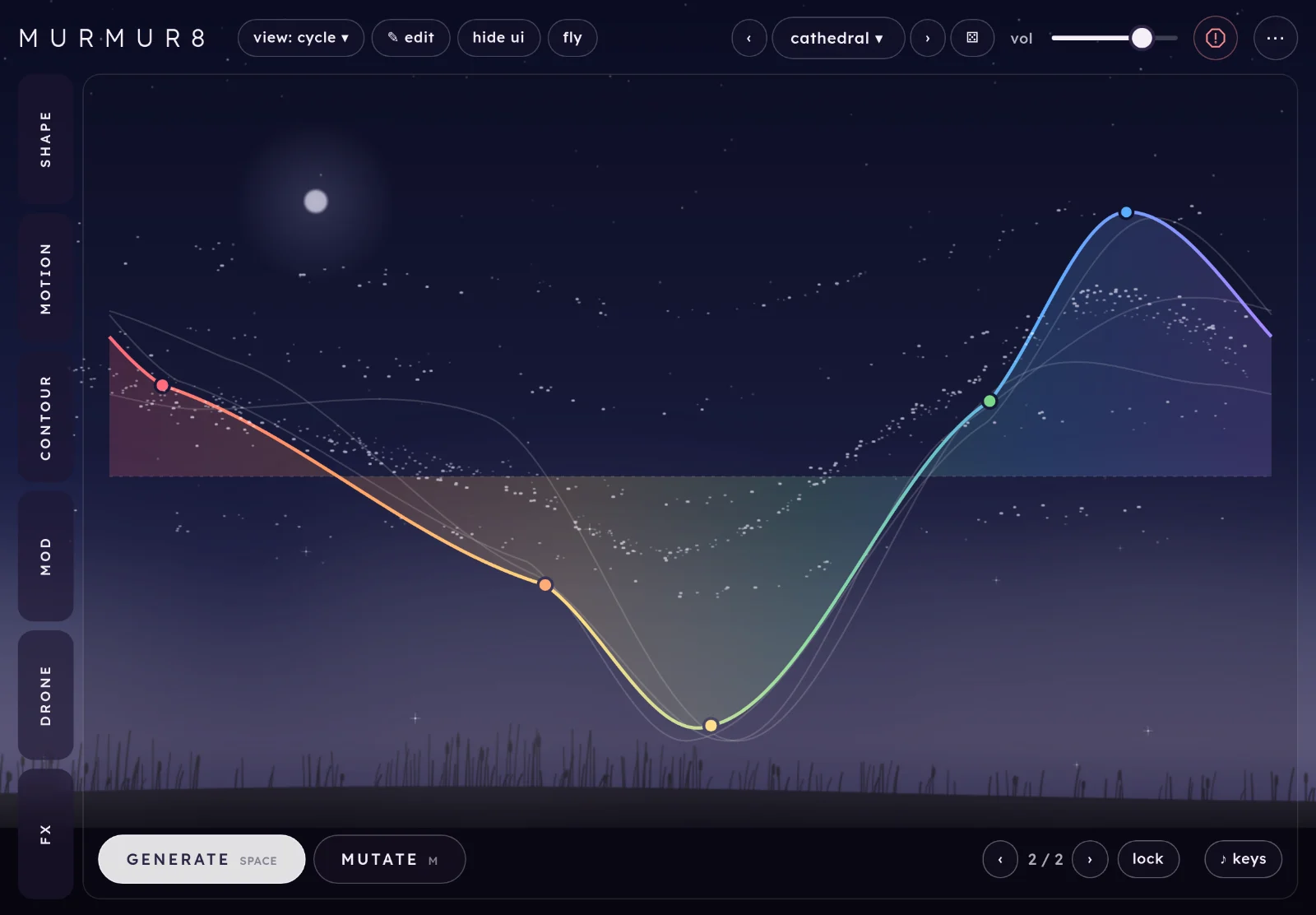
Murmur8 is a polysynth made from random waveforms. It rolls a new wave for every sound and lets you keep the good ones. A flock of birds follows the wave across the sky.
Start here
Five steps from opening Murmur8 to a sound you like. It runs in Chrome, Edge and Safari, on a computer or an iPad.
Open Murmur8 and tap begin. The first time, a short intro shows you around; you can skip it. Browsers only allow sound after a tap or a key press, so nothing plays until you do.
Play a note. Use a MIDI keyboard, the computer keys awsed (a row of white and black keys from C), or tap ♪ keys for a keyboard on screen. Or tap fly and let Murmur8 play itself.
Press generate (or space) for a new wave. Every press is a new sound with the same settings. mutate (m) changes the wave a little instead.
Step through the presets with ‹› at the top, or open the list to pick one. ⚄ rolls a random patch.
Open a tab and move things.shape changes the wave itself; fx adds space. Double-tap any slider to put it back.
TipLost a wave you liked? ‹ next to the counter at the bottom goes back through the last 32 waves.
The screen
Controls on the left, the wave on the right. Everything on screen, numbered:
Tabs. Six tabs, each in its own colour. Tap one to open its drawer; tap it again (or `) to close. A small line on a tab means a mod is moving something on it.
The drawer holds the open tab's controls. Its i shows a few short lines about the tab and its controls; ✕ closes it.
Presets.‹› step through them, the name opens the list, ⚄ rolls a random patch. More.
vol, the volume. It isn't saved in presets.
Panic stops every note, at once. So does esc.
⋯ has the tempo, MIDI status, keys and tips, the sky, the intro and this guide.
view picks the wave view; ✎ edit lets you draw the wave; hide ui leaves only the sky; fly (Murmur8 plays itself) sits beside them. The header stays on one row at any width: as the window gets narrower, edit and hide ui move into ⋯ first, then fly, then view, then the preset arrows. The random patch button goes into ⋯ below about 900px wide.
The wave, one cycle of it, with its key points. The birds follow it.
generate and mutate: a new wave, or a nudge.
History (‹ 2 / 2 ›) and lock.
♪ keys (a keyboard on screen).
On a phone or a tall window
The tabs move to the bottom and the drawer slides up from there, under the wave. To save room, ♪ stands in for keys, and the header keeps to one row: edit, hide ui, fly, view, the preset arrows and the random patch button all move into ⋯, and the volume fader stays in the header. Everything else is the same.
On a phone.
How Murmur8 works
The sound is one wave. Murmur8 draws one cycle of a waveform through a handful of random key points, and plays that cycle over and over at the pitch of each note. Change the points and you change the sound. The shape tab sets how many points there are, how they sit and how the line runs between them.
The wave can change while you play.generate picks new points and mutate moves the ones you have. Drift mutates by itself every so often, and inertia sets how slowly the wave travels to its new shape. Notes don't click while it moves. That's the motion tab.
Each note has a filter and an envelope. Murmur8 plays eight notes at once, and the contour tab shapes how each one opens, holds and fades.
Mods and drones keep it moving. Five slow modulators can move almost any control (mod). Four held drone voices, each with a wave of its own, wander under what you play (drone).
The effects show in the sky. Drive, squash, phaser, resonator, tape delay and reverb are on the fx tab. Reverb shows as mist and shimmer as flashes of light. When you stop playing, the birds settle in the reeds.
Playing it
Four ways in: MIDI, the computer keys, the keys on screen, and Murmur8 playing itself.
MIDI
Plug in a MIDI keyboard and play. Murmur8 starts out listening to every MIDI input, and picks up devices you plug in later. ⋯ shows what it can hear (midi · Keystation 49). Tap that row to choose: off, all inputs or one device from the list. Murmur8 remembers your choice in this browser.
Notes and velocity, eight at a time.
Sustain pedal (CC 64).
Pitch bend, two semitones each way.
All notes off (CC 120 or 123) works like panic.
MIDI clock: send clock and Murmur8 follows its tempo; a start message puts everything synced back on beat one. See clock.
BrowsersMIDI works in Chrome and Edge. Safari doesn't support it, so on a Mac use Chrome, and on an iPad use the computer keys, the keys on screen or the iPad app. Chrome asks permission the first time; if you said no, ⋯ shows blocked and you can allow it in the site settings.
Computer keys
The middle row plays a white key on each letter and the row above plays the black keys, like a piano: a is C, w C♯, s D, and so on up to ' (F, an octave and a bit up). z and x move down and up an octave. ⋯ shows which octave you're in.
♪ keys
Tap ♪ keys for a one-octave keyboard on screen. Play with several fingers and slide between keys. Where you touch matters: lower on a key plays louder. ‹› beside it change the octave.
On touch screens the keys are on to begin with; Murmur8 remembers whether you leave them on.
♪ keys: one octave, under the wave.
fly
fly lets Murmur8 play by itself: short phrases, then a rest, in a scale built on the drone's root note and in time with the clock. Each note shows as a ring in the sky, and the birds rise where it lands. Play along, or change the wave while it plays.
fly speed, in motion under the clock, sets how often fly may play a note: every 1/8 (the way it always played), 1/4, 1/2 or 1 bar. The slower settings leave more room between notes. It is yours rather than the preset's, so it stays as you set it.
With the controls hidden (hide ui), tapping the sky plays a note too, and each tap comes back every four bars, a little quieter each time, five times. Bringing the controls back (or panic) stops the echoes that haven't played yet.
The wave
The right-hand side of the screen: the wave and the buttons that change it.
generate and mutate
generate space
A completely new wave: new points, with all your settings kept.
mutate m
Moves the points you have, by the amount set in motion. Small amounts keep the character; large ones head somewhere new.
History and lock
‹ 1 / 1 › []
The last 32 waves. Each generate, mutate or drawn line adds one; drift doesn't, so it can't fill the list. Going back and then generating drops the waves after it.
lock
Freezes the wave: generate, mutate, drift and mutate on note all leave it alone. Everything else still moves, including mods on the shape controls.
Lock a wave you love before you roll random patches: ⚄ then keeps the wave and changes only the settings.
Views
cycle
One cycle of the wave, with its key points. Where it's heading shows as a faint line while it glides.
scope
What you hear, like an oscilloscope, steadied on the lowest note you're holding.
x / y
Left channel against right. A thin line is mono; the wider it opens, the wider the stereo (detune and the drone spread it).
none
No wave, only the sky. The wave box goes, and generate, mutate and the rest sit in one row along the bottom, so the sky and the controls get the room. Handy in a small window. ✎ edit hides, as there's no wave to draw. Pick a view from view in the header, or press v to step through the four. Murmur8 remembers the one you left on.
✎ edit and hide ui
✎ edit: the hint at the top says what you can do.hide ui: only the sky.
✎ edit b
Draw the wave by hand, on the cycle view:
drag a dot to move it;
tap empty space to add a point;
double-tap a dot to remove it;
scribble across the stage to draw a whole new wave (up to 20 points).
Your first touch turns the wave into points you can move without changing how it sounds. Generate, mutate, drift and history all still work on a drawn wave.
hide ui i
Only the sky is left, and the sound carries on. Tap the sky to play notes (see fly). To bring the controls back, press i or touch with two fingers.
shape tab 1
The wave itself: how many points, how they sit, the line between them, and its colour.
points
entanglement2 to 20 points
How many key points the wave has. Few points: simple, round, hollow tones. Many: busy, bright, buzzy ones. Most of the slider covers 2 to 10.
dispersioneven to scattered
How the points are spaced along the cycle: evenly, or bunched and gappy.
chaossmooth to random
How far each point's height jumps from the last. Low chaos gives gentle hills; high chaos, jagged peaks.
form
smoothness0 to 100%
The line between the points: steps at the bottom, then straight lines, then curves, then smoothed towards a sine at the top. The single biggest change to the tone.
harmonics+0 to +6
Adds copies of the wave at higher harmonics, for a fuller, organ-like sound.
stretchharmonic to bell
Pulls those harmonics out of tune into a bell or metal bar. Only does something when harmonics is up.
colour
formantoff, then a e i o u
A vowel filter, swept from “a” through to “u”. It doesn't follow the note, so it sounds like a voice.
detune0 to 38 cents
Two extra copies of each note, slowly drifting out of tune and spread left and right. A little is warm; a lot is seasick.
dirt
foldoff to 100%
Folds the wave back on itself where it would go too high: bright, rattly harmonics, more as you turn it up.
symmetry−100% to +100%
Offsets the fold so the top and bottom fold differently, for a reedier, harder edge. Even in the middle.
motion tab 2
How the wave changes on its own, blending between sounds, and the clock.
change
the pad↑ mutate · inertia →
One puck for two controls: up for more mutate, right for more inertia. It pulses each time drift fires.
mutate0 to 100%
How much a mutate (and each drift) changes the wave.
inertiasnap to 10 s
How slowly the wave travels to its new shape. At snap it jumps; up high, a new wave takes seconds to arrive and you hear it morph.
driftoff, or every 0.1 s to 4 min
Mutates the wave by itself, over and over. Quick on the left, slow on the right. Slow drift with high inertia is the easiest way to a sound that never quite repeats.
mutate on noteon / off
Every note you play mutates the wave a little, so no two notes are quite the same.
sync drift to clockoff, or every 1/16 to 128 bars
Drift fires on the beat instead, and its slider counts in bars and beats, short on the left and long on the right.
superposition
superpositionfour corners, A to D
Blend between up to four whole sounds. Tap an empty corner (or capture sound to A–D) to store what you're hearing, change things, capture another, then drag the puck between them. The wave and the settings blend; switches like the filter type follow the nearest corner.
clear empties all four. Mods, volume and tempo stay out of it, so a mod can move the puck (superposition x and y are destinations).
Capture a dark sound and a bright one in opposite corners, then point a slow mod at superposition x.
clock
tempo40 to 240 bpm
The clock everything synced follows: synced drift, synced mods, the synced delay and fly. ⋯ shows the tempo, and tapping that row takes you here. The line above it says where the tempo comes from: internal or midi clock.
tap
Tap it in time, two or more times, to set the tempo.
When MIDI clock arrives, it takes over from the tempo slider; when it stops, the slider is back in charge.
contour tab 3
The filter and the envelope, as two graphs you drag.
filter
lp · bp · hpfilter type
Low-pass (darker), band-pass (thinner, vocal) or high-pass (brighter, no bass).
the filter graph
Drag the handle: left and right is cutoff (20 Hz to 20 kHz), up and down is resonance. The shaded hill behind it is what's playing right now. A dashed line shows where the envelope sweeps it, and a coloured one where a mod has moved it. Double-tap to reset.
cutoff20 Hz to 20 kHz
Where the filter starts cutting. A mod destination too.
resonance0 to 100%
A peak at the cutoff; high values whistle.
env amt−100% to +100%
How far each note's envelope opens the filter (or, below the middle, closes it). The main control for plucky versus soft.
envelope
the envelope graphA · D · S · R
Three handles shape every note: the first sets attack, the second decay (sideways) and sustain (up and down), the last release. Double-tap to reset.
attack1 ms to 8 s
How long a note takes to arrive.
decay5 ms to 10 s
How long it takes to fall to the sustain level.
sustain0 to 100%
The level it holds while the key is down. At zero, every note is a pluck.
release5 ms to 10 s
How long it rings after you let go.
legatoon · off
One note at a time. Play a note while another is held and it slides there without starting again. Let go and it slides back to the note you are still holding. Fly keeps its own notes.
slideinstant, or 10 ms to 2 s
How long the slide takes. Shows when legato is on.
mod tab 4
Five slow modulators. Point one at a control and it moves it for you.
Each row is one mod. When it's on, the control it moves shows a coloured ring on its slider and a small dot by its name, and the tab it lives on gets a line.
on / off1 to 5
Off keeps its settings, so you can try a sound with and without it.
shape
∿ sine, ⋀ tri, ⊓ square (flips between two values), ⟋ ramp, ⁘ s&h (a new random value each cycle) and 〰 wander (glides smoothly between random values, so the movement never repeats).
→ destination
What it moves, grouped by tab: anything in shape and contour, inertia, mutate, drift, superposition x and y, the drone's character, most of the fx, and pitch for vibrato.
sync
Locks the mod to the clock; rate becomes division, from 16 bars to 1/32.
rateonce every 200 s to 8 Hz
How fast it cycles, when it's not synced. Most of Murmur8's best sounds use slow rates, from a few seconds to a few minutes.
division16 bars to 1/32
The length of one cycle, in bars and beats, when synced.
depth−100% to +100%
How far it moves the control, either way round. Zero is the middle.
drone tab 5
Up to four held notes of their own, under whatever you play. Each voice has its own wave that wanders on its own clock; the shape settings are shared.
drone on / off
Starts or fades out the drone.
follow keyson / off
Each note you play moves the drone's root to that note (in the same octave), so it follows your harmony. Notes from fly don't move it.
root‹ C2 › · oct − · oct +
The drone's root note, a semitone or an octave at a time. Fly's scale is built on it too.
level0 to 100%
The whole drone's volume.
fade0.3 s to 15 s
How slowly it fades in and out.
wanderstill, or every 10 min to 0.4 s
How often each voice's wave changes by itself. Still on the left, then slow, then faster as you go right.
character
couplingfree to locked
Pulls the voices' waves towards the main wave. Free, they each go their own way; locked, they follow what you're playing.
breatheoff to 100%
Slow swells in each voice's level and position, so the drone moves around you.
tiltdarker to brighter
Darkens or brightens the upper voices against the lower ones.
windoff to 100%
Adds breathy air that comes and goes in gusts.
voices
voice 1–4on / off
Each voice can be on or off. A voice you turn on starts close to the main wave.
interval−12 to +24 semitones
The voice's pitch against the root, named where it helps (5th, octave, oct+M3…).
level0 to 100%
That voice's volume.
pull voices back to the main wave
Every voice glides back towards the main wave, to start wandering again from there.
fx tab 6
Drive and squash work on the whole instrument; the phaser sweeps; resonator, delay and reverb are sends you mix in.
drive0 to 100%
Saturates the whole instrument, from warmth to grit.
squashoff to 100%
Then compresses it, from gentle glue to flat and dense.
phaser
mix · rate · depth · feedback
Sweeps notches through the sound. Mix at zero is off; rate runs from one sweep every 33 s to 6 a second; feedback makes it sharper and more metallic.
resonator
send · decay · tone
Rings with each note you play, tuned to it, like a string or bar struck in sympathy. Decay runs from 0.2 to 20 s.
structurestring, stiff, bar, bell
What the resonator is made of.
tape delay
send · feedback · tone
Ping-pong echoes. Feedback sets how many come back; tone goes from dark to bright.
time · sync20 ms to 1.5 s, or 1/32 to 1 bar
The echo time. Change it while it's echoing and the pitch bends, like tape. sync sets it in note lengths from the clock instead (division).
wow0 to 100%
Tape wobble on the echoes.
reverb
send · size · decay · tone
The room. Decay runs from 0.4 s to 40 s. It shows in the sky as mist.
shimmer0 to 100%
Feeds the reverb back an octave up, so the tail climbs in pitch. Shows as flashes of light in the sky.
freezeon / off
Holds the reverb tail forever. Play a chord, freeze it, and play over the top.
Presets and sharing
About thirty factory sounds in four banks: keys & plucks, pads, drones and textures. Your own go in yours.
‹› step through every preset, factory then yours.
The name opens the list: pick a bank, then a sound.
⚄ (r) rolls a random patch that's built to be playable. It keeps your volume, tempo, drone setup and mod timings, and keeps the wave if it's locked.
Saving
Type a name under save current sound and press save. Saving with the same name again overwrites it; ✕ deletes one. Factory names are taken.
A preset holds every setting, the mods, the wave's key points, the drone and the superposition corners. It doesn't hold the volume or the tempo.
Where they liveYour presets are saved in this browser, on this device. Clearing the site's data or using a private window loses them, so export file now and then to keep a copy.
Sharing
copy code
Copies the current sound as a line of text starting murmur:. Paste it into a message, a note, anywhere.
paste code
Paste a murmur: code and load code to hear it.
export file
Saves all your presets as murmur-presets.json.
import file
Adds the presets from a file. Ones with the same name are replaced.
The sky
⋯ › scene sets the picture behind the wave.
backgroundlandscape · black
The landscape, or plain black (easier on a dark stage, and lighter on the battery).
birdslive · still · off
The flock that follows the wave. still keeps them in place.
skydawn · day · dusk · night
Changes play out like a time-lapse. day passes runs a whole day in 15 minutes; your clock follows the time where you are.
Recipes
Starting points. Begin from init (the first preset) unless it says otherwise.
A drone that keeps changing
drone: drone on, all four voices on.
wander every 10 s, coupling 30%, breathe 60%.
motion: inertia 3 s, drift every 20 s.
fx: reverb send 50%, decay 12 s.
You hear four held notes that slowly change tone and move around the stereo field. For a darker version, set tilt to top darker 40%.
A pad that holds while you play over it
Load glass pad.
Reverb shimmer 60%, send 70%.
Play a chord, then press freeze.
Play a melody over the top.
The chord keeps ringing under the melody. Press freeze again to let it fade. Try it with the drone on.
A bell
smoothness 80%, harmonics +3.0, stretch to bell.
contour: attack 1 ms, sustain 0%, release 2 s.
fx: resonator send 40%, structurebell.
You hear a struck metal tone that rings on. For a glass sound, set stretch back to 50%.
A slow blend between two presets
Load dusk strings and tap superposition corner A.
Load glass pad and tap corner D.
Hold a chord and drag the puck from A to D.
mod 1: 〰 wander → superposition x, rate 60 s.
The sound moves between the two by itself. Capture a third sound in B and point mod 2 at superposition y.
A pad that slowly changes colour
Load warm poly.
mod 1: 〰 wander → cutoff, rate 20 s, depth +50%.
mod 2: ∿ sine → smoothness, rate 40 s, depth +40%.
Hold a chord for a minute.
The chord brightens, darkens and softens on its own. Turn on sync on both mods to tie the movement to the tempo.
A wave you draw yourself
Press ✎ edit.
Scribble across the stage from left to right.
Drag dots to tidy it, and double-tap the ones you don't need.
Press lock.
You hear your own shape, and it stays put while you change everything else. Turn smoothness up and down to hear the same points with steps, lines and curves between them.
Shortcuts
Also in ⋯ › keys and tips. On sliders: drag (hold shift for fine), double-tap to reset, scroll, or use the arrow keys.
Key
Does
aws … '
play notes, from C
zx
octave down, up
space
generate
m
mutate
[]
history back, forward
r
random patch
b
✎ edit the wave, on or off
v
next view: cycle, scope, x / y, none
i
hide ui, show it again
`
hide or show the drawer
1 … 5
mod 1–5 on or off
esc
close a menu, or all notes off
In this guide, / jumps to find.
On iPad in testing
Murmur8 is coming to iPad and iPhone as an app and as an Audio Unit (AUv3) plug-in. It's the same instrument: everything in this guide applies. What's different is how it fits in with other apps. Each update's changes are listed in what's new.
MIDI in the app
Murmur8 listens to every MIDI input, including USB keyboards and Bluetooth MIDI.
Other apps can send it MIDI too: it shows up as a destination called Murmur8.
The clock works as on the web: internal tempo, tap, or MIDI clock.
As a plug-in
Add Murmur8 as an instrument in a host such as AUM, Logic Pro, GarageBand or Loopy Pro. In a host:
MIDI comes from the host. Route a keyboard or a sequencer to Murmur8's track or channel there; in AUM, connect it in the MIDI matrix.
The clock follows the host's tempo and transport; the clock line reads host · 120.0 bpm. Synced mods, drift, delay and fly lock to the host.
Your sound is saved with the host's project, and the controls can be automated from the host.
Several copies can run at once.
Still being writtenThis part will grow as the app gets closer to release: host-by-host steps, recording, and anything that works differently.
Tips and limits
In a browser
MIDI works in Chrome and Edge, not Safari.
Your presets are stored in that browser on that device. Export a file to keep them.
The web version can't record what you play. Record your computer's output in another app.
Sound starts only after a tap or a key press.
Playing
Eight notes at once, plus the four drone voices.
On a phone the random patch button is hidden, and r needs a keyboard.
Volume and tempo stay as you set them when you change preset.
If it stutters
Each drone voice, a high entanglement and each running mod adds load. Turn off what you aren't using.
The black background and the none view take load off the screen.
Questions
I can't hear anything
Tap begin (or any key): browsers stay silent until you do. Check vol at the top, your device's volume and, on an iPad or iPhone, the silent switch or Control Centre's mute. Then play a note, or tap fly.
If it played before and has stopped, panic (esc) and play again, or reload the page.
My MIDI keyboard does nothing
Use Chrome or Edge (Safari has no MIDI). ⋯ shows the MIDI status: no devices means it can't see the keyboard (check the cable and that no other app has it), and off means you or a past visit chose off (tap the row and pick the keyboard or all inputs), blocked means permission was refused (allow MIDI in the site settings and reload).
A note won't stop
Press panic or esc. If it's a long, slow sound, it may be the drone (turn it off in drone), a frozen reverb (freeze) or a long release (contour).
The sound keeps changing by itself
That's drift (motion), mutate on note, a mod, or fly. To keep a wave exactly as it is, press lock.
My presets have gone
They're stored in the browser you made them in, so they won't appear in another browser, a private window or another device, and clearing site data removes them. Use export file to keep a copy, and import file to bring them back.
It crackles or stutters
Close other tabs and apps, and try fewer notes at once. Drone voices, high entanglement and lots of mods all cost a little. Black background (⋯ › scene) and none view take load off the screen.
Does it work offline?
Once it has loaded, it doesn't need the internet: nothing is sent anywhere, and it makes no network requests.
Can I record what I play?
Not inside the web version yet. Record your computer's output with an audio app, or use the iPad plug-in in a host that records.