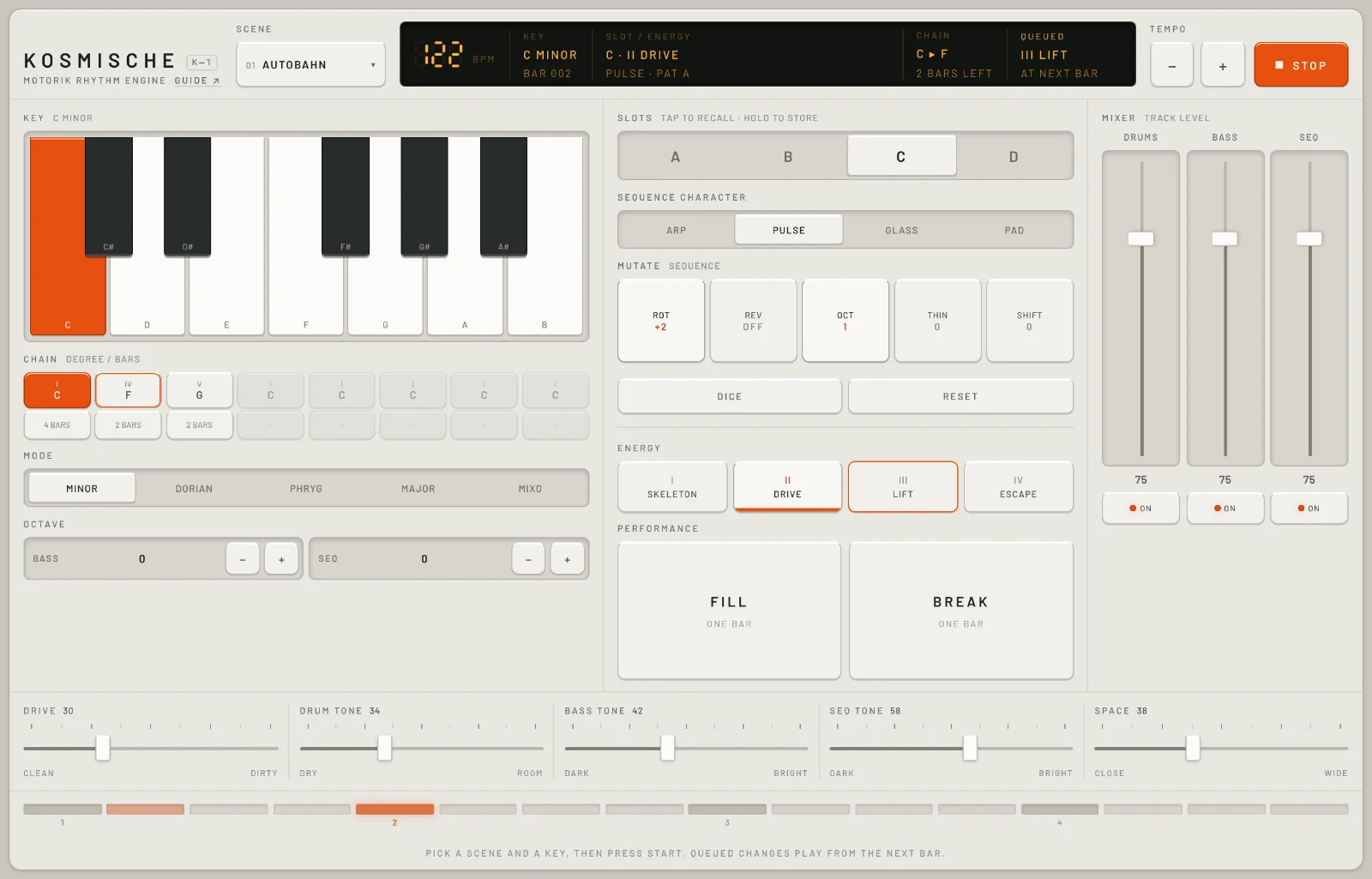
Kosmische is a motorik rhythm engine: drums, bass and a synth sequence for Krautrock jams. Pick a scene and a key, press start, and make your changes on the bar.
Start here
Five steps from opening Kosmische to a groove you're changing as it plays. It runs in a browser on a computer, a tablet or a phone.
Press START (or space). Browsers only allow sound after a tap or a key press, so nothing plays until you do. You hear scene 01 AUTOBAHN: drums, bass and a sequence in C minor at 122 BPM.
Pick a key. Tap a note on the keyboard on the left. The bass and the sequence move to it straight away; the drums carry on. Mode, under the chain, changes the scale.
Raise the energy. Tap III LIFT. It gets an orange outline and waits for the next bar, then more of the kit and the bass come in and the sequence opens up.
Play a fill. Tap FILL (or f). The next bar is a drum fill, then the groove carries on.
Change the scene. Open Scene at the top and pick another groove, or press 2. It starts on the next bar, at its own tempo.
TipAnything that changes the groove waits for the next bar, so you can tap it anywhere in the bar and it still lands in time. An orange outline means a change is waiting; On the bar lists what waits and what doesn't.
The screen
One panel, no tabs: the scene, display and transport along the top, three columns in the middle, then the tone sliders and the position strip along the bottom.
The display: tempo, key, bar, slot, energy, chain and what's waiting for the next bar. More.
Tempo−+, 80 to 160 BPM.
START and STOP.
Key: the root note, on a one-octave keyboard.
Chain: up to eight chords, each a degree and a length in bars.
Mode: the scale.
Octave for the bass and the sequence.
Slots A to D: tap to recall, hold to store.
Sequence character: the synth that plays the sequence.
Mutate: five ways to rework the sequence, plus DICE and RESET.
Energy, I SKELETON to IV ESCAPE.
Performance: FILL and BREAK, one bar each.
Mixer: a level and an on button for drums, bass and sequence.
Tone: five sliders for the whole sound.
Position: where the bar is, in sixteenths.
The line along the very bottom of the panel is a reminder: "Pick a scene and a key, then press start. Queued changes play from the next bar."
How Kosmische works
Three parts in one key. Kosmische plays drums, a bass line and a synth sequence together, from built-in patterns. The bass and the sequence play in the key and mode you pick; the drums have no notes, so key changes leave them alone. Nothing is recorded or sampled: every sound is made as it plays.
A scene is a whole groove. Each of the five scenes has its own drum pattern, bass line, sequence, fill and tempo, and two versions of all of them, pattern A and pattern B. You choose A or B with the slots, which also hold a sequence character and a set of mutations: changes to the order, octave, density and pitch of the sequence. Sequence
Changes wait for the bar. A new scene, slot, energy, mutation, fill or break doesn't start the moment you tap it. It waits, outlined in orange, and plays from the first step of the next bar, so it's always in time. Key, mode, the chain, the mixer and the tone act at once. On the bar has the full list.
Energy is how much is going on. Four levels, from I SKELETON (little more than the downbeats) to IV ESCAPE (open hats and extra bass notes). It isn't only the number of notes: each level also changes how bright the bass and sequence are, how much echo and drive there is, and how hard the hats hit. Energy and performance
The chain moves the harmony. Up to eight chain steps, each a chord degree (I to VII) and a length in bars, play in a loop. On each step the bass and the sequence move up the scale to that degree and stay in the key. With only one step on, the groove stays on that step's degree: the key's root, while it's I. Key and chain
On the bar
Kosmische is played by changing things while it runs, so most changes are lined up with the bar for you.
You can see what's waiting. The button gets an orange outline (the scene button shows the waiting scene's name in orange), and the display's Queued column lists everything with AT NEXT BAR.
You can change your mind before the bar. Tap a different scene, slot or energy and that one waits instead. Tap the one that's playing to cancel. Tap FILL or BREAK again to cancel it. Mutations build up: each tap changes the waiting set, and they all arrive together.
While it's stopped, nothing waits. Every change happens at once, so you can set up the next groove before you press START. FILL and BREAK only work while it's playing.
START and STOP clear the queue.START always begins at bar 1 and the first step of the chain.
Playing it
Kosmische plays itself; you play it by changing it. Every control is a tap, a hold or a slider, and the main ones have keys.
Touch and mouse
Tap buttons, drag sliders and faders. Two controls do more than tap: a slot stores when you hold it, and tempo−+ repeat when you hold them.
Computer keys
space starts and stops, 1 to 5 pick scenes, and f, b, r, d and a cover fill, break, ROT, DICE and slot A. The full list is in Shortcuts. Nothing on the panel shows these keys.
MIDI and sync
Kosmische has no MIDI in or out and no clock sync. It runs at its own tempo, from the tempo buttons and the scenes.
BrowsersSound starts only after a tap or a key press. It runs in current browsers on a computer, an iPad or a phone. Nothing you change is saved: reloading the page puts every control back as it was.
On a phone or a tall window
The panel becomes one column that scrolls: the header, then key and chain, then the sequence, energy and performance, the mixer, and the tone sliders. The name, scene, display, tempo and START stay pinned at the top as you scroll. To make room, the display drops its Chain and Queued columns, so watch the orange outlines on the buttons to see what's waiting.
On a phone: one scrolling column.
Scene and tempo top
The scene button, tempo and start, along the top of the panel.
Scene01 to 05 · 1 to 5
Opens the list of five scenes, each with its number, name, tempo and mode. While it's playing, the scene you pick waits for the next bar and brings its tempo with it; the key you're in stays. While it's stopped, the scene loads at once with its tempo, and also its key and mode, until you change the key or mode yourself.
Once you've picked a key or mode, scenes stop setting their own. Reload the page to get that back.
STARTSTART · STOP · space
Starts the groove at bar 1, on the first chain step, with nothing waiting. It turns orange and reads STOP while it plays; pressing it again stops at once and clears anything queued.
Tempo80 to 160 BPM
− and + change the tempo by 1 BPM a tap; hold one to keep going. The echoes from Space follow the tempo.
Picking a scene sets the tempo to the scene's own, so change scene first, then the tempo.
The five scenes
Scene
Tempo and key
The groove
01 AUTOBAHN
122 BPM, C minor
The motorik beat: kicks pushing on the eighths, snare on 2 and 4, hats on every eighth. The bass locks to the kick. The sequence is eight eighth notes, one bar long. Snare fill.
02 NIGHT DRIVE
112 BPM, A Dorian
The push stays, but the hats move to the offbeats and the kick clears out of the middle of the bar. The sequence is twelve eighths, so it lines up with the bar only every three bars. Snare fill.
03 INDUSTRIAL MARCH
102 BPM, E Phrygian
Four on the floor, with the snare landing on the kick on 2 and 4 for a stomp. Tom fill.
04 COSMIC DRIFT
96 BPM, D minor
Half time: kick on 1, snare on 3, long bass notes. The sequence is fifteen eighths, so it slides against the bar and comes round differently each time. Tom fill.
05 FAST MOTOR
148 BPM, G Mixolydian
The motorik kick driven harder, with sixteenth-note hats and a sequence in sixteenths. Snare fill.
The display top
The dark window at the top shows what you're hearing, and what's waiting to come in.
Playing slot C at energy II, two bars from the chain's next chord, with COSMIC DRIFT waiting for the next bar.
BPM80 to 160
The tempo, in big digits.
Keyroot and mode · bar
The key and mode, such as C MINOR. Underneath, the bar count since you pressed start (BAR 001 on), which reads FILL BAR or BREAK BAR while one plays.
Slot / Energy
The slot and energy you're hearing (A · II DRIVE), and underneath, the sequence character and pattern (ARP · PAT A).
Chain
With two or more chain steps on: the chord now and the next one (C ▸ F). Underneath, how many bars are left on this step while it plays, or how many steps are on while it's stopped. With one step, it reads OFF.
Queued
Everything waiting for the next bar, such as III LIFT · FILL, lit up with AT NEXT BAR; NONE when nothing is. A long list is cut short with an ellipsis.
Position16 steps · beats 1 to 4
The strip of lamps along the bottom of the panel: one per sixteenth note, with the beats numbered. The lit lamp is where the bar is now.
On a phone or a tall window, the display shows only BPM, Key and Slot / Energy.
Key and chain left
Where the bass and the sequence sit: the root note, the chords they move through, the scale and the octave. All of it acts at once.
KeyC to B
Tap a key on the one-octave keyboard to set the root note. The bass and the sequence move to it straight away; the drums don't change. The legend beside Key shows the full key, such as C MINOR.
chain
Chain8 steps · degree and bars
A loop of up to eight chords. Each step has two buttons: the degree on top and the length underneath. Steps with a length play in order, left to right, and the chain goes round again; steps set to – are skipped.
On each step the bass and the sequence move up the scale to that degree, so a IV in C minor plays from F, still in C minor. While it plays, the step you're on is orange and the next one is outlined.
degreeI · IV · V · VII · VI · II · III
Tap to step through the degrees in that order, then back to I. The button shows the numeral and the note it starts on in your key.
bars– · 1 BAR · 2 BARS · 4 BARS
How long the step lasts. – turns the step off. One step always stays on: if it's the last, it goes to 1 BAR instead of off.
The chain starts as one step, I for 4 bars, which keeps the groove on the root. Turn on a second step to hear it move.
scale and range
ModeMINOR · DORIAN · PHRYG · MAJOR · MIXO
The scale the bass, the sequence and the chain use: minor, Dorian, Phrygian, major or Mixolydian. Each scene starts in its own mode; change it here and the same patterns play in the new scale.
DORIAN is minor with a brighter sixth, MIXO is major with a flat seventh, and PHRYG is the darkest, with a half step above the root.
OctaveBass · Seq · −2 to +2
Moves the bass or the sequence up or down by octaves with − and +.
Sequence middle
The slots, and the synth line over the drums and bass: which instrument plays it and how it's reworked.
slots
SlotsA · B · C · D
Tap a slot to recall it. While playing, it waits for the next bar. A slot holds three things: the pattern (A or B of the scene, for the drums, bass and sequence), the sequence character and the mutations.
Hold a slot for about half a second to store what you have now in it. It doesn't wait for the bar.
Slots aren't tied to a scene: slot B is pattern B of whichever scene is playing.
sequence character
Sequence characterARP · PULSE · GLASS · PAD
Four different synths for the sequence. Changing it acts at once.
ARP: bright and buzzy, two voices slightly out of tune with each other.
PULSE: a thin, reedy pulse that slowly changes width, with a lower octave under it.
GLASS: a soft, hollow tone with a ring an octave up, like a bell.
PAD: slower to start and much longer, so the notes overlap into chords.
mutate
Mutatewaits for the bar
Five ways to rework the sequence; it stays in key whatever you do. Each tap steps a mutation to its next setting, shown under its name and lit while it's on. They only change the sequence; the bass and drums are left alone.
ROT0, +1, +2… · r
Rotates the sequence by one note each tap, so it starts from a later note. It goes round as many steps as the sequence is long (8, 12, 15 or 16 notes, by scene).
REVOFF · ON
Plays the sequence backwards.
OCT0 · 1 · 2 · 3
Moves some notes by an octave. 1: one note in every four goes up. 2: the offbeat notes go up. 3: the downbeat notes go down.
THIN0 · −1 · −2 · −3 · +2 · +1
Below zero it drops notes and keeps the downbeats: −1 drops the last of every four, −2 every other note, −3 all but the first of every four. Above zero it fills the rests by repeating the note before: +1 fills short gaps, +2 fills every rest.
SHIFT0 · +2 · +4 · −2 · −3 · +1
Moves every sequence note along the scale by that many degrees, so the line keeps its shape on different notes and stays in key.
DICEd
Sets all five mutations at once to one of six combinations, picked at random. One of the six is no mutations at all.
RESET
Sets all five mutations back to zero, on the next bar while playing.
What's in the slots to begin with
Slot
Holds
A
pattern A, ARP, no mutations
B
pattern B, ARP, no mutations
C
pattern A, PULSE, ROT +2, OCT 1
D
pattern B, ARP, REV on, THIN −1, SHIFT +2
Whatever you store stays until you reload the page. Nothing is saved between visits.
Energy and performance middle
How much is playing, and one-bar moves for the end of a phrase. All of these wait for the next bar.
energy
EnergyI · II · III · IV
Four levels for the whole groove. Each one adds parts and also changes the sound: higher energy is brighter, with more echo on the sequence, more drive on the drums and harder hats. The level playing has an orange line under it.
I SKELETON
The bones: the kick on its main beats plus one push, quarter-note hats, no snare, the bass holding the root, and one sequence note in four. Darker and drier.
II DRIVE
The scene's groove as written. Each scene starts here.
III LIFT
Adds in-between hats and quiet snare notes, and a couple more bass notes. The bass and the sequence get brighter.
IV ESCAPE
Everything: open hats join (and toms, in some scenes), the bass adds more notes, and one sequence note in every eight jumps up an octave. The brightest, with the most echo and drive.
performance
FILLone bar · f
The next bar is a drum fill, then the groove carries on. AUTOBAHN, NIGHT DRIVE and FAST MOTOR play a snare roll; INDUSTRIAL MARCH and COSMIC DRIFT play falling toms. The bass keeps going, and the sequence rests for the last beat.
BREAKone bar · b
The next bar drops to the kick and the bass root on beats 1 and 3, with no hats, snare or sequence. Then everything comes back.
Fill or breakOnly one at a time: queuing one cancels the other. Both only work while it's playing, and tapping the same one again before the bar cancels it.
Mixer and tone right and bottom
The level of each part, and five sliders that colour the whole sound. They all act at once and work while it's stopped too.
mixer
Drums · Bass · Seq0 to 100
A fader for each part's level, with its number underneath. They start at 75.
ONON · MUTED
Mutes or unmutes the part. The fader keeps its place, so the level comes back as it was.
Mute the drums and bass to hear what the mutations are doing to the sequence.
tone
DriveClean to Dirty · 0 to 100
Saturates the drums, from clean to crunchy. Higher energy pushes it harder. Starts at 30.
Drum toneDry to Room · 0 to 100
Towards Room, the drums ring longer, lose some top end and go into the room. Starts at 34.
Bass toneDark to Bright · 0 to 100
Opens the bass up from round and dark to bright and buzzy. Higher energy opens it further. Starts at 42.
Seq toneDark to Bright · 0 to 100
The same for the sequence. The sequence's filter also moves slowly by itself, so the line opens and closes over time. Starts at 58.
SpaceClose to Wide · 0 to 100
Echoes on the sequence that bounce left and right in time with the tempo, plus room around it. Turn it up for more echo, more repeats and a little wobble. Above about two thirds, the drums and the bass go into the room too. Starts at 38.
Energy changes how much echo you hear, so Space at 50 is wetter at IV ESCAPE than at I SKELETON.
The tone sliders as a phone shows them. On a wide screen they sit in one row along the bottom.
Recipes
Starting points. Each begins from a fresh page (reload to get one) unless it says otherwise.
Four chords under the motorik beat
Scene 01 AUTOBAHN. In the chain, set step 1 to 2 BARS.
The bass and the sequence walk C, G#, F and G (as the chain buttons show them) over eight bars while the drums hold steady. For a lighter mood, set Mode to DORIAN.
A build from nothing
Tap I SKELETON, then START.
After four bars, tap II DRIVE; four bars later, III LIFT.
After four more bars, tap FILL; while the fill plays, tap IV ESCAPE.
Eight bars on, tap BREAK and II DRIVE together.
It grows from a pulse to the full groove, with a fill into the top, then a one-bar drop and back to II. Raise Space to 60 to hear the echoes grow with it.
A slow cosmic wash
Scene 04 COSMIC DRIFT, sequence character PAD.
Space 75, Seq tone 35, Drum tone 70.
Seq Octave −1. Press START.
Long, overlapping sequence notes and a roomy half-time beat. The fifteen-note sequence never sits the same way on the bar twice. Try GLASS instead of PAD for a brighter ring.
Keep a variation for later
While it plays, tap ROT twice and THIN once (to −1).
After the bar, change the sequence character to GLASS.
Hold slot D for half a second to store it.
Tap A, then D, a few bars apart.
You switch between the plain groove and your variation, each on the bar. a brings back slot A from the keyboard.
The sequence on its own
Scene 05 FAST MOTOR. Mute Drums and Bass.
Sequence character PULSE, Seq tone 70, Space 60.
Press START, then press d every few bars.
A sixteenth-note synth line on its own, reworked by DICE on each bar you roll it. Turn the drums back on at energy IV for the full drive.
Shortcuts
Nothing on the panel shows these. They don't work while a slider has focus: tap an empty part of the panel first.
Key
Does
space
START or STOP
1 … 5
pick scene 01 to 05 (on the next bar while playing)
f
FILL
b
BREAK
r
ROT
d
DICE
a
recall slot A (the only slot with a key)
esc
close the scene list
On a focused slider, the arrow keys move it one step. In this guide, / jumps to find.
On iPad planned
An iPad version of Kosmische is planned. Until then, the web version runs in the iPad's browser: open the page, tap START, and everything in this guide works by touch. This section will say what's different when the app is ready.
Tips and limits
In a browser
Nothing is saved. Reloading the page puts back the first scene, the starting slots and every slider.
No MIDI and no clock sync, so it can't follow or lead other gear.
It can't record. Record your computer's output in another app.
Sound starts only after a tap or a key press.
The keyboard shortcuts stop while a slider has focus.
Playing
The scenes are fixed: you shape them with the controls, but you can't write a new drum pattern or bass line.
Tempo runs from 80 to 160 BPM, and picking a scene resets it to the scene's tempo.
A scene picked while it's playing keeps your current key. Stop first if you want the scene's own key.
Only slot A has a key; B to D are tap only, and storing needs a hold.
Fill and break are one bar each, and only one can wait at a time.
Questions
I can't hear anything
Press START: browsers stay silent until you tap or press a key, and Kosmische doesn't play until you start it. Check the mixer (an ON button reading MUTED, or a fader at 0), your device's volume and, on an iPhone or iPad, the silent switch and Control Centre's mute. If it stops after a call or an app switch, press STOP and START.
I tapped something and nothing happened
If it has an orange outline, it's waiting for the next bar; the display's Queued column says so too. At slow tempos a bar is a couple of seconds. FILL and BREAK do nothing while it's stopped. See On the bar.
The scene changed but the key didn't
A scene picked while it's playing keeps the key you're in. Picked while stopped, it brings its own key and mode, but only until you change the key or mode yourself; after that, scenes leave the key alone until you reload the page.
The tempo jumped
Each scene brings its own tempo. Set the tempo after you pick the scene.
My slots have gone
Kosmische doesn't save anything, so reloading the page or opening it again starts fresh. Note down the settings you like, or keep the tab open.
The keyboard shortcuts stopped working
A slider probably has focus (the last one you touched). Tap an empty part of the panel, then try again.
Can I play it from MIDI or sync it to other gear?
Not in this version: it has no MIDI and no clock sync.
Does it work offline?
Once it has loaded, it doesn't need the internet: it makes no network requests and nothing is sent anywhere.