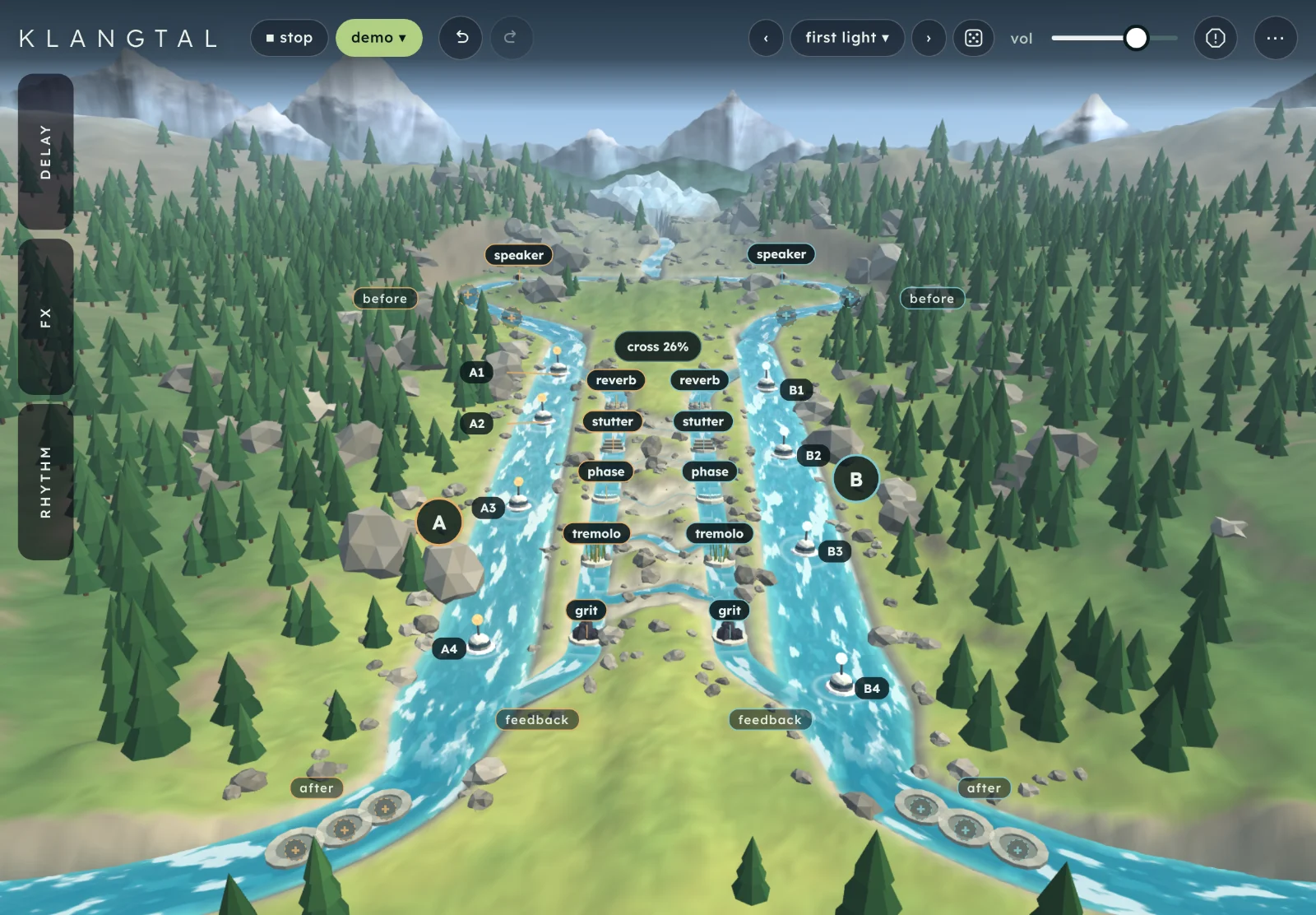
Klangtal is a multi-tap delay with two lanes of echoes. Each lane is a river in an alpine valley, each buoy on it is a tap, and effects sit before the delay, inside its feedback or after it.
Start here
Two minutes from opening Klangtal to echoes you have placed yourself. It runs in the browser, and the sound needs a first tap.
Open Klangtal and tap begin. Three short screens explain the valley, the effects and the crossing. Skip them any time. Afterwards a start pill waits for your first tap.
Press play.play in the header starts the demo: short synthesised phrases run down both rivers and come back as echoes.
Drag a buoy. Each buoy is a tap. Drag one downstream and its echo comes later. Its label shows the time in ms while you hold it.
Raise feedback. Open delay and turn feedback up to about 80%. Each echo now comes round several times, and every effect in the feedback zone changes it again on each pass.
Try a preset. Tap the preset name in the header (first light to start with) and pick another bank: starting points, wild circuits, gentle, rhythm, wide, soundscapes or classic. Each preset brings its own sky.
TipTap a buoy, an effect or the cross pill to open its card. Everything about that one thing is in the card.
The screen
The valley is the instrument. The header and the tabs sit around it, and a card opens for whatever you tap.
Tabs.delayfxrhythm. Tap one to open its drawer, and tap it again or ✕ to close it. On a phone they sit along the bottom.
Play and source.play starts the demo and turns into stop. source picks a demo sound, an audio file or the microphone, and then reads demo, file or mic.
Undo and redo. Every edit, preset included.
Presets. Back and forward arrows, and the preset's name, which opens the browser.
vol, panic and the menu.vol is the output level. Panic clears every echo at once. The menu (⋯) holds clear delay, play demo, stop source, hide ui, the guide, the intro and what's new.
The buoys. One per tap, A1 to A8 on lane A and B1 to B8 on lane B. Upstream is early, downstream is late.
The lane badges.A and B beside each river open that lane in rhythm.
The effects. Labels on the channels between the rivers, one per effect in each lane.
Zones and empty sockets.before, feedback and after mark the three places an effect can sit. A dashed + is an empty socket.
The cross pill. On the ridge between the rivers: how much each lane sends to the other.
The card. Whatever you tapped: here buoy A1, with its position and chance.
After a few seconds without a touch the labels fade to dots, so you can see the valley. Any tap, drag or key brings them back. A tap on empty scenery while they are faded only brings them back.
How Klangtal works
It is a delay first: sound goes in, and comes back later as echoes you can see.
Two lanes, each a river. Whatever you play goes into lane A and lane B at once. Each lane is a delay line drawn as a river: sound enters at the glacier and runs downstream. The two lanes have their own taps and steps, and share their effect settings.
Taps are buoys. A tap is one point where the lane plays an echo. A lane has 1 to 8 taps, and new setups start with two. The further downstream a buoy sits, the later its echo. The whole river is as long as time (or delay beats when synced), and stretch spreads the buoys further apart or closer together.
Effects sit in three places.Before changes the sound as it enters the lane, once. Feedback is the channel that carries echoes back to the top: an effect there changes every echo again each time it comes round, so its sound builds up in the tail. After changes only what you hear, and never feeds back. The same effect sounds very different in each place. See fx.
Cross is the one bridge. Echoes coming back up the feedback channel can spill into the other river. Cross sets how much: at 26% each return is 74% its own lane and 26% the other. Zigzag has every other buoy listen to the other lane instead.
Steps let new sound in. Each lane has a row of 4 to 16 steps, two to a beat. A closed step keeps new sound out of that lane, but the echoes already in it carry on. Lanes of different lengths drift apart and meet again. See rhythm.
Playing it
The source
Klangtal is an effect, so it needs something to play into it. source in the header opens a list:
demo sound: nylon pluck, glass keys, warm synth, wire guitar or sparse plucks. These are short synthesised phrases made to test the delay, not recordings. Picking one sets the sound; play starts it.
open audio: a file of your own (WAV, AIFF, CAF, MP3, FLAC, Ogg or Opus). Its first 90 seconds loop into the delay, brought to an even level.
microphone: your own sound, live. The browser asks for permission first.
stop stops whatever is playing and clears the echoes. The source isn't an edit, so undo never changes it, and it isn't saved with a preset.
HeadphonesWith the microphone, wear headphones. Through speakers the mic hears the echoes and feeds them back in, and with feedback up that quickly gets loud.
Touch and mouse
Tap a buoy, an effect, a lane badge or the cross pill to select it. Drag a buoy along its river to move its tap. Drag an effect to move it to another place or along its zone. Press near a river, away from any buoy, and the nearest buoy on that river follows your finger. A tap on empty ground closes the card.
Undo and redo
The two arrows in the header, or ⌘Z and ⇧⌘Z. A slider drag is one step. On narrow screens they move into the ⋯ menu.
vol, panic and the menu
vol is the output level, from 0 to 100. It isn't saved with a preset. Panic, the round button beside it, clears every echo and the feedback at once (esc). The ⋯ menu repeats clear delay, play demo and stop source, and holds hide ui, this guide, the intro and what's new.
Hide ui
Choose hide ui in the menu, or press i. Everything but the valley fades and the sound carries on. Tap anywhere, or press i or esc, to bring the controls back.
BrowsersThe valley needs WebGL 2. A browser without it shows the lanes as a list instead (see Tips and limits). The microphone needs a secure page (https).
In the valley the cards
Most of Klangtal is played on the water. Tap something and its card opens: top right on a wide screen, as a sheet at the bottom on a phone. esc or ✕ closes it.
Buoys and the tap card
position18 ms to the length of the lane
When the tap's echo sounds, in ms and in beats at the tempo. The card's title shows the same, as 82 ms · 0.13 beats. Dragging the buoy does the same thing.
− and + move it 1 ms earlier or later, or one grid point when it snaps.
chance0 to 100%
How often this tap lets new sound in. On every step the tap rolls a die: at 50% it takes new sound about every other step. Echoes already in the lane are left alone.
A little chance on every tap keeps a pattern from repeating exactly.
tap onon or off
Switches the tap off without removing it. An off buoy is dimmed and keeps its place.
tap snapfree or snap
The same switch as tap snap in the delay tab. While the delay is synced it always snaps, and the switch can't be changed.
remove
Takes the tap away. A lane keeps at least one. The other buoys keep their echoes.
add tapup to 8 per lane
Adds a buoy to the same lane and selects it. The count beside it reads 4 of 8.
With a buoy focused from the keyboard, the arrow keys move it 1 ms (10 ms with ⇧), delete removes it and return opens its card. When it snaps, the arrows move it one grid point (four with ⇧).
Effects and the effect card
Each lane has its own copy of every effect it uses, as a label on the channel beside its river. Lane A's are on the left, lane B's on the right.
Add one. Tap an empty socket (a dashed +) in the zone you want. A small list shows the effects that lane isn't using yet. An effect appears once per lane.
Move one. Drag its label. Rings show where it can land: any place in its own zone, or in another zone with room. A zone holds 3 before, 5 in feedback and 3 after.
Remove one. Drag it onto the × that appears at the bottom of the screen, or press remove in its card.
amount0 to 100
How much of the effect you hear. The same as the effect's slider in fx, and shared by both lanes, with its settings below it.
in usein use or bypassed
Bypasses the effect in this lane only. A bypassed label is struck through and dashed, and the effect keeps its place.
before, feedback, after
Moves the effect to another zone, at its end. A zone that is full is greyed out until you move or remove something there.
earlier, later
Moves it one place along its zone, so the sound passes through it sooner or later. The line beside them reads 1 of 1 before.
remove
Takes the effect out of this lane only. The other lane keeps its copy.
The cross pill and its card
amount0 to 100
The cross slider: how much of each lane's returning echoes goes to the other lane. The pill reads cross 26%.
zigzagoff or on
The same switch as zigzag in the delay tab. The pill adds · zigzag, and dotted arcs cross the ridge.
spread, swirl
The stereo pair from the delay tab: see spread and swirl.
The lane badges
Tap A or B beside a river to open rhythm with that lane marked. While link lanes is on, a small chain sits above the cross pill and lane B's buoys are dimmed: they follow lane A.
The sky
The valley's light and weather are part of the look, saved with your session and with every preset. Set them with weather and time of day in the delay tab. With weather following the dirt, clouds and rain come in as the sound gets dirtier and clear slowly when it cleans up.
delay tab 1
How the two rivers of echoes behave: their length, how much comes round, how they cross, and the sky.
time
delay syncfree or sync
Locks the length of both lanes to the tempo. time gives way to delay beats and tempo, and the line under swirl shows the length, as 1277 ms at 94 bpm. Free, it reads free time.
Synced buoys settle onto 1/16 notes and triplets as you drag them.
delay beats1/16 to 4 bars, dotted and triplet
The length of the lanes while synced. Straight: 1/16, 1/8, 1/4, 1/2, 1 bar, 2 bars, 4 bars. Dotted: dotted 1/8, dotted 1/16, dotted 1/4, dotted 1/2. Triplet: 1/16 triplet to 1/2 triplet.
tempo55 to 170 bpm
Shown here while the delay is synced. It is the same tempo as in rhythm.
time0.18 to 2.6 s
The length of the lanes in free time. Together with stretch it sets how late the furthest buoy can be.
stretch0 to 100
Scales the gaps between the buoys. Low, every echo crowds close behind the sound. High, they spread over the whole length.
repeats
feedback0 to 94%
How much of each echo comes round again. Low, a few echoes. High, a long tail that every feedback effect works on again on each pass.
A guard holds the level back if the echoes build up too far, so high settings stay playable.
cross0 to 100
How much of each lane's returning echoes go to the other lane. At 0 the lanes stay apart. At 100 every return swaps sides.
zigzagoff or on
Every other buoy listens to the other lane: A2 and A4 hear lane B, B2 and B4 hear lane A. Echoes then step back and forth across the ridge as they repeat. A buoy's card says Reads lane B when it does.
mix0 to 100
The balance of the source and the echoes. At 100 you hear only echoes.
tap snapfree or 1/4 beat
Puts the buoys on a grid of sixteen points along the lane, so each lands on a sixteenth of the delay.
stereo
spread0 to 100%
Pans lane A to the left and lane B to the right. At 0 both are in the middle.
swirl0 to 100%
Turns each returning echo round the stereo field, lane A one way and lane B the other. With feedback up, the tail circles.
the sky
weatherfollows the dirt, always calm, always stormy
Follows the dirt: a storm gathers as grit, drive, stutter and speaker breakup get louder in the sound, and clears when they stop. Or keep it calm or stormy. The sound doesn't change.
time of daydawn, day, dusk, night
The light in the valley. It fades over about a second. Shown as day to start with.
fx tab 2
The amount and settings of every effect, for both lanes. Where an effect sits, and whether a lane uses it, is set on the water (see effects). Each effect with settings has a settings line under its slider that opens them.
for all of them
sync fxfree or sync
Locks tremolo, phase and stutter to the tempo. Each swaps its rate for a beat value of its own, and shows what that is, as 1.57 Hz at 94 bpm. It is separate from delay sync.
speaker
speaker0 to 100
Plays the sound through a small speaker that goes from clean to cracking. Low, it narrows the sound. High, it breaks up, with the odd crack when pushed. New setups put it before the delay.
After the delay it breaks up the whole tail. Inside feedback it eats each echo a little more.
The speaker: how much of the top it keeps and how soon it breaks up. radio to start with. Tannoy and radio keep the least of the top and cube amp the most. Blown 12 breaks up soonest and cube amp last.
drive0 to 30 dB
How hard the sound hits the speaker. More drive breaks it up sooner, and the level is brought back down after it, so it gets dirtier, not louder.
grit
grit0 to 100
A dirty filter in one slider. More grit pushes the sound harder and closes the top, at about the same level.
Inside feedback, each echo comes back rougher and darker than the one before.
tremolo
tremolo0 to 100
Pulses the level. In free time it speeds up a little when the sound is louder. At 100 the level nearly vanishes at the bottom of each pulse.
tremolo rate0.1 to 12 Hz
How fast it pulses, in free time.
tremolo beats1/16 to 4 bars
One pulse in beats, while sync fx is on. Starts at 1/4.
phase
phase0 to 100
A sweeping phase filter. Inside feedback the sweep is a little further on each time an echo comes round.
phase rate0.03 to 6 Hz
How fast it sweeps, in free time.
phase beats1/16 to 4 bars
One sweep in beats, while sync fx is on. Starts at 1 bar.
stutter
stutter0 to 100
Catches a short slice of the sound and repeats it three times, then catches the next. The slider is how much of the repeats you hear.
slice length15 to 500 ms
How long each slice is, in free time. It is separate from the amount.
stutter beats1/16 to 1/2, dotted and triplet
The slice length in beats, while sync fx is on. Starts at 1/16.
reverb
reverb0 to 100
A reverb tail of up to about seven seconds. Inside feedback every echo gains more room as it repeats.
tape
tape0 to 100
Wow, flutter, warmth and a little hiss, all together, so the sound wavers and wears like an old tape. New setups leave it out: add it from an empty socket.
Inside feedback each pass wears the echo a little more. At high amounts the tail is shorter than a clean one.
ensemble
ensemble0 to 100
A slow chorus: three voices round the sound, a little apart in time and pitch. New setups leave it out; it goes after the delay when you add it.
ensemble rate0.10 to 4.00×
How fast the voices move, as a multiple of their own slow rates.
formant
formant0 to 100
Filters the sound towards a vowel, so it sounds more like a voice. Inside feedback each echo comes round more vowel-like. New setups leave it out.
At high amounts the tail is shorter, more so than with the other effects.
vowela, e, i, o, u
Which vowel. It moves smoothly between them as you drag.
rhythm tab 3
Patterns for each lane: which steps let new sound in. Tap A or B in the valley to jump here with that lane marked.
both lanes
tempo55 to 170 bpm
The speed of the steps, two to a beat, and of every synced time.
link lanesoff or on
Lane B copies lane A, and from then on an edit to either lane goes to both: taps, steps, length and effects. Switching it off leaves lane B as it is.
each lane
length4 to 16 steps
How many steps the lane's pattern has. The button reads length 8. Each lane counts its own, so lanes of different lengths drift apart and meet again.
Try 15 against 14, as in the preset fifteen against fourteen.
Fills the steps in one go. Straight opens them all, sparse one in four, clusters three in every eight, random about half, and clear closes them all.
steps1 to 16
Tap a step to open or close it. An open (lit) step lets new sound into the lane. A closed step keeps it out, while the echoes already there carry on. The playing step is outlined.
add tapup to 8 per lane
Adds a buoy to the lane. Each buoy's chance is in its card.
Presets and sharing
A preset is everything except vol and the source: every slider and switch, both lanes' taps, steps and effects, and the sky.
Banks. Tap the preset's name in the header. There are 27 factory presets in seven banks:
Each says in a line what it does. The arrows beside the name, and [ and ], step through them. history holds the states you have passed through this session, and yours the ones you save.
Search and stars. The search line on top finds a preset by name in every bank. The star beside a preset puts it in a starred bank at the top of the list, in this browser only; tap it again to take it off.
The sky. Every factory preset has its own weather and time of day, so loading one changes the light. Your own presets save the sky you had.
Saving. Name it under save this preset and press save. Your presets stay in this browser.
Sharing.copy code makes a short code for the current sound, to paste in a message. paste code opens a box to load one. export file saves your presets to a file, and import file brings a file back.
Recipes
A dotted eighth that sits in time
Open clean space in starting points.
In delay, turn delay sync on and set delay beats to dotted 1/8.
Set feedback to 45% and mix to 40.
Drag A1 and B1 to the bottom of their rivers, and take out A2 and B2.
Every note comes back a dotted eighth later, in time with the tempo. Set spread to 60% to split the two lanes left and right.
Echoes that wear out
Open first light.
Set feedback to 85%.
In fx, raise grit to 45 and reverb to 30.
Tap lane A's stutter and press remove, then do the same in lane B. Tap an empty feedback socket in each lane and add tape at 60.
Each echo comes back darker, rougher and more worn than the last, until it dissolves into the room. Move grit to after in its card to hear the difference.
Two lanes out of step
Open plain multitap in classic and turn link lanes off.
In rhythm, set lane A's length to 7 and lane B's to 9.
Set lane A's pattern to sparse and lane B's to clusters.
Set cross to 30.
The two lanes let sound in on different counts, so the echoes interlock in a pattern that only repeats every 63 steps. Give two buoys a chance of 60% to loosen it.
Echoes that walk across
Open both banks in wide.
Tap the cross pill and switch zigzag on.
Set swirl to 40%.
Add taps until each lane has four.
Echoes step back and forth across the ridge and circle round the stereo field as they repeat. Lower swirl for a plain ping-pong.
A choir in the cave
Open cave voices in starting points, pick warm synth under source and press play.
In fx, set formant to 70 and drag vowel slowly from a to u.
Set feedback to 75%.
Set time of day to night.
Each echo comes back more like a sung vowel. Add ensemble after the delay for a wider choir.
Shortcuts
Key
Does
esc
Closes the open list or card. With nothing open, clears every echo (panic). With the controls hidden, brings them back.
[]
Previous and next preset.
i
Hide or show the controls.
⌘Z⇧⌘Z
Undo and redo.
←→↑↓
On a focused buoy: 1 ms earlier or later, or one grid point when it snaps. With ⇧, 10 ms or four points.
delete
On a focused buoy: remove it.
return
On a focused buoy: open its card.
On iPad planned
An iPad version is planned. For now, open Klangtal in Safari on the iPad: the valley, the cards and the tabs all work by touch. Use headphones with the microphone.
Tips and limits
Klangtal is a prototype. Controls, the picture and the presets may change.
The longest delay is about 11 seconds. A synced 4 bars below about 88 bpm is shortened to fit.
An audio file plays its first 90 seconds, on a loop.
The valley is drawn in 3D. If the browser can't draw it, or stops, Klangtal shows the lanes as a list headed Lanes as a list: drag the taps along each lane, tap the steps, and drag the effects between before delay, inside feedback and after delay, with on, × and restore buttons for each.
On a phone the labels crowd the narrow valley. They fade to dots when you leave it alone, and the cards open as a sheet at the bottom.
Each lane can hold 3 effects before, 5 in feedback and 3 after. In new setups feedback is full, so to add tape or formant there, take one out first.
Your presets and your last session are stored in this browser. Clearing its site data clears them.
Questions
I can't hear anything
Tap begin or the start pill: the browser keeps sound off until you do. Then press play, or pick a source. Check that vol is up, that mix isn't at 0 with nothing to echo, and that the steps in rhythm aren't all closed.
I hear the sound but no echoes
Check that mix is up, that the buoys are switched on, and that some steps are lit in rhythm. A tap with chance at 0 never takes new sound in.
It is getting loud and won't stop
Press panic or esc to clear the echoes, then lower feedback. With the microphone, wear headphones: speakers feed the echoes back into the mic.
The microphone doesn't work
The browser has to allow it, and only on a secure page (https). If you said no once, allow it again in the browser's site settings, then choose microphone under source.
I can't add an effect where I want it
That zone is full, or the lane already has every effect. Move one to another zone or remove it, and a socket appears.
I changed an effect and both lanes changed
An effect's amount and settings are shared by both lanes. Its place, bypass and removal are per lane. To make lanes differ, put the effect in a different zone in each, or remove it from one.
The sky changed when I loaded a preset
Each preset carries its own weather and time of day. Set them again in delay after loading.
Klangtal is inspired by multi-head tape echoes and rhythmic multi-tap delays. Its speaker, grit, tremolo, stutter, tape, ensemble, formant, phase and reverb are shared with the other Tinkerhaus apps.